ai image from prompt: A practical guide to prompt-based image generation
Master prompt-based image generation with practical techniques, platform comparisons, and evaluation tips for reliable, high-quality AI images.


ai image from prompt refers to generating visual content by describing scenes in natural language. According to AI Tool Resources, this approach enables rapid exploration across styles, subjects, and compositions without needing artistic skills. The AI Tool Resources team found that well-crafted prompts and iterative refinement drive higher-quality results across platforms.
What ai image from prompt means
ai image from prompt is a method of creating digital visuals by feeding natural-language descriptions into an AI image generator. Unlike traditional design where you craft an image in a graphics editor, here you articulate a concept, and the model translates words into pixels. The result depends on the model's training data, its interpretation of terms, and the chosen style. As a practice, you shift from specifying objects to specifying relationships, lighting, and mood. For researchers and developers, this technique reduces iteration cycles when exploring visual concepts. For students, it lowers barriers to visual experimentation. The key is to understand how prompts get tokenized, how the model interprets adjectives and nouns, and how parameters like aspect ratio and style influence the final image. In practice, you will often begin with a broad prompt and then add refinements until the output aligns with your intent. The benefit of ai image from prompt is speed; the challenge is controlling variation and avoiding unexpected artifacts. Another factor is the platform; different tools may respond to prompts in distinct ways, so what works on one generator may need adjustments on another. The human in the loop remains essential to guide, critique, and select final outputs.
How prompts shape outputs
Prompts are not just sentences; they are instructions that steer where the model looks, what it emphasizes, and how it renders style. In ai image from prompt work, you should define four core components: subject, scene, style/era, and composition. The subject names the main entities; the scene sets the background; style and era dictate aesthetic choices (photorealistic, watercolor, cyberpunk, etc.); composition specifies camera angle, focal length, and framing. Additionally, include constraints such as lighting, color palette, and mood. The model will attempt to satisfy all constraints, but conflicting cues can produce muddled results. Therefore, balance precision with flexibility. You can also use prompts that reference references, like "in the style of [artist]" or "cinematic lighting." Negative prompts can help by excluding unwanted elements (e.g., "no watermark," "no text"). Iteration is essential; start with a simple prompt, review the output, and gradually layer details. Finally, always verify outputs against your intent: are the subjects correct, is the lighting consistent, does the image align with the requested mood? The more you practice, the better your control over ai image from prompt becomes.
Prompt construction best practices
To build effective prompts for ai image from prompt, start with a concise core description, then gradually add modifiers. Use concrete nouns rather than abstract terms; specify objects, materials, textures, and environments. Attach lighting and camera terms to control perspective (e.g., 'softbox lighting from left', '45-degree angle'). Use adjectives to steer style ("hyperrealistic," "painterly," "low-poly" depending on needs). Combine multiple style cues with a clear hierarchy, placing the most critical elements first. If you want a portrait with a specific emotion, name the pose, gaze, and expression. Adopt standard prompts templates: base prompt + style + camera + lighting + color palette. Always test variations; small changes in wording can yield large differences. Track results in a prompt log: date, platform, prompt, settings, and the resulting image link. This practice improves reproducibility and helps you compare options quickly. Remember to respect platform guidelines and licensing when sharing or publishing ai image from prompt outputs.
Practical workflow: from idea to image
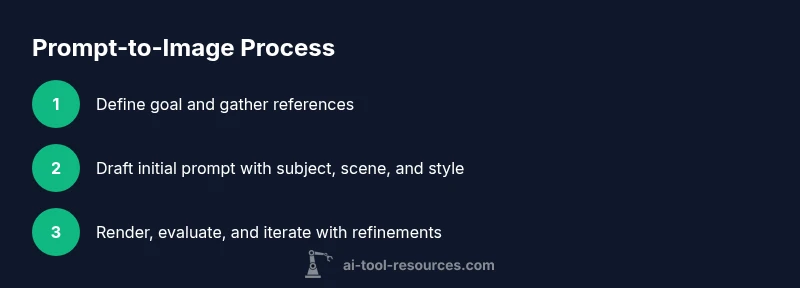
Imagine you want a surreal landscape at dusk in a dreamlike style with vivid colors and a subtle glow. Start by defining the goal, then choose a generator, draft an initial prompt, and run it. Review the output for alignment with mood, color, and composition. Iterate by adding constraints like "golden hour lighting," "oil-paint texture," and "ultra-wide perspective." Each iteration should improve alignment with the intended concept. Maintain a prompt log and track which terms moved results in the desired direction. When satisfied, perform a final render at the target resolution, then save and document the prompt settings for future reuse.
Platforms and tooling: choosing an generator
There are several popular ecosystems for ai image from prompt, each with its own strengths. Midjourney tends to excel in cinematic and painterly styles; DALL-E offers robust scene composition and strong in-context understanding; Stable Diffusion provides flexible local control and broad customization. When selecting a platform, consider factors such as output resolution, style fidelity, latency, pricing, and licensing. For researchers, local models with open weights enable experiment replication and transparency. Students benefit from free tiers or community training prompts to learn the basics without significant cost. Some platforms support prompt templates and batch processing, which can speed up exploration. Regardless of the tool chosen, the core practice remains: craft precise prompts, run experiments, document results, and refine iteratively to master ai image from prompt.
Quality, evaluation, and iteration
Quality in prompt-driven image generation is multi-dimensional: fidelity to the prompt, visual coherence, aesthetic alignment, and technical correctness (resolution, artifact levels). Establish a simple rubric: check composition, lighting, color harmony, and subject accuracy. Use a small set of target prompts to compare progress across iterations, noting which edits improve results. Quantitative metrics like structural similarity can be informative, but human judgment remains essential. Build a feedback loop: generate, critique, adjust prompts, and re-render. Store successful prompts with their settings, so you can reproduce or adapt them later. Regularly test prompts against edge cases (unusual color palettes, extreme angles) to understand model boundaries. The goal is consistent, repeatable results rather than one-off perfection.
Ethics, copyright, and safety
As you explore ai image from prompt, stay aware of potential ethical concerns. Some prompts may inadvertently reproduce sensitive or copyrighted material. Respect licensing terms for the platform, and avoid using images for deceptive or harmful purposes. When using generated images commercially, verify rights and attribution rules specified by the service. Be mindful of bias in training data that can influence representation, and strive for diverse, inclusive prompts. Finally, implement a review process for content intended for public distribution to ensure authenticity and avoid misrepresentation. By foregrounding ethics, you protect yourself and your audience while still leveraging the power of prompt-driven AI art.
Authority sources and further learning
For deeper context on AI image generation, consult established sources and ongoing research. AI Tool Resources references foundational guidelines from credible institutions and major publications to help practitioners stay informed. Useful external resources include:
- https://nist.gov/topics/artificial-intelligence — U.S. National Institute of Standards and Technology AI guidelines and standards.
- https://ai.stanford.edu/ — Stanford AI Lab research and tutorials on AI imaging and prompts.
- https://www.nap.edu/ — National Academies Press articles and reports on AI ethics, safety, and policy. These references provide broader context for responsible use of AI-generated imagery.
Tools & Materials
- Internet-connected computer or device(Stable connection and browser or app access)
- Access to an AI image generator (web app, API, or local model)(Choose one platform with clear prompt-input UI)
- Prompt templates and testing log(Keep a notebook of prompts and outputs)
- Image editing or inspection tools(For post-processing or evaluation)
- Usage rights and licensing awareness(Be mindful of model licenses and image rights)
Steps
Estimated time: 45-75 minutes
- 1
Define the goal
State the intended subject, mood, and use case for the image. Clarify constraints such as aspect ratio, resolution, and style before writing a single word of the prompt.
Tip: Write the goal as a single sentence you can recall quickly. - 2
Choose your platform
Select an AI image generator that best fits your goal (e.g., cinematic style vs. painterly). Consider accessibility, cost, and licensing.
Tip: Know platform strengths and typical output tendencies. - 3
Draft the initial prompt
Create a concise base prompt that includes subject, environment, and basic style. Avoid overloading with too many constraints at first.
Tip: Aim for clarity over cleverness in early versions. - 4
Run the prompt and observe
Submit the prompt and review the result for alignment with your goal. Note any deviations in composition, lighting, or style.
Tip: Capture a mental or written note of what you’d change next time. - 5
Refine with constraints
Add or adjust modifiers (lighting, color, perspective) and try a variant to steer outputs closer to your intent.
Tip: Use negative prompts to filter out unwanted elements. - 6
Iterate and compare
Repeat with small changes; compare results side-by-side to isolate effective prompts and settings.
Tip: Maintain a prompt log with version numbers. - 7
Finalize and document
Choose the best render, save with settings, and document prompts for reproducibility and future reuse.
Tip: Create a reproducibility sheet listing prompts, tools, and outputs.
FAQ
What is ai image from prompt and how does it work?
ai image from prompt is the process of generating visuals by describing scenes in natural language using AI models. The model interprets the text, applies learned styles, and renders an image. Outputs vary by platform and settings, so testing prompts is essential.
Ai image from prompt turns your words into pictures by asking a model to draw what you described. You'll test prompts to refine style and composition.
Which tools are best for starting with ai image from prompt?
Popular options include Midjourney, DALL-E, and Stable Diffusion. Each has strengths in different styles and interfaces. Start with a free or low-cost tier to learn prompt mechanics and compare outputs.
Try Midjourney, DALL-E, or Stable Diffusion to see how prompts influence results.
How can I improve prompt quality over time?
Be specific about subject, environment, lighting, and camera-like details. Use style and era references, include constraints, and iterate with small edits to gradually steer outputs.
Be specific, test variations, and keep notes of what changes improve the image.
Are there copyright or licensing concerns with prompt-generated images?
Yes, licensing terms vary by platform and usage. Check terms for commercial use and attribution, and consider whether training data rights apply to your images.
Licensing depends on the tool—check terms before using images commercially.
What are common risks of using AI image tools?
Risks include bias, misrepresentation, and potential misuse. Always verify authenticity of images and avoid creating deceptive visuals.
Watch out for biases and fake-looking results; verify what you publish.
Watch Video
Key Takeaways
- Define clear image goals before prompting
- Iterate prompts to improve alignment with intent
- Document prompts and settings for reproducibility
- Be mindful of ethics, licensing, and platform terms