AI Tools for Dress Design: A Practical Guide
Explore how to select and use AI tools for dress design. Learn features, workflows, data governance, and real-world use cases for developers, researchers, and students.


An AI tool for designing dress is a software solution that blends generative design, fabric simulation, and pattern drafting to help designers ideate, iterate, and produce production-ready garments. It speeds concept exploration, enables rapid prototyping, and integrates with CAD workflows. According to AI Tool Resources, success depends on clean data, clear constraints, and governance over outputs.
What is an AI tool for designing dress?
An AI tool for designing dress blends generative design, fabric simulation, and pattern drafting to assist fashion designers, researchers, and students. According to AI Tool Resources, these tools can generate multiple silhouette options from a single sketch, test fit virtually, and propose material and color combinations without costly physical samples. The AI Tool Resources team found that the most effective systems combine editable prompts, real-time fabric behavior simulations, and seamless export to CAD formats. This integration speeds ideation, supports creative experimentation, and helps teams align with production constraints. For developers, understanding the core capabilities—geometry generation, constraint-based editing, texture mapping, and virtual try-ons—pins down where to invest effort and what to measure in validation studies. Use this guide to evaluate a tool’s ability to deliver reliable outputs and maintain design intent across iterations. The broader goal is to empower designers to explore more options in less time while maintaining the aesthetics and functional requirements of a garment. Throughout, expect closer collaboration between design teams and technical engineers as they translate concept ideas into manufacturable patterns, while keeping accessibility and sustainability in view.
Key features to evaluate in AI dress-design tools
Modern AI dress-design tools typically combine several core capabilities that influence both the creative process and the feasibility of production. When selecting a tool, look for robust generative design with constraint handling, high-fidelity fabric simulation, and reliable pattern drafting with grading. A strong system should allow you to seed prompts with specific silhouettes, control seam placements, and adjust fabric properties like stretch, drape, and weight. In addition, consider integration with CAD platforms, version control for design iterations, and clear licensing terms for generated assets. Governance features—such as provenance tracking, audit trails, and prompt logging—help teams maintain design intent across multiple sessions and users. Finally, assess collaboration features: multi-user sharing, feedback loops, and cloud-based storage that aligns with your organization’s security posture. According to AI Tool Resources analysis, teams that prioritize data hygiene, clean prompts, and testable outputs tend to realize faster iteration cycles and fewer rework events. In short, evaluate the tool’s ability to translate creative goals into production-ready patterns while protecting intellectual property and enabling scalable collaboration.
Practical workflow: from sketch to finished dress using AI
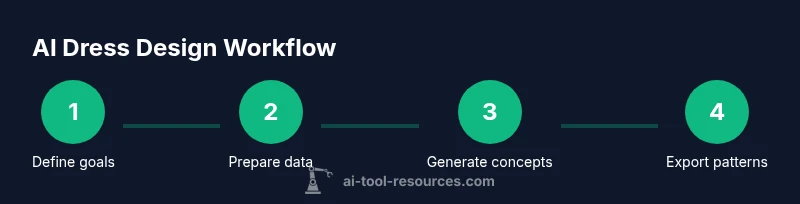
A pragmatic workflow begins with a clear brief and ends with a production-ready pattern. Start by sketching a few core silhouettes and selecting fabrics suitable for the intended use. Use the AI tool to generate multiple variations from the brief, then compare outcomes based on fit, movement, and visual balance. Iterate prompts to refine necklines, sleeve shapes, and hem lines, while keeping constraints like size grading and seam allowances in view. Virtual try-on and physics-based fabric simulation help you assess drape, wrinkle behavior, and motion under different activities. With validated concepts, export pattern pieces and create documentation for production teams. Throughout, maintain a feedback loop with pattern-makers and seamstresses to catch practical constraints not evident in the digital realm. The goal is to compress weeks of manual sketching into a handful of viable designs while preserving design intent and fabric behavior.
Data, privacy, and governance considerations
AI-driven dress design relies on data—from reference images and fabric libraries to prompts and generated outputs. For teams, this raises questions about licensing, ownership, and reuse rights. A best practice is to establish a data governance policy that defines who owns inputs and outputs, how prompts may be reused, and how assets can be licensed for commercial production. Be mindful of dataset provenance and ensure that any fabric textures or patterns used in training are properly licensed. When using cloud-based AI tools, review terms of service, data-privacy commitments, and data-retention policies. Local, offline workflows can mitigate some risks, but they may limit real-time collaboration. Balance security with productivity by pairing robust access controls with clear design-credit attribution so that every iteration remains auditable and respectful of creators’ rights. According to AI Tool Resources, establishing governance early reduces risk and accelerates adoption across teams.
Real-world use cases and examples
In education and research settings, AI dress-design tools enable students to explore thousands of silhouettes and fabrics in a single course, accelerating learning and experimentation. In small studios, designers use AI-assisted workflows to generate concept boards, test fabric behavior, and develop multiple export-ready patterns quickly, reducing costs associated with sampling. For larger brands, AI tools support rapid prototyping during design sprints, helping teams converge on final production designs faster while maintaining brand language. A fashion-tech startup might combine AI-driven pattern drafting with 3D visualization to simulate how garments move on avatars, enabling data-driven decisions about fit and comfort. Across these scenarios, the common thread is disciplined data management, transparent governance, and disciplined design intent tracking to ensure outputs align with business goals and consumer expectations.
Verdict and next steps
The journey to adopting an AI tool for designing dress should be approached with a clear plan: define design goals, validate outputs with humans in the loop, and implement governance that preserves ownership and quality. The AI Tool Resources team emphasizes starting with a minimal viable setup, auditing outputs, and scaling as confidence grows. By adopting a methodical, standards-driven workflow, teams can harness AI to expand creative possibilities without compromising production realities. The AI Tools Resources team recommends creating a pilot program with defined metrics for design quality, time-to-market, and cost of sampling, then iterating based on real-world feedback. As tools mature, a balanced approach that values human insight alongside automation will yield the strongest, most responsible dress designs.
Tools & Materials
- Powerful workstation or laptop(Quad-core or higher, 16GB RAM min)
- Stylus and graphics tablet(Wacom or equivalent, 12-inch plus)
- Digital fabric library or textures(Licensed or royalty-free textures)
- AI-enabled design software with integration(Support for prompts, param controls, CAD export)
- Reference images dataset(Optional prompts and references)
- Stable internet connection(For cloud-based features and updates)
- Data management plan(Asset ownership and licensing considerations)
Steps
Estimated time: 2-4 hours
- 1
Define design goals
Clarify target silhouette, fabric, size range, and production constraints. Document success criteria to guide prompts and evaluation.
Tip: Record constraints and metrics before generating concepts. - 2
Prepare data and references
Assemble a curated library of silhouettes, fabrics, and reference images. Normalize colors and textures to ensure consistent prompts.
Tip: Use a small, representative dataset for initial runs. - 3
Generate initial concepts
Feed prompts into the AI tool to create multiple silhouettes and details. Compare results across criteria like silhouette balance and fabric behavior.
Tip: Limit variation in early prompts to avoid noisy outputs. - 4
Refine silhouettes and details
Narrow down options and adjust necklines, sleeves, and hem lines. Iterate prompts with more precise constraints to converge on a preferred design.
Tip: Keep a changelog of prompt changes and outcomes. - 5
Test fit and motion
Use virtual try-on and fabric simulation to assess fit, drape, and movement. Validate sizing and comfort with representative avatars.
Tip: Incorporate at least two body types to catch fit issues early. - 6
Export patterns and documentation
Export production-ready patterns, fabric specs, and construction notes. Prepare a design dossier for pattern makers and manufacturers.
Tip: Attach licensing details and asset provenance to outputs.
FAQ
What exactly is an AI tool for designing dress?
An AI tool for designing dress is software that combines generative design, fabric simulation, and pattern drafting to support ideation, testing, and production-ready outputs. It helps translate creative briefs into viable garment concepts while enabling rapid iteration.
An AI dress-design tool combines generation, fabric behavior, and patterns to help you go from idea to production-ready designs quickly.
Do you need coding or advanced technical skills to use these tools?
Many tools are designed for designers and engineers with drag-and-drop interfaces and prompt-based controls. Some advanced workflows may benefit from basic scripting or API access, but core tasks can be accomplished with no programming background.
Most AI dress-design tools don't require coding; prompts and GUI controls are typically enough for basic to intermediate use.
Can AI-generated designs be used in production safely?
Yes, provided outputs are validated by designers and pattern makers, and licensing terms are followed for any textures or datasets used. Production readiness depends on fabric behavior, fit tests, and accurate pattern exports.
Outputs should be validated by humans and licensed textures must be properly credited before production.
How does fabric simulation influence design decisions?
Fabric simulation predicts drape, stretch, and wrinkle tendencies, which guides silhouette choices and construction details. It helps catch issues early, reducing costly physical sampling.
Simulations show how fabric moves, helping you pick silhouettes that perform well in real life.
What about licensing and ownership of AI-generated designs?
Respect licensing for inputs (textures, images) and establish who owns the generated designs. Clear agreements reduce disputes when assets are commercialized.
Make sure licenses cover inputs and outputs, and document ownership up front.
How can I quickly evaluate outputs without slowing down workflow?
Use structured evaluation criteria, run standardized prompts, and maintain a design dossier. Regularly compare outputs against a baseline to identify drift in results.
Create a simple rubric and stick to it across iterations to stay efficient.
Watch Video
Key Takeaways
- Define design goals early and document constraints.
- Choose tools with strong fabric simulation and CAD export.
- Validate outputs with virtual try-ons.
- Maintain data governance and licensing.
- Balance automation with human creativity.