Which AI Tool to Make Art: A Practical Comparison
Compare major AI art tools—Midjourney, DALL·E 3, and Stable Diffusion—across prompts, style control, rights, and costs to pick the right tool for your art projects.


Choosing the right AI tool to make art depends on your goals, workflow, input options, and licensing needs. For most creators, mid-tier tools balance control, output quality, and accessibility, while specialized platforms excel at rapid visuals or licensed commercial work. This comparison helps you pick confidently by evaluating input modalities, style control, cost models, and rights. In this article, we compare Midjourney, DALL·E 3, and Stable Diffusion across common criteria to guide your choice.
Why the Right AI Art Tool Matters
Choosing the right AI art tool matters because it shapes the creative direction, output style, and how you can monetize or publish your work. The choice affects input requirements, iteration speed, licensing terms, and technical accessibility. According to AI Tool Resources, the optimal tool for a given project aligns with your workflow, the desired level of control, and your rights to commercial use. For researchers, developers, and students exploring AI tools, understanding these dimensions avoids wasted time and unexpected restrictions. In practice, you’ll weigh model capabilities, prompt engineering surfaces, and integration with your existing toolchain. The landscape includes cloud-based services and local-model options, each with distinct trade-offs for image fidelity, latency, and customization potential. By mapping your needs to these factors, you’ll minimize risk and maximize creative output.
How AI Art Tools Work: Core Concepts
AI art tools rely on generative models that translate textual intent into visual output. Diffusion models iteratively refine noise into coherent images, guided by prompts, style cues, and optional reference images. You’ll encounter two broad families: hosted services that render on the vendor’s infrastructure, and open-source or self-hosted solutions that let you control the compute environment. For developers and researchers, understanding the training data, fine-tuning options, and licensing implications is crucial. The AI Tool Resources team notes that model variants differ in emphasis—some favor photorealism, others favor painterly textures or abstract compositions—so pick a tool whose strengths align with your intended results and distribution plan.
Input Modalities: Text Prompts, Sketches, and More
Prompts are the primary input, but modern tools also accept sketches, reference images, or style prompts to steer output. Prompt quality and prompt engineering techniques can dramatically affect results, so learning descriptors like composition, lighting, mood, and color schemes matters. Some tools let you seed generations to improve repeatability, while others emphasize exploration with high-variation results. If you’re collaborating with designers or researchers, consider tools that support image prompts or batch generation for iterative prototyping. In practice, you’ll experiment with prompt length, specificity, and creative constraints to achieve consistent tonal quality across outputs.
Output Styles: Image Quality, Style and Variability
Output style varies widely between tools. Some prioritize high realism and sharp edges; others favor impressionistic textures or stylized palettes. Variability can be controlled with seeds, sampling methods, and guidance scales, but there’s often a trade-off between fidelity and creative diversity. When selecting a tool, consider where your art will live—social media, print, or game assets—as this affects resolution requirements and color management. Licensing terms also influence how aggressively you want to push style consistency across multiple pieces. A balanced choice typically offers reliable quality with predictable control while leaving room for experimentation.
Licensing and Rights: Ownership and Commercial Use
Licensing is often the deciding factor for commercial projects. Some platforms provide broad commercial rights within standard terms, while others impose limitations on redistribution or resale. Open-source or self-hosted options may offer the most control but require compliance with licenses and potential legal caveats around training data. As you evaluate tools, map out who owns the generated content, what happens if terms change, and how derivatives are treated. The goal is to secure clear, transferable rights for clients or portfolio use while avoiding claims of infringed art from training data. AI Tool Resources emphasizes reviewing terms carefully before committing to a tool for business work.
Costs and Access: Subscriptions, Credits, and Free Tiers
Cost models range from per-generation credits and monthly subscriptions to free tiers with usage limits. Evaluate not just per-output cost but access to commercial rights, API usage, and rate limits that affect workflow. Look for tools offering flexible credits, generous free tiers for experimentation, and predictable renewal pricing. For researchers or students, education discounts or academic licenses can dramatically affect total cost of ownership. Always estimate your annual spend based on typical monthly output to avoid surprise budget spikes during production cycles.
Popular Tools at a Glance: What Each Brings to the Table
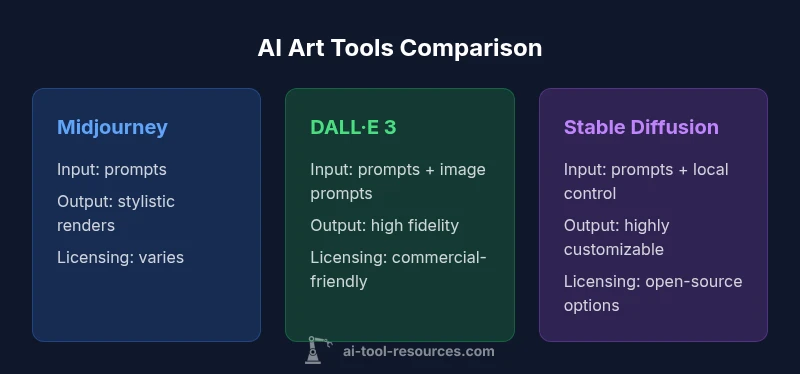
- Midjourney: Strong emphasis on stylistic cohesion and brand-ready aesthetics; excels at concept art and poster-ready visuals. Designed for iterative prompts and expressive textures. Best for concept exploration and social media visuals.
- DALL·E 3: High fidelity with robust comprehension of complex prompts; tends to perform well on detailed scenes and structured prompts. Good for product renderings, illustrations with precise details, and marketing assets.
- Stable Diffusion: Open-source accessibility and customization; strong for local runs, experimentation, and cost control over large batches. Ideal for researchers, students, and developers who want to tailor models or build custom pipelines.
Workflow Scenarios: When to Choose Which Tool
If you need rapid concept art for pitches, a hosted service with strong prompt guidance (Midjourney or DALL·E 3) is advantageous. For detailed, client-ready illustrations with specific references, DALL·E 3 often performs better. When you require control over the compute environment, licensing, and offline processing, Stable Diffusion shines, especially for research or classroom settings. For mixed teams, a hybrid approach—using one tool for ideation and another for final renders—can maximize efficiency and maintain creative flexibility.
Practical Setup: Hardware, Cloud, and API Considerations
Cloud-based tools relieve hardware requirements but depend on stable Internet access and API rate limits. Local or self-hosted deployments demand GPUs with ample VRAM and careful environment setup for reproducible results. API-based workflows are common among developers and researchers who want automated pipelines and batch rendering. If you’re working in education or research, ensure your hardware budget accounts for peak workloads and data transfer. Always verify data privacy policies and whether your prompts and outputs are stored or used to improve models.
Quality vs. Convenience: Trade-offs
High-quality, consistent outputs often come with higher costs or longer iteration times. Quick results and creative variety may require looser prompts and more manual curation. For production pipelines, reliability and repeatability matter more than pushing the latest novelty. A practical approach is to start with a mid-range tool to establish a baseline, then selectively add a more specialized option for tasks that demand unique aesthetics or licensing flexibility. Balancing quality, cost, and speed is the core art of tool selection.
Risk and Ethics: Bias, Copyright, and Safety
Generative art tools inherit biases present in training data, which can lead to unintended stereotypes or unsafe outputs. Copyright considerations vary by jurisdiction and platform; ensure you have rights for commercial use, especially for client work or product visuals. Safety features help filter explicit or harmful content, but they may also limit creative expression. Establish internal guidelines for ethical use, attribution, and disclosure when presenting AI-assisted artwork to stakeholders.
How to Run a Side-by-Side Test: A Practical Checklist
- Define success criteria (style, turnaround, rights).
- Select 3 tools and design 5 prompts that represent your typical tasks.
- Generate multiple outputs with varied seeds/prompts.
- Compare outputs by fidelity, style adherence, and licensing terms.
- Document results and choose a primary tool for the project; keep a secondary option as a backup for specific needs.
Feature Comparison
| Feature | Midjourney | DALL·E 3 | Stable Diffusion |
|---|---|---|---|
| Input Modalities | Text prompts + style cues | Text prompts + image prompts | Text prompts + image prompts + sketches |
| Output Resolution & Detail | High stylistic consistency, strong branding | High fidelity with complex prompts | Open-source flexibility with scalable detail |
| Style Control & Consistency | Moderate control via prompts | Fine-grained control with references | Extensive customization via local models |
| Licensing & Commercial Use | Vendor licenses; varies by plan | Vendor licenses; commercial terms | Model and distro dependent; varies by setup |
| Cost Model | Credit-based subscriptions | Subscription/credits; high value | Open-source; compute costs apply |
| Hardware/Deployment | Cloud-managed rendering | Cloud-based API access | Local or cloud with self-hosted options |
| Best For | Rapid concept art and branding visuals | Detailed illustrations and structured prompts | Custom pipelines and cost-conscious experimentation |
Upsides
- Balances creativity and accessibility for most users
- Strong ecosystem and community resources
- Flexible licensing options across platforms
- Broad prompt-based control supports diverse styles
- Good for rapid iteration and concept exploration
Weaknesses
- Licensing and rights can be complex to navigate
- Some tools have inconsistent results with niche prompts
- Open-source options require more setup and maintenance
Midjourney and DALL·E 3 offer the best balance for most users; Stable Diffusion excels for cost-conscious, technically inclined creators.
For fast, high-quality visuals with reasonable rights, start with Midjourney or DALL·E 3. If you need control, customization, and local deployment, Stable Diffusion is the superior option.
FAQ
Which AI art tool should a beginner start with?
Beginners usually benefit from Midjourney or DALL·E 3 due to polished interfaces and guided prompts. Start with one to learn basic prompts, then expand to other tools as you gain confidence. Always check licensing terms for commercial use.
If you're new, start with Midjourney or DALL·E 3 to learn prompts and licensing basics. Then explore others as you grow.
Can I use AI-generated art for commercial projects?
Commercial use depends on the tool and its licensing terms. Always review the vendor's policy and ensure you have rights for client work or product deployment. If uncertain, choose tools with clear commercial licenses or opt for open-source options with explicit terms.
Yes, but check the license. Look for clear commercial rights or choose open-source tools with explicit terms.
Do these tools require high-end hardware?
Cloud-based tools minimize local hardware needs, but self-hosted or offline workflows require GPUs with adequate VRAM. Plan for peak workloads and ensure your setup aligns with your performance needs.
Most tools run in the cloud, but if you host locally, you’ll need capable GPUs.
How do licensing terms vary by tool?
Licensing varies by platform and model: some offer broad commercial rights, others restrict certain uses or require attribution. Always read terms before starting a project and re-check if you switch tools.
Licensing is tool-specific—read terms before starting and re-check when you switch.
What about copyright when using AI-generated art?
Copyright for AI-generated art is evolving across jurisdictions. Generally, if you provide the creative direction and retain control, you hold rights to the output, but rules differ by country and platform.
Copyright varies by country; generally, your creative input helps you hold rights, but confirm local rules.
Key Takeaways
- Define your project goals before tool selection
- Verify licensing terms for commercial use
- Test prompts across tools to compare quality
- Consider cost, speed, and workflow integration
- Balance convenience with control for long-term projects