ChatGPT How To Use: A Step-by-Step Guide
Learn how to use ChatGPT effectively with practical prompts, safety practices, and workflow integration for developers, researchers, and students exploring AI tools.


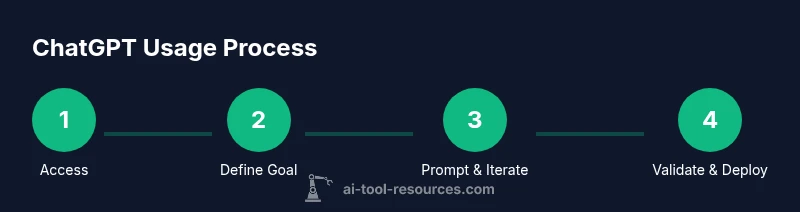
ChatGPT usage starts with a clear goal, selecting the right model, and crafting a precise prompt. Sign in, set basic parameters (temperature, max tokens), then review and refine responses through follow-up prompts. This quick path helps developers, researchers, and students learn to prompt, test, and integrate outputs safely into experiments and projects.
What ChatGPT is and how to use it in practice
ChatGPT is a conversational AI model designed to generate human-like text in response to prompts. It can assist with drafting emails, writing code, outlining research ideas, and brainstorming solutions. For anyone learning chat gpt how to use, the key is to treat ChatGPT as a collaborative instrument rather than a final authority. It shines at suggesting ideas, explaining concepts, and enabling rapid iteration, but it requires careful prompting and validation. Start with a clear objective, then craft prompts that constrain the model’s output to your goal. This approach is especially valuable for developers, researchers, and students who want to move faster while maintaining rigor. Remember: you are collaborating with a system that can be spectacularly creative but occasionally inaccurate.
Prerequisites and setup: getting access and ready to go
To begin, ensure you have reliable access to ChatGPT. This usually means an account with OpenAI or an institutional integration. Before you prompt, confirm acceptable usage, privacy policies, and any data handling constraints set by your organization. Have a preferred browser and a note-taking tool ready, so you can capture prompts, outputs, and ideas for later refinement. If you plan to use the API, prepare an API key and a simple development environment to test requests and responses in real time. These upfront steps reduce friction and help you start experimenting quickly.
Prompt design: crafting effective prompts
Prompts are the primary control lever for ChatGPT. Start with a precise, outcome-focused prompt that states the task, context, constraints, and desired format. Use role prompts to set expectations (e.g., you are a concise assistant). Break complex tasks into smaller steps and request outputs in a structured format (bullets, code blocks, or JSON). Examples include: “Draft a 3-paragraph email about X with a call to action,” or “Provide a Python function to parse CSV with headers Y and Z.” Prompt engineering improves reliability and reduces back-and-forth.
Interacting with ChatGPT: prompts, responses, and iteration
ChatGPT responds best when you guide it with clarifying questions and iterative prompts. After the initial reply, evaluate accuracy, completeness, and tone. If something is missing, request additions or refinements explicitly. Use follow-up prompts to constrain length, switch formats, or switch perspectives. Practically, iterate in short loops: prompt → review → refine → run again. This disciplined cycle yields higher quality outputs and faster learning.
Advanced controls: system prompts, context, and integration
Advanced users can leverage system messages or context windows to steer long conversations. Maintain context by re-summarizing important facts or past decisions in each prompt. For coding or data tasks, pair ChatGPT with your toolchain: export outputs to your IDE, run tests, and provide results back to the model for refinement. Adjust temperature for creativity and max tokens to control length. When integrating into workflows, consider API usage patterns, rate limits, and logging for reproducibility.
Safety, privacy, and ethics when using ChatGPT
Security and ethics matter when using any AI tool. Do not feed secrets or credentials into prompts, and avoid sharing personal or sensitive data. Treat outputs as drafts and verify critical claims. Be aware of biases in responses and cross-check with trusted sources. Establish clear governance for how outputs are stored, reused, and attributed, especially in collaborative or educational settings.
Real-world use cases: coding, research, writing, data analysis
Developers can use ChatGPT to draft boilerplate code, generate test cases, or explain algorithms. Researchers can outline literature reviews, summarize papers, or brainstorm experimental designs. Students benefit from quick drafting, brainstorming ideas, or practicing problem explanations. In data projects, you can generate exploratory analysis prompts, build pseudo-code, and create reproducible templates. Always validate outputs in your environment and adapt guidance to your domain.
AUTHORITY SOURCES
- https://www.nist.gov/topics/artificial-intelligence
- https://ai.stanford.edu
- https://science.org
Tools & Materials
- Laptop or desktop with reliable internet(Stable connection and up-to-date browser)
- ChatGPT access (account or API key)(Ensure you understand data usage and pricing)
- Web browser(Chrome/Edge/Firefox recommended)
- Note-taking app(Capture prompts, outputs, and iterations)
- Code editor (for developers)(Optional for coding-related tasks)
Steps
Estimated time: 45-60 minutes
- 1
Create or access ChatGPT
Sign up for an OpenAI account or access ChatGPT through your institution. Review terms, pricing, and data handling policies before starting.
Tip: Use two-factor authentication and bookmark the login page. - 2
Define your goal and success criteria
Write down the task you want to accomplish, the audience, and how you will measure success. A clear goal reduces back-and-forth and improves relevance.
Tip: Summarize goals in one sentence to keep prompts focused. - 3
Draft a precise initial prompt
Describe the task, context, constraints, and desired output format. Consider including role, tone, length, and formatting requirements.
Tip: Ask for a structured format (e.g., bullet list or JSON) to simplify downstream work. - 4
Set model parameters thoughtfully
Choose a model appropriate for your task and adjust temperature, max tokens, and top_p to balance creativity and accuracy.
Tip: Begin with lower temperature for factual tasks; increase for creative writing. - 5
Review and refine the first response
Check for accuracy, completeness, and tone. Identify gaps or errors to address in the next prompt.
Tip: If something is missing, prompt for specific additions or clarifications. - 6
Iterate with focused follow-ups
Ask targeted follow-ups to fix issues, restructure output, or switch formats. Use iterative prompts to converge on a good result.
Tip: Limit each follow-up to a new constraint to avoid confusion. - 7
Incorporate outputs into your workflow
Copy results into your preferred tools, run tests, or deploy as drafts. Maintain an audit trail of prompts and revisions.
Tip: Automate where possible with scripts or templates to speed repeats. - 8
Validate safety and ethics
Review outputs for bias, privacy concerns, and factual integrity before use in production or study.
Tip: Run a quick bias and factuality check on critical items. - 9
Reflect and update your approach
Periodically reassess prompts, settings, and workflows as you gain experience with ChatGPT.
Tip: Maintain a prompt library and track what works best for different tasks.
FAQ
What is ChatGPT and how does it help me?
ChatGPT is a conversational AI model that generates human-like text in response to prompts. It can assist with writing, coding, brainstorming, and research tasks by providing suggestions, explanations, and drafts.
ChatGPT is a conversational AI that helps with writing, coding, and research by generating helpful text and ideas.
How do I access ChatGPT?
Access is typically through an OpenAI account or institutional integration. Review terms, pricing, and privacy before starting.
You access ChatGPT through an account or institution. Review terms before you start.
What are best practices for prompting?
Be explicit about the task, provide constraints, and specify format. Break complex tasks into smaller steps and request clarifications when needed.
Be clear about the task and desired output; use step-by-step prompts and ask for clarifications.
Can ChatGPT assist with coding or data analysis?
Yes, it can generate code, explain algorithms, and help with data tasks. Validate results and test thoroughly in your development environment.
ChatGPT can help with coding and data tasks, but you should test and validate outputs in your environment.
How should I handle safety and privacy?
Avoid sharing secrets or personal data in prompts. Treat outputs as drafts and review for accuracy and bias before applying them.
Be mindful of what you share and review AI outputs for safety and accuracy.
What are common limitations?
ChatGPT may produce plausible but incorrect information, be sensitive to prompt wording, and have knowledge cutoffs. Use it as a helper, not a final authority.
It can make mistakes; use it as a tool and verify critical info.
Watch Video
Key Takeaways
- Define clear goals before prompting.
- Use structured prompts to improve reliability.
- Iterate prompts to converge on high-quality outputs.
- Balance creativity and accuracy with model settings.
- Verify outputs before applying to real work.