Using AI Tools to Check Grammar and Spelling: A Practical Guide
Learn how to use AI tools to check grammar and spelling, interpret suggestions, and integrate checks into your writing workflow for clearer, more effective communication.


How AI grammar tools work
According to AI Tool Resources, AI grammar tools rely on natural language processing (NLP) to parse text, identify errors, and propose improvements. They break down sentences into tokens, evaluate grammar patterns, and compare wording against large language models. While they can detect common mistakes—such as misused commas, subject-verb disagreement, or inconsistent tense—no tool fully understands your meaning or audience. In practice, you use ai tool to check grammar and spelling as part of an iterative drafting workflow: draft, scan, revise, and recheck. This loop helps catch mechanical errors early, freeing you to focus on ideas, structure, and clarity. It also supports non-native writers by suggesting cues for more natural phrasing. Remember that AI suggestions come with caveats: suggestions may be overly prescriptive for your field, or they may misinterpret jargon. Treat auto-corrections as proposals rather than final commands and always verify in context.
Choosing the right AI grammar tool
Selecting the right AI grammar tool depends on your needs, budget, and data privacy preferences. Look for real-time checks, grammar and style guidance, domain-aware terminology, and the ability to customize your writing rules. If you are working in academia or engineering, the tool should handle technical terms and citation conventions without changing meaning. Compare cloud-based services with offline options if you deal with sensitive documents or confidential drafts. AI Tool Resources recommends prioritizing tools that clearly explain their rules, provide transparent data-handling policies, and allow you to export revisions for audit trails. For students, educators, and researchers, features like grammar-as-you-go feedback, readability scoring, and integration with popular editors can save time. When evaluating price, look for per-seat licenses or flexible usage limits rather than rigid yearly fees. Finally, test the tool with representative samples: narrative prose, spreadsheets, and code comments, to ensure it performs well across formats.
Preparing your text for AI checks
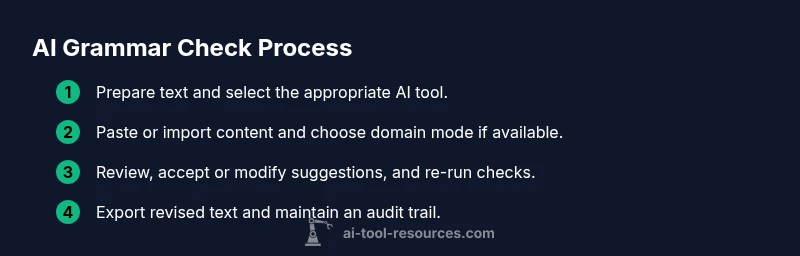
Before running checks, format your text for best results. Start with clean sentences, standard punctuation, and minimal noise like stray symbols. If your document contains specialized terms, create glossaries or enable the tool's domain mode. Remove unnecessary formatting that could confuse the analyzer, such as hidden characters, excessive line breaks, or inconsistent hyphenation. For multilingual documents, split content into separate sections or use the tool's language selector to avoid mixed-language errors. If you rely on templates, extract placeholders so the tool doesn't interpret them as text to rewrite. For code comments, ensure that code blocks remain intact and that the tool only scans the natural language portions. Finally, save a baseline version of your text, so you can compare revisions after applying changes and avoid unintended edits.
Running checks on different content types
AI grammar tools behave differently depending on content type. For essays and reports, focus on clarity, tense consistency, and proper citation punctuation. For emails and memos, prioritize tone, directness, and professional register. For technical writing or code comments, preserve terminology and avoid altering meaning. When reviewing results, start with high-priority issues such as agreement errors, run-on sentences, and misused modifiers. Use batch processing for long documents, but review flagged sections individually to avoid missing context. Some tools offer style suggestions: prefer standard usage but adapt to your audience. If the tool suggests replacing a rare term with a more common synonym, verify that the replacement preserves nuance. Finally, run a second pass after making edits to confirm no new issues were introduced.
Interpreting and applying AI suggestions
AI suggestions are proposals, not orders. Read each note, check the surrounding sentences, and decide whether a change improves meaning or readability. Prioritize corrections that fix glaring errors before adjusting style or tone. In technical writing, ensure that domain-specific terms stay accurate and that abbreviations remain defined. If you disagree with a suggestion, compare both versions and test by reading aloud or having a colleague review. Use the tool's explanations to understand why a change is proposed, which helps you learn common mistakes and improve your writing over time. Remember that context matters: a perfectly grammatical sentence can still be awkward or inaccurate if it misstates facts.
Integrating AI checks into your writing workflow
Embed AI grammar checks at multiple stages of your workflow. During drafting, enable real-time feedback to catch errors early; during editing, run a full pass for consistency; and during proofreading, do a final run to catch minor issues. Create a reusable style guide and import it into the tool so suggestions align with your preferences. Use templates to standardize sections, headings, and terminology. For group projects, share style settings and revision history to keep teammates aligned. Schedule regular refreshes of your glossary to reflect evolving terminology. Finally, document the learning from AI reviews in your writing notes to accelerate future work.
Case studies: examples in code, essays, and reports
Consider three real-world scenarios. A student rewrites a paragraph for a term paper using an AI checker, and then cross-checks with their professor's rubric to ensure argument flow remains intact. A software engineer uses an AI tool to polish inline comments and API docs, while preserving function and variable names. A researcher drafts a methods section and uses AI feedback to tighten sentences and improve reproducibility, without altering the described protocol. In each case, the human reviewer validates that edits preserve intent, accuracy, and audience-appropriate tone.
Privacy, safety, and data handling
Understand how tools process your data. Most cloud-based checkers collect input text to generate feedback; some offer on-device processing or encrypted transmissions. Review the tool's privacy policy, data retention terms, and whether edits are stored to improve models. If you work with sensitive data (personally identifiable information, confidential research, or client material), prefer offline tools or private deployments. Consider disabling features that save drafts to cloud storage or share content with third parties. Always test a non-sensitive sample first to gauge the impact of AI edits on your text. Finally, ensure compliance with your institution's or company's data-handling policies.
Best practices and a quick-start checklist
Define your audience and tone before you begin. Run checks in multiple passes: spelling, grammar, and style. Review suggestions carefully and selectively; do not accept changes blindly. Preserve essential terminology and domain-specific abbreviations. Re-check after edits to catch overlaps or missed errors. Guard privacy by avoiding sensitive material in public tools. Maintain a living glossary and synchronize with your team standards. Finally, keep a record of decisions to improve future drafts.