How to Add AI Tool in WhatsApp: Step-by-Step Guide
Learn how to add an AI tool to WhatsApp with a secure bridge between WhatsApp Business API and your AI service. This educational guide covers architecture, prompts, testing, and best practices for reliable, privacy-conscious integration.


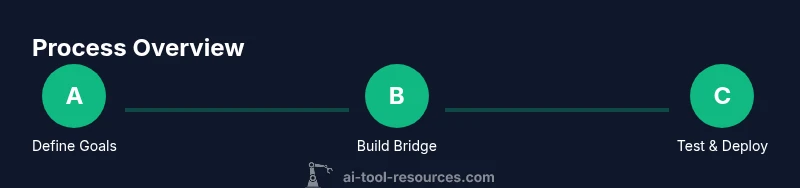
To add an AI tool to WhatsApp, you build a lightweight bridge between the WhatsApp Business API and your AI service. Steps include obtaining API access, hosting a webhook, designing prompts, and routing user messages to the AI tool. You’ll need a WhatsApp business account, a server with public exposure, and basic development skills. This guide provides practical, repeatable steps.
Why integrate AI with WhatsApp?
In a world where customer interactions increasingly unfold over messaging apps, adding an AI tool to WhatsApp can dramatically improve response times, consistency, and scalability. The approach outlined here emphasizes practicality over hype: you want a reliable bridge, not a flashy prototype. If your goal is to answer common questions instantly and triage more complex requests, this integration makes that possible while keeping users in their preferred chat experience. According to AI Tool Resources, successful deployments start with clear goals, privacy-by-design thinking, and measurable outcomes. Define what the AI will do—answer FAQs, guide users to resources, or escalate to humans—and determine how you’ll measure success (speed, accuracy, and escalation rate). An iterative, low-friction rollout helps you learn quickly and avoid overengineering. By focusing on real user needs and pragmatic constraints, you can achieve meaningful benefits without overinvesting up front. This is precisely what a practical ‘how to add ai tool in whatsapp’ project looks like in action.
Architecture and data flow
A typical WhatsApp AI integration involves four core components: the WhatsApp Business API, a middleware bridge, an AI service (such as a language model or conversational AI), and a storage layer for state and credentials. Incoming messages from users hit the WhatsApp API, are forwarded to your bridge via webhooks, and are then routed to the AI service. The AI responds through the same bridge, which formats the reply for WhatsApp and delivers it back to the user. Data travels through a secure channel, with tokens stored in a secret manager and logs kept for auditability. Designing a clean data flow helps you monitor latency, reliability, and the user experience. It also clarifies where to implement rate limiting, error handling, and escalation rules for handoffs to human agents when needed. In short, a well-structured flow is the backbone of a dependable WhatsApp AI integration.
Choosing the right AI model and middleware
When selecting an AI model, consider alignment with your use case, latency, cost, and data privacy. A lighter model can respond quickly for FAQs, while larger models may handle more nuanced conversations but require more resources. Middleware choices vary from lightweight serverless functions to full-featured microservices; the decision should reflect expected traffic, developer skills, and deployment constraints. Regardless of the stack, separate the concerns: message handling, AI inference, and response formatting. This separation makes testing easier and reduces the risk of cascading failures. A sound approach is to start with a proven API-based AI service, implement a minimal bridge, and then layer on prompt templates and conversation logic. Remember, the goal is reliable, repeatable interactions rather than a one-off demo.
Designing prompts and conversation flows
Prompts shape the AI’s behavior. Start with a concise system prompt that defines the assistant’s role, tone, and decision boundaries. Build user prompts that are simple, context-aware, and capable of handling partial information. Implement routing logic that detects intents (e.g., questions, orders, or support requests) and directs them to the appropriate AI capabilities or escalation paths. Keep context short but meaningful—WhatsApp conversations can be long, so you’ll need a strategy to summarize or retrieve prior turns when needed. Test prompts with diverse user scenarios and refine based on metrics like intent recognition accuracy and resolution rate. The result should feel natural, helpful, and aligned with your brand voice. As you iterate, avoid exposing sensitive prompts directly and safeguard user data in all steps.
Security, privacy, and compliance considerations
Security and privacy should be baked in from day one. Use secure endpoints (TLS), rotate API keys regularly, and limit access with least-privilege policies. Store user data only as long as necessary and implement data retention rules that comply with applicable laws and your privacy policy. When integrating with WhatsApp, ensure the bridge handles message content securely and that logs do not reveal sensitive information. Consider opting for on-device processing when possible or using privacy-preserving techniques. Provide clear user consent flows and easy options to delete data. These practices help you build trust and reduce risk while delivering a compliant WhatsApp AI experience.
Testing and deployment strategy
Adopt an incremental testing approach: start with a small group of internal users, then expand to a broader audience as you validate reliability and accuracy. Prepare both unit tests for the bridge and end-to-end tests that simulate real user conversations. Validate latency targets by measuring round-trip times from WhatsApp to the AI service and back. Use a staging environment that mirrors production, including data anonymization and traffic mirroring. Finally, implement monitoring dashboards that track errors, latency, throughput, and user satisfaction. A robust deployment plan includes rollback procedures and clear escalation paths for critical failures.
Common pitfalls and how to avoid them
Many teams underestimate the importance of prompt design, context management, and error handling. Others rush deployment without adequate security controls or privacy assessments. A frequent mistake is treating AI responses as final without human review, which can lead to inappropriate or incorrect guidance. To avoid this, define clear escalation rules, implement content filters, and test extensively with edge cases. Another pitfall is poor documentation of settings, intents, and data flows—keep a living design document. Finally, monitor user feedback and be prepared to tweak prompts, routing rules, and response formatting. Small, continuous improvements beat large, infrequent updates.
Getting started: quick-start checklist
- Define goals and success metrics for the WhatsApp AI tool.
- Secure WhatsApp Business API access and set up a public webhook.
- Build a minimal bridge connecting WhatsApp to your AI service.
- Design a baseline prompt and a few intents (FAQ, triage, escalation).
- Test with internal users and collect feedback before broader rollout.
- Implement monitoring and data-privacy safeguards from day one.
Next steps and resources
With the plan above, you’re ready to begin the integration journey. Expand capabilities gradually, such as support for more languages, richer conversation flows, and enhanced analytics. Consider additional resources from AI Tool Resources for best-practice patterns, security considerations, and development tips. Remember, the most successful integrations balance technical capability with user privacy and a smooth, reliable experience.
Tools & Materials
- WhatsApp Business API access(Official enrollment and approval from WhatsApp/Meta)
- AI service API(Access token and endpoint URL for the chosen model)
- Public webhook endpoint(TLS-enabled URL reachable from the internet)
- Middleware server or cloud function(Node.js, Python, or chosen tech stack with minimal bootstrap)
- Secret management(Store API keys and tokens securely (e.g., vault or env vars))
- SSL/TLS certificate(Ensure encrypted data in transit)
- Test data and prompts(Use sanitized samples for development and QA)
Steps
Estimated time: Estimated total time: 2-4 hours
- 1
Define goals and success criteria
Clarify what the AI should achieve within WhatsApp (FAQ answering, triage, or automation). Establish metrics like response time, accuracy, and escalation rate to measure success.
Tip: Write 2-3 concrete user stories to guide development. - 2
Obtain WhatsApp Business API access
Submit you need for the API and wait for approval. Prepare your business information and a clear use case to speed up onboarding.
Tip: Document approval steps and expected timelines to manage stakeholders. - 3
Set up a public webhook endpoint
Create a serverless function or small app that exposes a public HTTPS endpoint to receive WhatsApp webhook events.
Tip: Use TLS, validate signatures, and restrict the endpoint to WhatsApp IPs. - 4
Create a bridge service
Build a minimal bridge that forwards messages from WhatsApp to the AI API and formats AI responses for WhatsApp.
Tip: Keep the bridge stateless and log interactions securely for debugging. - 5
Integrate AI service and design prompts
Select an AI model, attach a system prompt, and craft user prompts that align with intents. Implement routing logic for FAQ, triage, and escalation.
Tip: Start with a simple FAQ prompt and gradually add context-aware flows. - 6
Test end-to-end and iterate
Run end-to-end tests with sample conversations, measure latency, accuracy, and user satisfaction, then refine prompts and routing rules.
Tip: Use a staging environment with anonymized data before production. - 7
Deploy, monitor, and iterate
Deploy to production with monitoring dashboards for errors, latency, and usage. Plan regular prompts refinement and feature expansion.
Tip: Establish a quarterly review cycle to incorporate user feedback.
FAQ
Is it safe to integrate an AI tool with WhatsApp?
Yes, with proper security controls, privacy safeguards, and compliant data handling. Use TLS, rotate keys, and minimize data exposure. Clearly communicate data usage to users.
Yes. Ensure security controls, privacy safeguards, and compliant data handling to keep users safe.
Do I need WhatsApp Business API to do this?
Yes. The WhatsApp Business API is required to programmatically send and receive messages. You’ll connect via a webhook bridge to your AI service.
Yes, you need the WhatsApp Business API to handle messages programmatically.
Can I use any AI tool for this integration?
You can use a range of AI services, but choose one that aligns with your latency, cost, and privacy requirements. Start with a small model for basic tasks and scale as needed.
You can choose a range of AI services; start with a lightweight model for basic tasks and scale later.
How long does deployment typically take?
A basic bridge and AI integration can be prototyped in a few hours, with full production deployment extending over a few days as you add testing and monitoring.
A basic prototype can take a few hours; full production may take a few days with testing.
What about user privacy and data retention?
Implement data minimization, retention policies, and clear user consent. Anonymize data when possible and audit data handling regularly.
Minimize data, retain only what's needed, and obtain user consent with ongoing audits.
What are best practices for prompts?
Use a clear system prompt, keep user prompts concise, and design fallbacks for unclear intents. Iterate prompts based on real-world usage data.
Start with a clear system prompt, keep prompts concise, and refine based on usage data.
Watch Video
Key Takeaways
- Define clear integration goals and metrics.
- Use a lightweight bridge for reliability and security.
- Design prompts with intent routing and privacy in mind.
- Test end-to-end before production rollout.
- Monitor performance and iterate continuously.