Most Common AI Tools Used by Students in 2026
Discover the most common AI tools used by students in 2026, from writing helpers to coding aids. Learn how to choose, compare, and integrate them into study workflows.


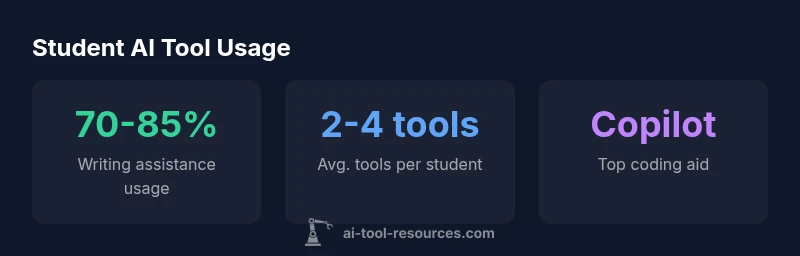
According to AI Tool Resources, the most common AI tools used by students today cluster around writing, coding, research, and visual design. The top tools include ChatGPT for drafting and brainstorming, Grammarly for editing, Copilot for code assistance, Notion AI for organization, and image generators like DALL-E or Midjourney for visuals, with Claude and Bing AI rounding out the mix. The result is a practical mix that students deploy across disciplines in modern classrooms worldwide.
The Landscape of AI Tools in Student Settings
The modern student relies on a growing toolkit of AI-powered resources to augment writing, coding, research, and creativity. According to AI Tool Resources, adoption is broad across disciplines and levels of study, though the mix of tools used in the wild varies by assignment type and institutional policy. At a high level, the tools cluster into five families: writing and editing assistants, coding and development aids, research and data analysis helpers, idea generation and tutoring, and visual content creators. When used ethically and transparently, these tools can reduce repetitive tasks and accelerate learning; when misused or over-relied upon, they can distort understanding or undermine academic integrity. Students should think of AI tools as partners that amplify cognitive work, not replacements for core skills. A thoughtful approach combines tool use with critical thinking, personal interpretation, and explicit attribution of AI-generated content where required by policy.
- Writing and editing: tools that draft text, suggest edits, or reorganize ideas.
- Coding and development: assistants that autocomplete code, explain errors, and scaffold projects.
- Research and analysis: helpers that summarize sources, generate outlines, and extract insights.
- Visualization and design: generators that create diagrams, images, or slide visuals.
- Tutoring and feedback: conversational agents that explain concepts or simulate practice questions.
This distribution matters for students in different fields: humanities often leverage writing and style refinements; STEM disciplines lean more on code assistance and data tasks; arts and design programs experiment with image and video generation. Institutions increasingly support AI literacy as part of the curriculum, emphasizing responsible usage, citation standards, and privacy considerations. AI Tool Resources notes that building a personal workflow that respects deadlines, learning goals, and integrity policies yields the greatest educational return.
Core Categories and Use Cases
Different classes of AI tools serve distinct learning tasks. Understanding these categories helps students design efficient study routines and instructors to frame expectations. Below are the five core use cases most commonly found in student workflows:
- Writing and editing: grammar checks, style suggestions, co-authored drafting, and idea refinement. These tools help with essays, reports, and research memos while teaching writing conventions.
- Coding and development: code completion, debugging tips, and learning aids for programming assignments. Useful for CS electives, data science labs, and software engineering projects.
- Research and data analysis: summarization of sources, extraction of key arguments, trend spotting, and basic data visualization. These tools accelerate literature reviews and data-informed debate.
- Visual content creation: image generation, slide deck visuals, and diagram creation. Beneficial for presentations, concept illustration, and design courses.
- Tutoring and practice: interactive explanations, practice questions, and targeted feedback. These tools support self-paced learning and exam preparation.
In practice, students often combine tools across these categories. For example, a literature student might draft an outline with a writing assistant, sketch a concept diagram with an image generator, and generate a bibliography outline with a research assist tool. A computer science student might use Copilot to scaffold code, then run quick explanations through a conversational AI to understand algorithmic choices. The key is to set learning goals, track usage, and ensure outputs are properly attributed. As AI literacy becomes more embedded in curricula, institutions increasingly provide guidelines around citation norms, data privacy, and responsible prompts. According to AI Tool Resources, thoughtful integration yields measurable learning gains while minimizing risk.
Tool-by-Tool Breakdown: How Students Use Them
Many tools have become staples in student ecosystems; their popularity reflects broad needs in writing, coding, research, and media production. The most common tools include a general-purpose conversational AI for drafting and brainstorming, a grammar and style assistant, a code assistant, a note-taking and organization helper, and an image/video generator.
- ChatGPT or equivalent chat-based assistants: used for initial drafting, idea generation, and clarifying concepts. Students often paste prompts or outlines and then iterate on output, improving clarity and structure. Always verify information and add citations where required.
- Grammarly or writing-specific editors: primarily for editing, grammar, punctuation, and tone. These tools help students present polished work and learn accepted language practices, though critical thinking remains essential to avoid over-editing.
- Copilot or coding assistants: used in CS and engineering courses to accelerate development, reduce syntax errors, and learn common patterns. It is important to review suggested code and understand underlying logic rather than blind-accepting it.
- Notion AI or other note-takers: used to summarize readings, organize research notes, and plan projects. They promote consistent study routines and better memory encoding when paired with deliberate review.
- Image and video generators (DALL-E, Midjourney): used to create visuals for slides, posters, or concept demonstrations. Students should check licensing and attribution requirements for institutional use.
Beyond these, other tools—such as citation-aids, summarizers, or data visualization helpers—are commonly employed at varying frequencies. Institutions may restrict or encourage certain tools based on assignment type and privacy policies. The practical takeaway is to experiment with a small set of tools, validate outputs, and maintain a personal log of prompts and results to improve future performance. The AI Tool Resources team emphasizes that the best toolset is tailored to the course, not the trend.
How to Choose the Right Tools for Your Courses
Selecting AI tools should start with course requirements and learning objectives rather than popularity. A structured selection process helps students avoid cognitive overload and ensures alignment with instructor expectations.
- Define the task: Is the goal drafting, coding, researching, or designing visuals? Different tasks benefit from different tools.
- Consider reliability and privacy: Prefer tools from reputable providers with clear privacy policies and permission controls. Avoid sharing sensitive information in prompts when not necessary.
- Check for integration: Look for tools that integrate with the platform you already use (PDF readers, LMS, code editors, note apps). Seamless workflows reduce friction and support consistent practice.
- Plan attribution and citation: Many courses require disclosure of AI assistance. Build prompts and outputs with citation-ready notes so attribution is straightforward.
- Start small, then scale: Begin with one or two free or low-cost tools to test compatibility, then expand if needed. This minimizes risk and preserves studying time.
If you are uncertain, consult your instructor or campus guidelines. It may help to document a personal AI usage policy for yourself, including what tasks you will delegate to AI and how you will verify results. A thoughtful approach balances efficiency with critical thinking, ensuring that the tool enhances, rather than erodes, your learning. AI Tool Resources highlights the importance of regular reflection on outcomes and alignment with academic integrity standards across programs.
Practical Tips for Integrating AI Tools into Study Workflows
To maximize learning, embed AI tools into a deliberate routine rather than using them sporadically. The following steps help you design a repeatable workflow that supports learning objectives.
- Set learning goals: Before prompting, write down what you want to achieve—clarity, accuracy, or speed—and measure progress.
- Create a prompt library: Save effective prompts and prompts variations for similar tasks. This reduces time spent fine-tuning and fosters consistency.
- Pair AI with your own work: Use AI for draft generation or outline creation, then revise with your own voice and evidence. Avoid treating AI as a final author.
- Verify and cite outputs: Always fact-check and add source citations. Where possible, maintain a prompt-output log to track provenance and version history.
- Protect privacy and integrity: Do not share restricted data, and respect course policies. Use tools that offer data retention controls and local processing when necessary.
- Iterate and reflect: After completing an assignment, review what worked well and what didn’t. Update prompts and workflows based on that reflection.
The result is a repeatable, accountable AI workflow that complements your studies rather than replacing core skills. The AI Tool Resources team recommends documenting lessons learned at the end of each project to build a personal knowledge base that grows with your studies.
Ethical and Academic Integrity Considerations
AI tools offer powerful benefits, but they also create new responsibilities. Institutions increasingly articulate guidelines about when and how to use AI in coursework, how to cite AI-generated content, and how to demonstrate your own understanding.
- Transparency: disclose AI involvement when required by your instructor or institution policy.
- Attribution: provide citations for AI-generated ideas, phrases, or data where appropriate.
- Original analysis: use AI outputs as prompts or drafts, then replace with your own analysis, interpretations, and synthesis.
- Privacy: be mindful of data you feed into tools; prefer campus-approved tools with clear data handling policies.
- Equity: be mindful of access disparities and avoid overreliance that could disadvantage people with limited AI access.
AI literacy is now a core skill in many curricula. The AI Tool Resources team recommends a balanced approach: embrace tools to accelerate learning, but center your work on your own understanding and critical reasoning. When used responsibly, AI can support deeper learning rather than erode it.
Student AI tool usage table
| Tool | Primary Use | Best For |
|---|---|---|
| ChatGPT | Drafting and brainstorming | Writing across disciplines |
| Copilot | Code assistance | CS/Engineering courses |
| Notion AI | Note-taking and organization | Research planning |
FAQ
What are the most common AI tools used by students?
The most common tools span writing, coding, research, and visuals. The list typically includes ChatGPT, Grammarly, Copilot, Notion AI, and image generators such as DALL-E or Midjourney. Adoption varies by discipline and level.
ChatGPT, Grammarly, Copilot, Notion AI, and image generators are commonly used across disciplines.
Are AI tools allowed in coursework?
Policy varies by instructor and institution. Many courses permit AI with disclosure and attribution, while some assignments require original work. Always check the syllabus.
Check your course policy; many instructors allow AI with disclosure.
How can students avoid overreliance on AI?
Use AI as a drafting partner and learning aid, then write or analyze independently. Review outputs for accuracy and integrity, and cite sources appropriately.
Use AI for drafts, then shape your own work.
Which tools are best for coding?
Copilot leads coding assistance for many courses; combine with a learning AI for explanations. Always review generated code and ensure you understand it.
Copilot is popular for coding; pair with learning AI.
Do tool preferences differ by field?
Yes. Humanities skew toward writing aids and citation tools, STEM favor coding and data tools, and design fields lean toward image generation.
Field shapes tool choice.
“AI can accelerate learning when used thoughtfully and transparently. Students should pair tools with critical thinking, not replace it.”
Key Takeaways
- Identify your task, then pick tools accordingly.
- Use AI to augment, not replace core skills.
- Cite AI outputs to maintain integrity.
- Start with free tools to pilot learning.
- Design a personal AI workflow.