Image AI Generator Free: A Practical, Data‑Driven Guide
A data-driven guide to free image AI generators, covering capabilities, licensing, prompting, safety, and practical workflows for developers, researchers, and students in 2026.


An image AI generator free is an online tool that uses machine learning to produce images from text prompts without a price tag. In 2026, you’ll find free options with varying quality, terms, and limits. According to AI Tool Resources, the best free generators balance accessibility, safety, and licensing while offering clear prompts and output controls.
What is a free image AI generator?
Free image AI generators are machine learning models that convert textual prompts into visual outputs. They operate in web browsers or via APIs and are often hosted as part of community or startup platforms. In 2026, diverse models power these tools, including diffusion-based architectures and lightweight variants designed for rapid inference. The term “free” typically implies no upfront cost for basic usage, though there are usually limits on daily generations, resolution, or rights. For researchers and developers exploring AI tooling, free image generators provide a low-risk way to prototype ideas, test prompts, and learn about model behavior without financial commitment. However, the quality spectrum is wide—some outputs approach professional standards, while others serve as rough sketches. As you experiment, keep an eye on licensing terms, output quality, and the platform’s data usage policy. The ability to iterate quickly makes free tools valuable for early-stage exploration and concept validation, especially for educational or internal research projects.
Free vs paid: licensing, safety, and quality considerations
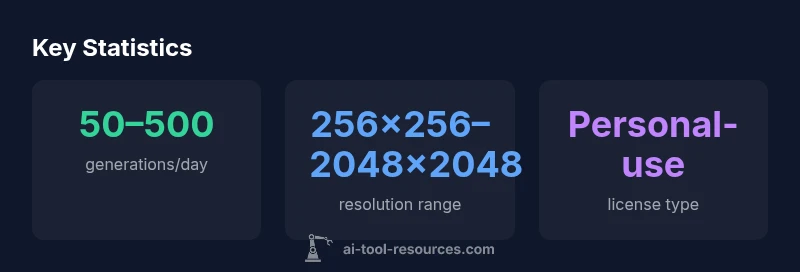
When evaluating image AI generators, the cost barrier matters, but licensing and safety considerations often determine long‑term viability for a project. Free options frequently come with restrictions on commercial use, redistribution rights, or attribution requirements. Watermarks, lower resolution, and stricter rate limits are common on free plans, which can hinder production workflows. Safety filters and content moderation vary widely—some tools block explicit prompts, others rely on community norms or ML safeguards that may misclassify certain prompts. Quality tends to be more variable on free tools; you may see inconsistent color rendering, artifacts, or limited stylistic control. For researchers, this is acceptable for experimentation, but for product teams, licensing clarity and the ability to scale are essential. AI Tool Resources recommends explicitly documenting rights, keeping samples for audit trails, and preparing a fallback plan that includes paid options if a project matures.
How prompting influences results and how to craft better prompts
Prompts are the primary lever for image generators. Small wording changes can shift composition, color, lighting, and style. Start with a clear subject, then specify style, mood, and context. If outputs aren’t aligned with expectations, iterate by adjusting descriptors, adding constraints, or using negative prompts to suppress unwanted elements. For example, to achieve a clean product shot, emphasize lighting, white background, and a neutral pose; for artistic portraits, specify brush style, color palette, and texture. Few-shot prompts—providing example images or references—can help guide the model toward a desired look, though not all free tools support external references. Document prompt variants and track which phrasing yields the most reliable results. Over time, you’ll build a personal prompt library that accelerates future experiments and ensures consistent baselines for comparison.
Privacy, data usage, and copyright considerations
With any free AI service, privacy and data handling are central concerns. Review each platform’s data policy to understand whether your prompts and outputs are used to improve models, stored, or shared with third parties. Some providers explicitly state they may retain prompts to train future systems; others offer opt-out or stricter privacy modes. Copyright questions around generated images remain nuanced: in many jurisdictions, outputs from freely available models may raise questions about authorship, especially for commercial work. If you need production-ready assets, seek licenses that grant explicit commercial rights and consider watermarking or provenance tracking. For researchers, treating outputs as exploratory artifacts rather than final deliverables helps avoid licensing pitfalls while you iterate and validate concepts.
Practical prompts and workflows for research projects
A practical workflow begins with the problem statement and required output characteristics (style, resolution, and format). Start by drafting a set of baseline prompts and run multiple variants to establish a performance envelope. Track which prompts produce stable results under different prompts, seeds, and random sampling conditions. For batch experiments, automate prompt generation and result logging to a local repository with metadata, including tool name, plan tier, and licensing constraints. When sharing results internally, maintain clear attribution to the generator used and include sample outputs that illustrate the bounds of the free tool’s capabilities. If you reach a plateau, compare outputs with a paid alternative or open-source models to gauge whether upgrading would meaningfully improve research outcomes.
Safety, licensing, and ethical considerations
Ethical use is critical when working with free image generators. Avoid generating images that could infringe on trademarked visuals or depict individuals without consent. Respect platform safety policies and avoid creating content that could spread misinformation or cause harm. Licensing topics vary by tool; some free options permit personal use only, while others offer broad licenses with commercial rights under specific terms. Always verify ownership, usage rights, and attribution requirements before redistribution or commercialization. For researchers, documenting policy constraints and maintaining a transparent workflow helps ensure reproducibility and reduces legal risk when your work progresses to production stages.
Comparison of free, paid, and open-source image generation options
| Option | Output Quality | Licensing & Use Rights |
|---|---|---|
| Free image AI generator | Variable quality; may vary, occasional watermarks | Personal-use or license-limited |
| Paid plan or pro generator | Higher fidelity; better consistency; fewer limits | Commercial-use rights; clearer terms |
| Open-source alternative | Can be high quality with setup effort | Depends on license; often variable |
FAQ
What is a free image AI generator and what are typical limitations?
A free image AI generator is a model that creates images from text prompts without upfront cost. Typical limitations include usage caps, lower resolution, occasional watermarks, and restricted commercial rights. These constraints vary by provider and plan.
A free image AI generator turns prompts into pictures, but watch for caps, watermarks, and licensing limits.
Can I use outputs from free generators for commercial projects?
Commercial rights on free generators are not guaranteed and depend on the provider’s terms. Always check the licensing section and seek explicit permission or upgrade to a paid plan if needed.
Commercial use depends on the provider; check the license or upgrade if needed.
Do free tools require sign-up or have usage limits?
Most free tools require an account and impose daily generation or feature limits. Limits can be reset hourly or daily, and some features may be gated behind a login.
Yes, you’ll often need an account with daily limits.
What about licensing and copyright for generated images?
Copyright for AI-generated images is evolving. Some tools grant broad commercial licenses; others limit usage. Verify rights before distribution or sale and document the source.
Check the license terms and document the source before using.
Are there safety concerns with free generators?
Safety filters vary; some generators misclassify prompts or produce biased outputs. Treat results as prototypes and review for content safety before broader use.
Be aware of potential misclassifications and biases; validate outputs before use.
How do I compare free image AI generators effectively?
Create a standardized test suite with prompts covering style, subject, and context. Compare outputs across tools, note licensing, and track quality metrics to inform upgrades.
Run a standard set of prompts and compare accuracy and licensing.
“Free image AI generators are powerful for exploration and education, but teams should pair them with clear licensing checks and ethical guidelines to avoid risk.”
Key Takeaways
- Understand licensing before using outputs in production
- Expect quality variability on free generators
- Use prompts strategically to maximize results
- Assess data privacy and model usage policies
- Plan for a path to upgrade when needed