Make Art with AI: A Practical Creator's Guide for Artists
Learn to make art with ai using prompts and models through iterative workflows. A practical guide for developers, researchers, and students exploring AI-powered creativity, including tools, ethics, licensing, and step-by-step workflows.


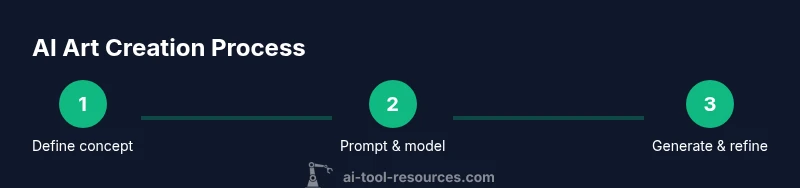
To make art with ai, start by defining your concept, choose a compatible generative model, and iteratively refine prompts. Run multiple generations, compare outputs, and select the best; then adjust prompts, seeds, and stylistic controls to tighten the result. Finish with post-processing and clear licensing for ethical use of the artwork.
Foundations: What it means to make art with ai
In its simplest form, make art with ai means using computer-based intelligence to generate visual, auditory, or multimedia outputs guided by human input. The core idea is collaboration: you provide direction through prompts, constraints, and feedback, and the model returns artifacts you can refine. According to AI Tool Resources, this field is expanding as more accessible interfaces emerge, bringing generation capabilities to students, developers, and independent artists alike. Different approaches exist, from text-to-image generation to music synthesis and style transfer. The common thread is that the algorithm learns from vast training data and applies learned patterns to new prompts. The result can be startlingly original or deliberately derivative—both options raise questions about authorship and licensing. The key is to frame your concept clearly and iterate with intention, treating AI as a creative assistant rather than a black box.
In practice, you’ll balance creative direction with the model’s constraints and capabilities. Early exploration should favor clear, concise prompts and a few reference examples to anchor the style. Keep in mind that outcomes depend on factors like resolution, color space, and the model’s training data. By documenting what works and what doesn’t, you create a reproducible workflow that supports learning and experimentation.
The AI Tool Resources team emphasizes that beginners can achieve meaningful results quickly by focusing on a few core elements: a strong concept, disciplined prompting, and thoughtful curation. This foundation helps you move from random outputs to intentional art with real polish.
The tools you need: prompts, models, and platforms
Creating compelling AI art starts with selecting the right combination of prompts, models, and interfaces. Start with a concept and sketch several prompt variations before you generate. Choose a model whose strengths align with your goal—whether you want high-detail landscapes, abstract textures, or character design. Interfaces vary from GUI-based tools to code-oriented frameworks, so pick the one that matches your experience and comfort level. For researchers and students, it’s worth exploring open documentation and community notes to understand model behavior, licensing, and output quality. The AI Tool Resources team recommends starting with a reproducible setup: a stable development environment, a clear concept, and a prompt notebook to track changes and outcomes. A well-organized workflow reduces repetitive work and speeds up iteration, helping you reach your artistic vision faster.
As you gain comfort, you’ll begin to experiment with advanced features such as style weights, seed control, and guidance scales. These controls let you influence texture, lighting, and form while preserving your creative intent. Always consider licensing and model provenance when sharing results, especially if you plan to publish or sell the artwork. Documentation and community resources can provide guidance on rights, attribution, and usage terms. The key is to keep your setup organized and your goals clear, so your creative process remains productive and enjoyable.
Understanding prompts: crafting input that guides the output
Prompts are the primary interface between you and the AI generator. A good prompt acts as a map for the model, outlining subject, composition, mood, and stylistic influences. Start with a concise baseline: describe the subject, setting, and action in a single sentence, then layer in details like lighting, color palette, and era or artist influences. You can also use negative prompts to tell the model what to avoid. Iterative prompting—adjusting words, order, and emphasis—often yields the most noticeable improvements. For consistent results, keep an organized prompt library, tagging entries by style, subject, and intended medium. This approach supports experimentation and helps you compare how small changes alter the final piece. The more deliberate your prompts, the closer you get to your intended aesthetic.
When experimenting with prompts, consider how language shapes perception. Words like “dramatic lighting,” “soft focus,” or “high contrast” steer the model toward specific visual cues. If your output diverges from your goal, reframe the prompt to emphasize the missing elements or reduce the influence of unwanted features. Practicing prompt craft over time builds intuition for what words the model responds to and how to balance specificity with creative freedom.
Style, control, and iteration: shaping the artwork
Style control is a core lever in AI-assisted art. You can guide the output toward a painting, a graphic design, or an impressionistic mood by combining prompts with model parameters. Techniques such as layering prompts, using style tokens, or prompting for multiple passes can yield richer results. Iteration is not merely repetition; it’s a dialogue with the model where you test hypotheses, compare variants, and refine your intent. Capture the outputs that align best with your vision, then analyze why they work and what could be improved. Post-generation adjustments—color grading, texture overlays, or compositional tweaks—often elevate AI-generated pieces into finished artwork. Remember that running multiple generations with small variations helps you map the design space more effectively and discover surprising, delightful outcomes.
A practical workflow starts with a concept phrase, followed by a descriptor set for mood, style, and lighting. You then generate several options, select the strongest candidates, and push them through a second round with adjusted prompts. This iterative loop transforms rough generative results into polished artwork that reflects your creative voice.
For those who want to explore deeper, document the exact prompts and settings used for each variant. This practice clarifies your decisions for future projects and is essential if you’ll publish or present your work.
Model selection: diffusion, GANs, and multi-model workflows
Model selection shapes the aesthetic and technical outcome of AI art. Diffusion-based models excel at rendering high-quality detail and nuanced lighting, while GAN-based systems can deliver distinctive stylizations. Multi-model workflows—where outputs from one model feed another—offer hybrid possibilities, like generating a base image with diffusion and applying a painterly style with a secondary model. When choosing a model, align its strengths with your desired outcome: realism, surrealism, texture, or abstraction. Be mindful of resource demands; some models require substantial compute and memory, which can affect turn-around times. Also consider licensing terms; some models carry restrictions on commercial use or redistribution. Start with a small, low-resolution test to understand how the model interprets your prompts before committing to higher-resolution renders. This approach saves time and resources while you explore different artistic directions.
Ethical considerations and licensing
Ethics and licensing are critical when making art with ai. Respect licensing terms, model provenance, and potential data biases embedded in training datasets. If you base a piece on a specific artist’s style, be transparent about influences and avoid misrepresentation. When releasing or selling AI-generated work, specify whether it was fully AI-generated, human-assisted, or output-enhanced, and cite any tools or platforms used. In academic or public contexts, provide credits for the models and prompts that contributed to the work. Many platforms have guidelines on reuse, commercial rights, and redistribution. Staying informed about evolving policies helps you navigate these issues responsibly and fosters trust with your audience.
AI Tool Resources analysis shows a growing interest in AI-assisted art and an emphasis on user control and ethical practice. As you experiment, keep a clear record of licenses, usage rights, and provenance for every piece you produce. This clarity benefits the creator, audience, and potential collaborators.
Practical project ideas to try this week
If you’re looking for hands-on experiments, try these approachable projects to get started with AI art: - Text-to-image posters that visualize a concept you’re studying. - Concept boards for a video game character or scene. - Album cover concepts that merge typography with abstract textures. - Surreal landscapes that explore dream-like color palettes. - Generative textures for 3D models or virtual environments. - Iterative portraits that blend multiple references with stylistic prompts.
Each project helps you practice prompts, model selection, and post-processing. Start with a simple prompt, then progressively introduce variations and refinements. Document outcomes to build a personal workflow that you can reuse for future art-making sessions.
Case studies: real-world ai art workflows
Real-world AI art workflows often blend human creativity with machine guidance. A typical case starts with a clear brief and a set of reference images, followed by multiple prompt iterations and model runs. Artists may combine outputs with traditional media, applying digital collage or painting techniques for a finished piece. In education settings, researchers use AI art to explore visual cognition and perception, building portfolios that showcase how prompts shape perception and interpretation. Analysts observed that structured prompts and disciplined curation lead to more cohesive series and better alignment with a creator’s voice. These workflows demonstrate that AI is a powerful collaborator when paired with deliberate design, critical evaluation, and thoughtful post-processing.
Common mistakes and how to avoid them
Beginners often over-promise what AI can deliver, rely on a single prompt, or neglect licensing. To avoid these pitfalls: - Start with a concise concept and build prompts around it. - Save seeds and variations to track what works. - Experiment with multiple models and resolutions. - Credit and license outputs properly and document provenance. - Avoid copying others’ work or implying originality when the creative input is primarily machine-generated. Adopting a disciplined approach reduces frustration and helps you produce consistent results.
Advanced techniques: layering prompts and post-processing
Advanced users layer prompts to refine output, using separate prompts for composition, color, and texture. You can perform post-processing in image editors, adjusting color grading, contrast, and sharpness to unify variations. Techniques like upscaling, denoising, and color matching help maintain coherence across iterations. Keeping a log of which prompts and settings produced each result makes it easier to replicate successful pieces. If you share work publicly, provide context about prompts and tools so others can learn from your process. This transparency supports a community of practice and helps you grow as a creator.
Collaboration with humans and AI: feedback loops
Collaborative workflows combine human critique with AI generation. Designers provide directional feedback, request variations, and refine until output aligns with the intended concept. Feedback loops accelerate learning: the more you critique outputs, the better your prompts and strategies become. When possible, invite peers to review outcomes and offer constructive critique. This collaborative approach expands your creative toolkit and fosters experimentation while preserving your unique artistic voice.
Getting started: a simple path to your first ai-assisted artwork
Begin with a concrete concept and a stable toolset. Draft a base prompt, generate several variants, and compare results. Choose the strongest outputs, then fine-tune prompts for color, lighting, and texture. Apply light post-processing to achieve a polished look, and document your settings for reproducibility. With consistent practice, you’ll develop a reliable workflow that produces intentional, high-quality AI-assisted art.
Tools & Materials
- Computer or tablet with internet access(Stable connection, up-to-date browser)
- Access to an AI art platform or framework(Choose GUI or code-based tool based on your comfort level)
- Prompt notebook or document(Draft prompts, variations, and style notes)
- Seed and parameter reference sheet(Optional for reproducibility)
- Image editing software for post-processing(Color grading, touch-ups)
- Licensing and provenance checklist(Track licenses and credits for outputs)
Steps
Estimated time: 2-3 hours
- 1
Define your concept and goals
Clarify what you want to convey and the intended medium (digital print, social post, gallery piece). Write a one-sentence concept and two to three adjectives describing mood, color, and lighting. This focus guides all subsequent prompts and model choices.
Tip: A clear concept at the start saves countless iterations later. - 2
Choose the model and settings
Select a model whose strengths align with your goal (detail, realism, or abstraction). Set initial parameters for resolution, sampling steps, and guidance strength. Start with moderate settings to balance speed and quality.
Tip: Document settings so you can reproduce or adjust later. - 3
Craft your base prompts
Create a base prompt that describes subject, scene, and mood. Add style modifiers (artist influences, eras, color palettes) one by one to see their impact.
Tip: Begin with a concise baseline prompt, then layer details in stages. - 4
Generate and evaluate outputs
Run several generations, then compare results for clarity, composition, and emotional impact. Save top candidates with notes on what you like or dislike.
Tip: Keep a changelog of prompts and outputs to track progress. - 5
Iterate with tweaks and post-processing
Refine prompts, adjust seeds, or apply a secondary pass with altered prompts. Use image editors for color correction and finishing touches to unify the piece.
Tip: Small changes can yield big aesthetic shifts. - 6
Finalize, credit, and share
Add provenance notes and licensing information. Prepare the artwork for display or sale, including file formats, sizes, and attribution.
Tip: Be transparent about AI involvement and tool sources.
FAQ
What does it mean to make art with ai?
AI art refers to artworks created with artificial intelligence tools, often using prompts and models to generate images, music, or other media. It blends machine-generated outputs with human guidance, and raises questions about originality and licensing.
AI art is machine-assisted art guided by your prompts and input.
Do I need coding skills to create AI art?
No coding is required for many AI art tools, as most offer visual interfaces. Basic prompt-writing can yield strong results, while some platforms support scripting for advanced users.
You can start with no coding and learn prompts as you go.
What ethical considerations should I know?
Consider licensing, consent, and attribution; avoid copying identifiable styles without permission; respect model terms and data provenance; ensure responsible use of generated content.
Ethics and licensing are important as you create and share AI art.
Can AI art be licensed or sold?
Yes, but licensing terms depend on the model and platform. Always verify rights to generated outputs and any included data. Some models restrict commercial use, so check terms before selling.
Licensing changes by model and platform, so check terms first.
What are common mistakes beginners make?
Relying on a single prompt, ignoring licensing, and not saving seeds. Start simple, document experiments, and iteratively refine prompts and outputs.
Newcomers often rely on one prompt; experiment and document results.
Watch Video
Key Takeaways
- Define a clear concept before prompting
- Experiment with prompts and seeds to vary results
- Document settings for reproducibility
- Credit licensing and usage rights properly
- Post-process outputs to finalize the artwork