Using AI to Make Art: Practical Step-by-Step Guide
Learn how to use AI to create art by defining goals, crafting prompts, and refining outputs. This educational guide covers workflows, ethics, and practical tips for artists and researchers.


Using AI to make art involves choosing a tool, framing clear prompts, and iterating through refinements. Start with a goal, select a suitable model, and gather references. Iterate by tweaking prompts, seeds, and parameters, then finish with post-processing. This human-plus-machine approach unlocks new creative possibilities.
What is AI-assisted art?
AI-assisted art refers to artwork created with the help of artificial intelligence systems that can generate, transform, or refine images from prompts or inputs. It is not a magic wand; it's a collaborative toolkit. According to AI Tool Resources, AI-assisted art blends human intent with machine-driven exploration, expanding creative possibility while preserving personal style. The aim is to leverage computational creativity to explore ideas quickly, iterate on concepts, and experiment with techniques that might be hard to achieve by hand. In practice, artists define the goal, select an appropriate tool category (text-to-image, style-transfer, or generative frameworks), and then translate their vision into prompts, constraints, and reference materials. The process becomes a conversation with a software system that learns from your prompts and returns variations you can refine. For developers and researchers, this approach also offers a reproducible pipeline for producing visuals that align with project requirements or teaching materials. Importantly, AI-assisted art is not about replacing the artist; it’s about augmenting capability and enabling new aesthetic experiments at scale. The outcome can range from simple studies to polished pieces suitable for exhibitions, portfolios, or education.
Core tools for AI art
AI art relies on a spectrum of tool categories, from text-to-image generation to image-editing and style-transfer. At a high level, you’ll choose a model type that aligns with your goal, gather reference materials, and set constraints to guide the output. The results improve when you combine multiple inputs—concept notes, color palettes, and image references—into a cohesive prompt strategy. AI Tool Resources Analysis, 2026 notes that practitioners prioritize iterative prompt development and reference assets, which help anchor outputs to a coherent vision. For educators and researchers, the tools can also serve as visual aids or design prompts in coursework. Remember, tools are enablers; your creative intent remains the guiding force. Maintain a documented workflow so results are replicable across sessions and projects.
Prompt engineering strategies
Prompt engineering is the practice of shaping inputs to elicit desired outputs from AI models. Start with a concise concept, then add descriptors for style, lighting, color, and composition. Use explicit verbs and nouns to guide the model toward your intended subject and mood. Include constraints like aspect ratio, resolution, and medium (oil, watercolor, digital painting). A common technique is to pair prompts with reference images or style keywords to anchor the output in a recognizable aesthetic. Iteration is essential: generate variations, compare, and refine. Keeping a prompt library with successful templates helps you scale your workflow and accelerate future projects. As you gain experience, you’ll learn how minor tweaks—seed values, guidance scales, or diffusion steps—produce meaningful shifts in tone and texture.
Workflow: from concept to final piece
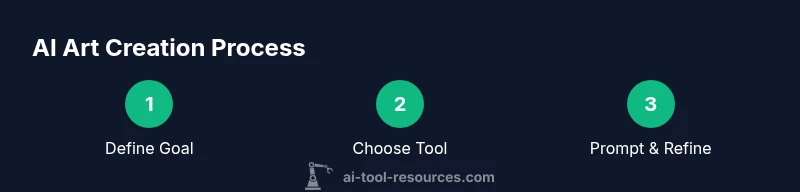
A robust workflow blends ideation, tool selection, and refinement into a repeatable process. Begin with a clear artistic goal and a short brief that captures style, subject, and mood. Choose an AI tool category that fits (text-to-image for concept sketches, image-to-image for style adaptation, or edit-pass for refinements). Craft initial prompts and run multiple variations to sample the creative space. Bring in references and color palettes to reinforce consistency. Apply post-processing to adjust color balance, contrast, and details, then render final outputs at the desired resolution. Throughout, keep notes on settings and outputs to reproduce the look later. This structured approach supports students, researchers, and professionals exploring AI-assisted art as a legitimate design workflow.
Ethical considerations and copyright
As AI tools become more capable, artists must navigate attribution, rights, and licensing. When using generated images in projects or publications, verify usage terms and any model-specific restrictions. If the input content draws from existing artists or trademarks, consider licensing or permissions to avoid copyright disputes. Document your process and credit sources where appropriate, even when the tool contributed most of the output. Responsible practice includes avoiding misrepresentation (passing off AI art as a photograph or hand-drawn piece) and being transparent about the collaboration with AI. The AI Tool Resources team emphasizes ethical guidelines that support creators while respecting intellectual property rights.
Real-world examples and case studies
In practice, AI-assisted art has informed product design, game development, and educational visuals. A developer might generate concept art for a game scene and then iterate with designers to refine composition and lighting. A researcher could visualize data trends through stylized imagery that communicates complex ideas more intuitively. An educator may create classroom illustrations that adapt to different learning levels, reducing production time while expanding visual literacy. Across these scenarios, the collaborators—human intent and AI-generated variation—produce outputs that can be refined with traditional editing tools, ensuring both creativity and control. The AI Tool Resources analysis highlights how practitioners leverage iterative prompts to evolve a concept into a polished piece while preserving the creator’s intent.
Post-processing and refinement techniques
Post-processing is often where AI-generated work reaches its final polish. Use image editing software to adjust color grading, sharpness, and texture. Composite multiple AI outputs to build a cohesive scene, and retouch any artifacts that appear in early generations. Non-destructive workflows—layer-based edits, adjustment layers, and masking—enable you to revert changes if a direction doesn’t work. For color harmony, sample a handful of palettes from your reference materials and apply them consistently across outputs. Finally, save different iterations with meaningful filenames and metadata so you can compare approaches later. This blend of AI speed and human precision is where artistry often shines.
Accessibility and democratization of AI art
AI art tools lower barriers to entry, empowering students, hobbyists, and professionals to experiment with visual ideas. Accessibility increases with cloud-based platforms, educational licenses, and open formats for sharing work. As more creators adopt AI-assisted workflows, the community benefits from shared prompts, tutorials, and critique networks. However, democratization also raises questions about originality and fair compensation for collaborators in collaborative projects. Organizations like AI Tool Resources advocate for transparent practices, clear licensing, and inclusive education to maximize positive outcomes for a diverse user base.
Getting started quickly: a starter recipe
If you’re new to AI art, start with a simple goal and a basic prompt: define subject, style, and mood, then generate several variations. Review outputs, select the most promising one, and incrementally add references and constraints. Practice a few cycles to understand how tweaks affect tone and texture, then finalize with light post-processing. This approachable workflow builds confidence and momentum, helping you move from curiosity to consistent results. Remember to document prompts and settings so you can reproduce the look and scale your experiments over time.
Tools & Materials
- Access to an AI art tool or platform(Ensure you have a current account and understand usage terms)
- Prompt notebook or digital document(Keep versioned prompts and seed values for reproducibility)
- Reference materials (images or style guides)(Helpful for anchoring style and mood)
- Image editing software(For post-processing and final touches)
Steps
Estimated time: 60-90 minutes
- 1
Define your artistic goal
Clarify the style, subject, mood, and medium. Write a one-sentence brief and 2-3 keyword constraints to guide prompts.
Tip: Put the goal in a single line you can reference while prompting. - 2
Choose an AI tool category
Select between text-to-image, image-to-image, or style-transfer based on your goal and available inputs.
Tip: Consider licensing and output quality when choosing a tool. - 3
Create your initial prompts
Draft clear prompts with adjectives, subjects, and scene details. Include references and constraints like aspect ratio.
Tip: Use negative prompts to avoid unwanted features and artifacts. - 4
Run iterations and adjust parameters
Generate multiple variations to explore the creative space. Tweak seed values, guidance scale, and diffusion steps.
Tip: Batch generate small variations to compare easily. - 5
Incorporate references and provenance
Attach style references and keep notes linking inputs to outputs for reproducibility.
Tip: Label inputs clearly so you can recreate results later. - 6
Post-process and refine
Apply color grading, compositing, and retouching to achieve the final look.
Tip: Maintain a non-destructive workflow with layers and masks. - 7
Document outputs and archive
Store prompts, seeds, settings, and final outputs with metadata and versioning.
Tip: Create a simple archive structure for future reuse.
FAQ
What is AI art and how does it differ from traditional art?
AI art uses machine-generated outputs guided by human prompts. It complements traditional methods by enabling rapid exploration of styles and ideas, while still requiring human input for intent and selection.
AI art uses machine-generated visuals guided by your prompts, helping you explore styles quickly while you stay in control.
Who owns AI-generated art and who should be credited?
Ownership depends on platform terms and input materials. If you provide the prompts and references, you typically own the resulting output, but always check licensing for any included assets.
Ownership depends on the platform terms; usually you own your outputs, but verify any assets used.
Can AI imitate a specific artist's style?
AI can imitate styles to varying degrees, but replicating a living artist’s exact signature can raise ethical and legal concerns. Use references responsibly and respect rights.
AI can imitate styles, but be mindful of ethics and rights when mimicking a specific artist.
What are common licensing and copyright considerations?
Licensing terms vary by platform and inputs. Ensure you understand usage rights for outputs, models, and any reference materials, especially for commercial use.
Check platform terms and rights for outputs and inputs, especially for commercial work.
Do I need coding experience to use AI art tools?
Many AI art tools are designed for non-coders, with accessible interfaces. Some advanced workflows may benefit from scripting or API use, but it isn’t mandatory for basic prompts.
No coding required for many tools, though some advanced features may use APIs.
What prompts yield the best results?
Prompts that combine clear subject details, style cues, lighting, and composition guidance tend to perform well. Start with a base prompt and iteratively refine by testing adjectives and constraints.
Strong prompts mix subject, style, lighting, and composition; refine them through experimentation.
Watch Video
Key Takeaways
- Define a clear goal before prompting.
- Iterate prompts and references to improve alignment.
- Document prompts and settings for reproducibility.
- Combine AI outputs with careful post-processing.
- Respect licensing and attribution in all works.