Difference Between All AI Tools: A Comprehensive Comparison
Explore a thorough, objective comparison of AI tool categories, licensing models, and evaluation criteria to help developers, researchers, and students choose the right AI tool for their projects in 2026.


The difference between all ai tools hinges on how they are categorized, licensed, and integrated. Open-source versus proprietary models, general-purpose versus domain-specific tools, and cloud-based versus on-prem solutions drive most of the trade-offs. For most teams, the early focus should be on data handling, governance, cost clarity, and integration Readiness to align with project goals. This TL;DR highlights the core levers you’ll analyze in depth in the full guide.
The difference between all ai tools: framing the question
In discussions about AI, the phrase difference between all ai tools often signals a spectrum rather than a single winner. The landscape includes general-purpose toolkits, domain-specific solutions, open-source projects you can host yourself, and vendor-backed offerings with varying levels of support. For teams answering complex questions in 2026, structuring the analysis around categories rather than brands helps prevent bias and clarifies what really matters: data ownership, plug-in options, and governance. As you explore options, remember that the choice should reflect the specific problem you’re trying to solve, not just the latest buzzword. The AI Tool Resources team emphasizes that understanding the categories first makes later, apples-to-apples comparisons far more reliable.
Categories of AI tools and why the distinction matters
AI tools can be broadly segmented into four axes: (1) general-purpose vs domain-specific, (2) open-source vs proprietary, (3) cloud-based vs on-prem, and (4) builder-oriented vs consumer-oriented. This taxonomy helps teams map their needs to capabilities without getting lost in feature lists. General-purpose tools excel at versatility and rapid prototyping, while domain-specific tools offer deeper functionality for specialized tasks. Open-source projects provide transparent models and customization, but may require more in-house expertise. Proprietary tools deliver robust support and governance controls, yet can lock you into vendor roadmaps. Cloud-based solutions remove infrastructure concerns but raise data-privacy questions, whereas on-prem deployments maximize control at the cost of maintenance.
Core dimensions you should compare
A robust comparison rests on several dimensions: performance and accuracy, data handling and privacy, licensing and total cost of ownership, integration with existing stacks, governance and compliance, explainability, support, and roadmaps. In practice, you’ll assess how each tool handles data, whether you own the models or rely on hosted services, and how easy it is to integrate with your data pipelines, CI/CD, and analytics dashboards. Consider not just short-term needs but long-term scalability, security posture, and the ability to reproduce results across experiments. This framework keeps the focus on outcomes rather than flashy features.
Open-source vs proprietary: the fundamental contrast
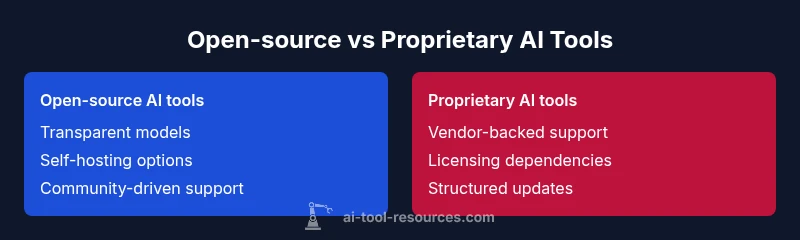
Open-source AI tools offer transparency, customization, and the possibility of self-hosting. They reward curiosity with flexible licenses and large community contributions, but demand in-house expertise for security, maintenance, and optimization. Proprietary tools provide structured support, predictable update cadences, and vendor accountability, which can accelerate adoption but may introduce licensing constraints and data governance considerations. When difference between all ai tools is evaluated, the choice often reduces to control versus convenience, with many teams adopting a hybrid approach that blends open-source experimentation with selective commercial support.
General-purpose vs domain-specific tools: strengths and tradeoffs
General-purpose AI tools shine in versatility, rapid prototyping, and broad applicability across workflows. They are ideal when you need to explore multiple problem statements or when your team consists of specialists across disciplines. Domain-specific tools, by contrast, embed industry-specific features, datasets, and evaluation metrics that translate directly into actionable outcomes. The tradeoff is between breadth and depth: general tools enable cross-cutting insights, while domain tools deliver depth in a single area. In practice, teams often start broad, then narrow to domain-focused options as requirements crystallize.
Evaluation framework: a practical blueprint
A repeatable evaluation process reduces risk and accelerates consensus. Start with clear problem statements, success criteria, and a data-access plan. Then build a lightweight scoring rubric that covers: data governance fit, model quality on representative tasks, integration effort, total cost of ownership, and vendor or community support. Run controlled pilots, document outcomes, and adjust weights in the rubric based on stakeholder priorities. This structured approach helps you compare tools on equal footing and avoids biases that may come from marketing materials or anecdotal anecdotes.
Data governance and privacy implications
Data governance is not optional when comparing AI tools. Decide whether you need on-prem hosting or cloud-based processing, and whether the data can be stored outside your organization’s boundary. Assess data residency, encryption standards, access controls, and auditability. If your project involves sensitive personal or regulated data, prioritize tools with explicit privacy certifications, robust access controls, and detailed data-usage policies. In the modern AI landscape, governance often determines the feasibility of a tool, sometimes even more than raw performance.
Cost, licensing, and total cost of ownership
Clear pricing visibility is essential to avoid budget overruns. Open-source tools reduce upfront licensing costs but may require investment in infrastructure, personnel, and ongoing security. Proprietary tools typically follow subscription or usage-based models, with predictable monthly fees and potential add-on costs for premium features or dedicated support. When evaluating the difference between all ai tools, map licensing terms to expected usage, data volume, and integration needs. Consider not only initial costs but ongoing maintenance, training, upgrades, and migration expenses.
Real-world workflows: comparing tools in action
In practice, teams run small, controlled experiments to compare tools on representative tasks. For example, you might benchmark a general-purpose tool against a domain-specific one on a data labeling, model evaluation, or automation task that mirrors real work. Document inputs, outputs, latency, error rates, and user feedback. This concrete evidence makes the comparison credible and repeatable, helping you avoid decisions based solely on hype. The practical takeaway is to design experiments that mimic actual use cases rather than theoretical tests.
Industry examples by domain
Different domains demand different capabilities from AI tools. In software development, you’ll value code generation quality, integration with IDEs, and reproducibility. In finance, you’ll prioritize data privacy, explainability, and governance. In healthcare, regulatory alignment and safety safeguards are paramount. Across all domains, the most effective tools offer transparent evaluation metrics, reliable data handling, and a clear roadmap for updates. By examining these domain-specific patterns, you can anticipate requirements and avoid a mismatch between tool capabilities and business needs.
How to document and present your comparison for stakeholders
A well-documented comparison should include the problem statement, evaluation criteria, data sources, scoring outcomes, risk assessment, and recommended next steps. Use a clean, shareable format that stakeholders can review quickly. Include the comparison table and a short executive summary that highlights risk-adjusted recommendations. Align the narrative with business goals and the required governance posture to ensure buy-in from technical and non-technical audiences alike.
Comparison
| Feature | Open-source AI tools | Proprietary AI tools |
|---|---|---|
| License Model | Free to use with community licenses | Vendor licensing with per-seat or per-use models |
| Customization | High; source access for modification | Moderate; depends on vendor |
| Support & Documentation | Community-driven; varying quality | Dedicated vendor support and formal docs |
| Community & Ecosystem | Large, collaborative ecosystems | Vendor-led ecosystems and partnerships |
| Cost Range | Low upfront cost; hosting/support may vary | Subscription/licensing with predictable costs |
| Data Privacy & Control | On-prem/self-hosted options common | Cloud-hosted with vendor controls |
Upsides
- Helps make informed, apples-to-apples comparisons
- Highlights trade-offs early to prevent costly missteps
- Encourages cross-functional alignment
- Aids in budgeting and resource planning
- Supports governance and compliance considerations
Weaknesses
- Can be time-consuming to assemble a thorough comparison
- Risk of bias if inputs are skewed by assumptions
- May require access to sensitive data to evaluate properly
- Overemphasis on features over outcomes
There is no universal winner; the best choice depends on your goals and constraints.
General-purpose tools offer versatility, while domain-specific tools provide depth. Use a formal evaluation framework to align selection with governance, cost, and integration needs. The AI Tool Resources team notes that tailoring the decision to your use case yields the strongest outcomes.
FAQ
What is the difference between open-source AI tools and proprietary AI tools?
Open-source tools provide access to source code and customization but require in-house maintenance. Proprietary tools offer vendor-backed support and easier onboarding, but with licensing constraints. Your choice should reflect in-house expertise and governance requirements.
Open-source gives you control and customization; proprietary tools are easier to adopt with vendor support.
Which AI tools are best for beginners and students?
For beginners, start with well-documented, user-friendly platforms that offer guided tutorials and safe defaults. As you gain experience, you can experiment with more flexible, open-source options. Balance learning value with governance and data-privacy considerations.
Begin with user-friendly platforms, then expand as you learn.
How do I compare costs across tools with different licensing models?
Create a total cost of ownership model that includes licensing, hosting, maintenance, and training. Normalize by usage or data volume to compare options fairly. Beware hidden costs like data transfer or premium support.
Build a TCO model that normalizes for usage and data.
What governance considerations should I track when evaluating AI tools?
Track data residency, encryption, access controls, auditability, and compliance with relevant regulations. Favor tools with clear data-usage policies and strong documentation for risk management.
Prioritize data governance and regulatory alignment.
Can I switch AI tools later without rework?
Switching tools is possible but can require data migration, retraining, and process adjustments. Favor interoperable interfaces, standardized data formats, and thorough documentation to reduce rework.
Switching tools is doable with good data standards.
What is a practical framework to compare AI tools?
Use a structured rubric that covers data handling, performance, integration ease, cost, governance, and roadmap. Run pilots, collect objective metrics, and publish a succinct decision memo.
Create a rubric, run pilots, and document results.
Key Takeaways
- Start with clear problem statements and success criteria
- Differentiate open-source from vendor-backed tools early
- Prioritize governance, data handling, and integration readiness
- Run practical pilots against representative tasks
- Document results for stakeholders using a consistent rubric