How to Use AI Tools: A Practical How-To Guide
Learn how to use ai tools to accelerate research, coding, and learning. This step-by-step guide covers tool selection, environment setup, workflows, safety, governance, and practical tips for safe, scalable AI tool usage.


Learn how to use ai tools effectively to accelerate research, coding, and learning. This guide provides a practical, step-by-step approach to selecting the right tools, configuring your environment, and applying safe, productive usage patterns. By the end you’ll be ready to start a project with confidence, using AI tools and a minimal, reproducible setup.
Why AI Tools Matter in Everyday Work
In today's fast-moving tech landscape, AI tools are not optional; they are strategic accelerants for developers, researchers, and students. According to AI Tool Resources, practical AI tool usage starts with clear goals, measurable pilots, and an understanding of where automation adds real value. The right tools can automate repetitive data tasks, generate code templates, summarize research, and help you prototype ideas quickly. This section explores scenarios where AI tools deliver tangible gains: when you need faster data processing, more consistent results, and the ability to run experiments at scale. You will learn how to translate abstract problems into tool-ready tasks, how to frame success, and how to avoid common missteps that dilute impact. By the end, you should be able to articulate a concrete use case for AI in your own workflow and begin evaluating options with confidence.
How to Choose the Right AI Tool
When you have a task, the first question is: which AI tool best fits the need? This section outlines criteria to evaluate candidates and a decision framework to avoid tool sprawl. Start by mapping your tasks to tool capabilities: natural language generation, code generation, data analysis, or image/video processing. Then check data compatibility, API options, latency, and cost. Consider privacy and governance requirements and ensure there is a clear path to integration with your existing tools. Finally, run a small pilot with 1-2 candidates to compare results side by side. Use a simple scoring rubric across four dimensions: suitability, reliability, security, and ease of use to guide your choice.
Setting Up Your Environment for AI Tool Usage
Before you can run AI tools effectively, you need a suitable environment. This includes a modern computer, reliable internet, and accounts with chosen AI tool providers. Create a dedicated workspace, secure credential storage, and a lightweight sandbox to test outputs. Install a modern code editor or notebook environment, and configure basic tooling like Git for version control. Document your setup steps so teammates can reproduce your environment. Finally, review data handling policies and confirm you are compliant with privacy requirements before loading any datasets.
Core Workflows: DataPrep, Modeling, and Evaluation
A typical AI-enabled workflow consists of three core phases: Data preparation, modeling, and evaluation. Start with clean, labeled data and perform preprocessing tasks such as normalization, splitting, and feature extraction. Choose the appropriate tool or model for your objective—coding assistants for templates, data analysis tools for summaries, or generative models for prototyping. Evaluate outputs against predefined metrics; iterate by adjusting prompts, parameters, or data inputs. Keep a changelog of model versions and tool configurations to ensure reproducibility.
Safety, Ethics, and Compliance
AI usage must respect safety and governance standards. Be mindful of data privacy, bias, and explainability. Implement access controls, audit trails, and documentation for decisions made by AI tools. Regularly audit model outputs for fairness and accuracy, and have a human-in-the-loop review for high-stakes decisions. Stay up to date with policy guidance from trusted sources and incorporate responsible AI practices into your workflow from day one.
Collaboration and Versioning with AI Tools
AI tool adoption thrives in collaborative environments. Use version control to track changes to prompts, configurations, and datasets. Maintain a model registry for different tool outputs and document lineage from data input to results. Establish collaboration norms: code reviews for prompts, shared notebooks, and centralized documentation. This approach helps teams reproduce experiments and scale successful workflows across projects.
Measuring Success: Metrics and Feedback
Define success metrics that align with your goals: accuracy or usefulness of outputs, time saved, user adoption, and cost efficiency. Track both quantitative measures (latency, throughput, error rate) and qualitative feedback from end users. Set up lightweight dashboards to monitor these metrics over time and use findings to prioritize iterations. Remember to establish feedback loops so AI-generated results improve with continued use.
Common Pitfalls and How to Avoid Them
Common mistakes include tool sprawl, overreliance on defaults, and neglecting data privacy. To avoid them, start with a single, well-scoped pilot; document decisions; and enforce governance checks before expanding. Avoid hidden costs by monitoring usage and setting budgets. Keep data handling strict and use synthetic or anonymized data when possible. Finally, maintain ongoing education for the team on tool capabilities and limits.
Getting Started: A 30-Minute Kickoff Plan
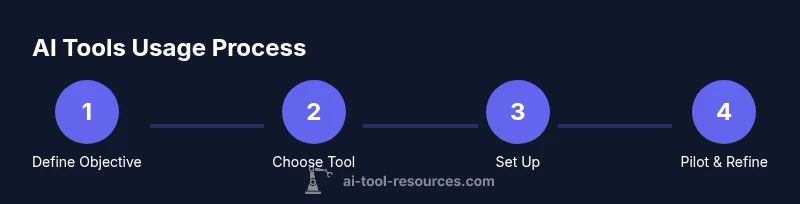
Kickoff in 30 minutes with a focused, repeatable plan: 1) State a single objective and measurable success criterion. 2) Pick one tool that best fits the task and set up a minimal environment. 3) Run a tiny pilot on a representative sample, capture results, and log observations. 4) Review outputs with a teammate and decide whether to scale or pivot. For deeper learning, consult authoritative sources such as NIST’s AI Risk Management Framework and MIT’s AI governance materials.
Tools & Materials
- Laptop or desktop computer(Recent OS, updated browser; ensure hardware meets tool requirements)
- Stable internet connection(Broadband or reliable Wi‑Fi; minimum latency for cloud tools)
- Accounts for AI tools (APIs or web apps)(Register with at least one provider; manage keys securely)
- Code editor or notebook environment (e.g., VS Code, Jupyter)(Installed and configured for scripting or notebooks)
- Project workspace with version control (Git)(Create a folder structure for data, code, prompts, and outputs)
- Sample dataset or tasks(Helps with pilots but not strictly required for initial setup)
- Documentation access (official guides, tutorials)(Bookmark primary docs for each tool you plan to use)
- Secure credential storage (password manager)(Protect API keys and credentials)
Steps
Estimated time: 60-90 minutes
- 1
Define your objective
Clarify the task you want AI to assist with and identify what a successful outcome looks like. Write 1–2 clear success criteria and ensure stakeholders agree on the goal.
Tip: Create a one-sentence objective and a 1-sentence success metric. - 2
Inventory potential tools
Survey tools that fit your task category (text generation, data analysis, code generation, etc.). Compare features, data handling, and integration options.
Tip: Limit to 3 top candidates to avoid tool sprawl. - 3
Set up the environment
Create your workspace, install required editors, and set up accounts and API keys in a secure, organized way.
Tip: Use a dedicated workspace and a password manager for credentials. - 4
Run a small pilot task
Execute a minimal task with the chosen tool and a representative dataset. Capture outputs and compare against your success criteria.
Tip: Use a copy-safe dataset and save prompts and settings for reproducibility. - 5
Evaluate results and iterate
Assess the outputs, adjust prompts or inputs, and re-run until you approach the target metric. Document decisions.
Tip: Maintain a change log to support governance and audits. - 6
Scale with governance
Expand usage only after establishing repeatable processes, version control, and monitoring. Create a simple automation plan.
Tip: Set guardrails for data privacy, costs, and access control.
FAQ
What is the first step to using AI tools effectively?
Start by defining a concrete objective and success criteria. This sets the direction for tool selection, data handling, and evaluation.
Begin with a clear objective and success metric to guide your tool choice and pilot.
Do I need to code to use AI tools?
Not always. Many tools offer no-code interfaces for common tasks, while scripting provides deeper customization.
You can start with no-code options and add code as needed.
How can I ensure data privacy when using AI tools?
Use anonymized or synthetic data when possible, review provider privacy policies, and restrict access to sensitive datasets.
Be mindful of privacy; use non-sensitive data or on‑prem options when possible.
What metrics should I track when using AI tools?
Track accuracy or usefulness, latency, cost, and user satisfaction to gauge impact.
Measure accuracy, speed, and cost to understand value.
Can AI tools replace humans?
They augment capabilities and speed up work, but human oversight remains essential for quality and ethics.
AI tools help, but humans still guide decisions.
How do I govern repeated tool usage?
Establish guidelines, approvals, and a model/asset registry with audit logs for accountability.
Set rules and keep records to stay in control of tool usage.
Watch Video
Key Takeaways
- Define clear objectives before tool selection
- Pilot one tool to validate fit
- Document setup for reproducibility
- Govern data handling and outputs from day one
- Scale responsibly with governance and monitoring