Reply to Email Professionally with AI Tools: A Practical Guide
Learn to reply to email professionally using AI tools. This step-by-step guide covers tool selection, tone control, templates, and best practices to keep messages clear, courteous, and brand-consistent.


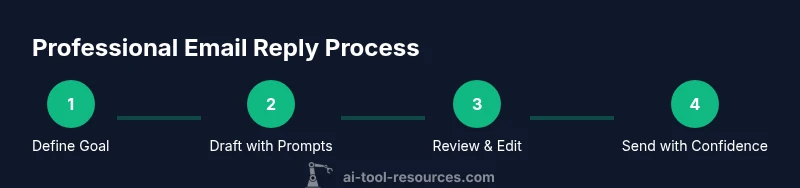
This guide helps you reply to email professionally using AI tools. You’ll learn how to choose the right tool, set your tone, structure replies clearly, and personalize responses at scale. We cover templates, safety checks, and edits to ensure accuracy and brand alignment, while saving time and reducing back-and-forth. This approach keeps communications professional, respectful, and efficient.
Why AI Tools Matter for Professional Email Replies
Effective email communication is a foundational skill for professionals across disciplines. AI tools can augment your ability to draft, edit, and tailor messages with consistency, speed, and care. According to AI Tool Resources, teams leveraging AI-assisted drafting often experience improvements in tone consistency, structure, and completeness across a wide range of emails. For developers, researchers, and students exploring AI tools, the objective is to amplify judgment, not replace it. Use AI to generate a solid base, then customize for recipient, context, and brand norms. This approach reduces repetitive edits and frees time for high-impact conversations. Start by building a small library of templates for common scenarios—acknowledgments, information requests, follow-ups—and rely on the tool to produce executable outlines that you refine. The result is faster replies that still feel human, courteous, and aligned with your brand voice.
Defining Professional Email Reply Goals
Before you draft, define clear goals for the reply. Identify what you want the recipient to know, what action you expect, and the timeframe you’re signaling. Your goals shape tone, length, and the level of detail. A well-scoped goal helps the AI tool generate content that stays on target rather than drifting into extraneous information. Consider three pillars: clarity (a concise summary of the issue), courtesy (appropriate tone for the relationship), and actionability (a concrete next step or request). When you prepare the prompt, include these goals so the AI can align its draft with your objectives from the start.
Selecting the Right AI Tool for Email Writing
Not all AI tools are created equal for email work. Look for features like tone control, selectable formality levels, and a library of ready-made templates designed for business communication. Ensure the tool can preserve your brand voice by referencing a style guide or a set of approved phrases. Privacy controls are essential: verify data handling policies and whether drafts are stored or transmitted to cloud servers. Integration with your email client and CRM can save time by exporting drafts directly or auto-populating fields. Finally, prioritize transparency in prompts and the ability to review changes before sending. A tool that lets you see suggested edits side-by-side with your original ensures you maintain control.
Understanding Tone and Brand Voice in AI Edits
Tone and brand voice must be maintained even when drafting with AI. Start by formalizing your tone range for different recipient types (colleagues, clients, professors, recruiters) and create a short guide you can embed in prompts. For each draft, specify the desired tone (neutral, courteous, assertive) and references to brand phrases, sign-offs, and preferred greetings. Use the AI tool to propose several tone variants, then select one that fits the context. Remember that AI suggestions are starting points; you should still review and adjust to ensure the voice matches your internal policies and the recipient’s expectations. Consistency across replies reinforces credibility and trust.
Crafting a Clear Subject and Greeting Using AI
A strong subject line is the first impression you make. Use AI to draft several concise options that reflect the message’s purpose, while avoiding ambiguous phrasing. Pair the subject with an appropriate greeting that respects hierarchy and relationship. For example, use “Hello Dr. Kim” with a formal exchange, or “Hi Team” for internal discussions. The AI tool should propose both subject lines and greetings, and you can quickly test which version yields the strongest initial clarity and engagement. Fine-tune these choices to fit your audience and the urgency of the reply.
Structuring Body Content for Clarity
Structure提升 clarity with a predictable pattern: a brief opening that restates the issue, a concise summary of the key points, supporting details in bullet form, and a clear call to action. Use AI to generate a tight outline first, then populate each section with concrete details. Bullet points improve scannability, while short paragraphs reduce cognitive load. Include dates, milestones, or attachments where relevant, and ensure every factual claim is verifiable. End with a courteous closing that invites further questions and reiterates the next steps.
Personalization at Scale: Balancing Automation and Humanity
Automation helps manage volume, but personalization remains essential. Use AI prompts to insert recipient-specific references (previous conversations, project names, deadlines) while keeping the core content consistent. When addressing multiple recipients, tailor pronouns and greeting forms to reflect the group’s dynamics. Maintain human warmth by integrating a brief appreciative note or a context-specific compliment where appropriate. The goal is to feel tailored, not robotic.
Templates, Prompts, and Customization Strategies
Build a library of prompts aligned with common scenarios: information requests, schedule changes, status updates, and apologies. Example prompts include: “Draft a concise reply to [name] about [topic], in a professional but friendly tone, include a clear next step and due date.” Combine prompts with your style guide to generate drafts that respect policy. Save approved replies as templates for future use, and include placeholders for recipient name, date, and action items to speed up customization.
Safety, Accuracy, and Data Privacy Considerations
Always treat sensitive data with care. Avoid sharing confidential information via AI drafts unless your organization permits it and the tool provides strong access controls. Verify dates, numbers, and attachments before sending, and consider running a quick fact-check or cross-reference with the relevant source. Establish guardrails: do not auto-send drafts that reveal privileged content, and ensure responses comply with privacy policies and regulatory requirements. Use encryption where available and audit drafts for compliance.
Editing, Proofreading, and Final Checks
Never rely solely on AI for final approval. Always proofread for grammar, tone, and factual accuracy. Check the greeting, subject, and closing for consistency with the organization’s standards. Confirm that attachments are correct and referenced in the body. Read the draft aloud to catch awkward phrasing and rhythm issues. If possible, have a peer review the reply before sending to catch nuances you might miss.
Integrating AI Replies with Your Workflow
Integrate AI drafting into your existing workflow to minimize friction. Draft in your AI tool, paste into your email client for a final human edit, and then send. Use templates and prompts to speed up responses, but maintain an approval step for quality control. Consider setting up automated routing to route high-priority messages to your inbox with recommended templates. Consistent processes reduce variability and improve response reliability.
Measuring Success and Iterating
Track qualitative outcomes like clarity, tone consistency, and recipient satisfaction, rather than relying solely on speed. Collect feedback from teammates and recipients to refine prompts and templates. Regularly review a sample of drafted replies to identify patterns that could be improved. Use insights to update your style guide and templates, creating a virtuous loop that steadily improves email quality over time.
Tools & Materials
- AI email drafting tool(Select a platform with tone control, templates, and brand voice support)
- Brand voice guidelines(Provide approved phrases, greetings, sign-offs, and style notes)
- Quality assurance editor(Human reviewer for tone, accuracy, and policy compliance)
- Email client with draft export(Ability to paste or import drafts and attach files easily)
- Template prompts library(Prebuilt prompts for common scenarios; keeps output consistent)
- Grammar and privacy tools(Spell/grammar checks and data privacy safeguards)
Steps
Estimated time: 30-60 minutes
- 1
Define your goal
Identify the message objective, required actions, and target timeframe. A clear goal guides the AI’s focus and reduces unnecessary content.
Tip: State the exact action you want from the recipient and a reasonable deadline. - 2
Set up the AI tool with brand guidelines
Load the brand voice guide into prompts and choose the appropriate tone level for the recipient. Establish defaults for greeting and sign-off.
Tip: Use a predefined tone slider to switch between formal and friendly as needed. - 3
Draft with prompts
Generate a draft using targeted prompts that specify tone, length, and key points. Start with a concise outline before fleshing out details.
Tip: Include placeholders for recipient name, project name, and due date. - 4
Review for accuracy and privacy
Check dates, numbers, and attachments; ensure no confidential content is exposed. Confirm compliance with policies.
Tip: Run a quick privacy and data sensitivity check before sending. - 5
Personalize for the recipient
Add recipient-specific references or context to demonstrate attention and relevance. Substitute placeholders with real data.
Tip: Mention a recent interaction or project milestone to show attentiveness. - 6
Finalize and send
Paste the draft into your email client, perform a last read, and send with confidence. Archive a copy as a template for future use.
Tip: Keep a 1-2 sentence backup summary in the draft for quick recall later.
FAQ
Can AI tools fully replace human review for emails?
No. AI should augment your drafting process, with human review for tone, accuracy, and policy compliance before sending.
AI helps draft, but a human review is essential for safety and accuracy.
How do I protect privacy when using AI for email replies?
Use tools with clear data handling policies, avoid sharing confidential information in drafts, and apply access controls and encryption where available.
Choose tools with strong privacy controls and review content before sending.
Can AI assist with multilingual email replies?
Yes, many AI tools support multiple languages, but you should verify translations and cultural nuances with a native speaker when possible.
AI can help draft in other languages, but human review is recommended for accuracy.
What is the best practice for tone settings in AI tools?
Define explicit tone levels (formal, neutral, friendly) and apply them consistently across recipient types to preserve brand voice.
Set clear tone levels and apply them consistently.
How do I measure success when using AI for email replies?
Track clarity, consistency, and response times, and solicit recipient feedback to improve prompts and templates.
Look at clarity, tone consistency, and speed, plus feedback.
Watch Video
Key Takeaways
- Leverage AI to draft, then customize for context and recipient.
- Maintain brand voice with explicit tone and greeting guidelines.
- Always review for accuracy and privacy before sending.
- Use templates to scale consistent, professional replies.