How to Change AI Tool Outputs: A Practical Guide
Learn practical methods to influence AI tool outputs through prompt design, guardrails, and post-processing. This educational guide helps developers, researchers, and students create auditable, safer results with clear steps and governance.


how can you make changes to an ai tools output? In practice, you influence results by shaping inputs, adding guardrails, and applying post-processing. This step-by-step guide shows practical, repeatable methods to improve accuracy and relevance while preserving safety and traceability. According to AI Tool Resources, combining thoughtful prompts with review loops yields auditable changes without altering the underlying model.
What editing AI outputs means in practice
Editing AI outputs means guiding the model toward your desired outcome without modifying the underlying algorithm. It involves careful input design, explicit constraints, and verification steps that make results more reliable and auditable. According to AI Tool Resources, reliable outcomes come from a deliberate mix of input shaping, guardrails, and observability. This approach helps reduce variance, captures your intent, and maintains a clear record for future review.
Core techniques for influencing results
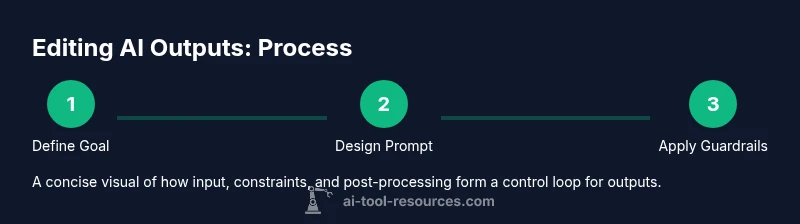
When asked, how can you make changes to an ai tools output, you typically adjust three layers: the prompt (input), the constraints (rules and guardrails), and the evaluation (how you judge success). Start with precise task definitions, examples, and boundary conditions. Then introduce deterministic options such as temperature, max tokens, and sampling methods in the API. Finally, build feedback loops that compare outputs against baselines and reserve the right to revert changes if needed. These steps create a repeatable workflow that scales across projects.
Prompt design and guardrails
Effective prompt design defines the task clearly and reduces ambiguity. Use system messages or context blocks to set expectations, and include explicit constraints like tone, format, and required fields. Implement guardrails such as allowed value ranges, disallowing disallowed content, and fallback options when the model is uncertain. Document the rationale behind each constraint so others can reproduce results. In practice, how can you make changes to an ai tools output? You typically start with a concise, testable prompt and layer in guardrails to constrain behavior.
Post-processing and auditing
After generating a result, apply deterministic post-processing to normalize format, extract required fields, and remove extraneous content. Techniques include normalization (case, punctuation), value clamping, canonicalization, and structured output formats (JSON, YAML). Maintain an audit trail by logging inputs, prompts, constraints, and the resulting outputs. Use version control for prompts and templates so you can reproduce or revert edits. This stage is essential to keep outputs consistent and explainable.
Governance, safety, and auditing
Establish governance: who can edit outputs, what approvals are required, and how to handle sensitive data. Align with organizational policies and privacy regulations. Implement risk scoring for outputs and a rollback plan. Consider bias, fairness, and explainability; ensure you can justify changes with evidence. Finally, train your team on best practices and keep a living playbook that evolves with your tooling.
Practical workflows and case studies
Workflow A: Research assistant uses prompt design and guardrails to refine a literature extraction tool. Start by defining success criteria, run a baseline, then apply targeted constraints and post-processing. Track changes with version control and document the rationale. Workflow B: Customer support bot uses post-processing to normalize customer names and dates, then audits results against a curated storybook of valid responses. Both workflows prioritize repeatability, safety, and reviewability.
Tools & Materials
- Access to the AI tool API(API key, authentication, and rate limits for consistent testing.)
- Prompt crafting notebook or editor(Versioned templates for quick reuse and audit.)
- Logging and version control system(Store prompts, constraints, and outputs with metadata.)
- Representative test datasets(Ensure examples reflect real use cases and edge cases.)
- QA and review checklists(Define acceptance criteria and review steps for each change.)
Steps
Estimated time: 1-2 hours
- 1
Define success criteria
Document what a successful output looks like, including required fields, tone, and structure. Establish measurable checks to determine if edits meet the objective.
Tip: Create a one-page acceptance rubric that a reviewer can apply quickly. - 2
Collect baseline outputs
Run representative prompts to establish a reference set. Capture metadata such as prompt version, settings, and timestamps for comparison.
Tip: Store baselines with clear identifiers so you can trace later changes. - 3
Design prompts with constraints
Craft prompts that clearly state the task, required fields, and any stylistic or factual constraints. Use examples to anchor expectations.
Tip: Iterate prompts in isolation to assess the impact of specific constraints. - 4
Implement post-processing rules
Define deterministic steps to normalize outputs (format, casing, structure) and to filter or transform data.
Tip: Document the exact sequence of post-processing operations for reproducibility. - 5
Set up monitoring and auditing
Automate comparisons against baselines and log discrepancies. Schedule periodic reviews to catch drift.
Tip: Flag significant deltas automatically and require human review. - 6
Iterate and document changes
Review outcomes, adjust prompts or constraints, and update the playbook. Maintain version history for all edits.
Tip: Keep a changelog detailing rationale and outcomes.
FAQ
How often should you audit AI outputs after changes?
Regular auditing helps ensure continued alignment with objectives. Schedule checks after major changes and at consistent intervals to catch drift early.
Audit your AI outputs after big changes and on a regular cadence to stay aligned.
Can changing prompts introduce bias?
Yes, prompts can shape results in subtle ways. Use balanced examples, diverse test data, and review by multiple perspectives to mitigate bias.
Prompts can bias results; use diverse inputs and review to minimize risk.
What is the difference between prompts and post-processing?
Prompts steer output generation; post-processing modifies or normalizes the produced data. Both are essential, but they operate at different stages of the workflow.
Prompts steer output; post-processing refines what’s produced.
Is it possible to guarantee outputs?
Guarantees are rarely possible due to probabilistic models. Focus on confidence bands, validation checks, and auditable means to justify results.
Guarantees are hard; prefer validation and auditable checks.
What tools help with version control of prompts?
Use standard version control systems and prompt templates that include metadata like version, date, and reviewer notes.
Version prompts with standard tools; add metadata for traceability.
Watch Video
Key Takeaways
- Define clear success criteria first
- Use structured prompts with guardrails
- Apply deterministic post-processing
- Audit changes and maintain a living playbook