How to Create AI Tool Without Coding
A comprehensive, no-code approach to building AI tools from idea to deployment. Learn step-by-step, pick the right tools, and apply best practices for safe, scalable results. Insights from AI Tool Resources.


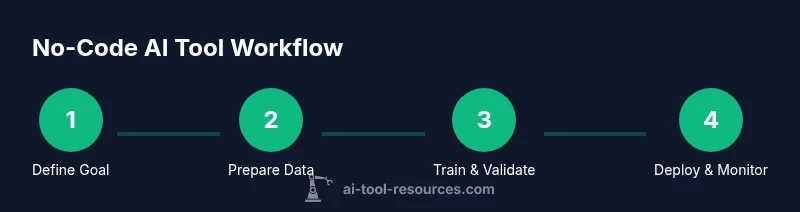
By using no-code AI platforms, you can turn ideas into a working AI tool without coding. This quick guide outlines a practical workflow to define goals, assemble data, train a model, test thoroughly, and deploy safely. It highlights essential tools, common pitfalls, and best practices to help you start creating AI tools without coding today. According to AI Tool Resources, a focused approach yields faster results and clearer success criteria.
What you can build with no-code AI
No-code AI aims to let non-programmers prototype and deploy intelligent features quickly. In practice, you can build chat assistants, data classifiers, simple recommendation engines, image tagging tools, and automation triggers. The goal is to separate business logic from code: you describe inputs, outputs, and rules, and the platform handles data processing, model training, and hosting. If you are wondering how to create ai tool without coding, start with a concrete use case, a minimal data set, and a measurable success criterion. AI Tool Resources recommends starting with a scoped problem: a single decision or insight your tool must provide. You will map user journeys, define input fields, and decide how results are surfaced (dashboard, API, or chat interface). You will also consider who will interact with the tool and what success looks like in real terms.
Tools & Materials
- No-code AI platform / builder(Choose a platform that supports your data types (text, images, numbers) and offers a visual workflow builder.)
- Quality dataset(Assemble representative data and clear labeling guidelines for consistency.)
- Clear problem statement & success metrics(Define the exact decision the tool must support and how you’ll measure it.)
- Data labeling guidelines(If you lack labels, plan a labeling workflow or use semi-supervised cues.)
- Secure workspace & data governance(Ensure access controls and data provenance are clear.)
Steps
Estimated time: Estimated total time: 2-6 hours
- 1
Define your AI goal
Articulate the user need and the single decision your tool will support. Write a one-sentence problem statement and list expected outputs. This clarity will guide data collection and platform choices, preventing scope creep.
Tip: Start with a real user story to ground the goal in practical use. - 2
Assemble and prepare data
Collect data that reflects real scenarios your tool will encounter. Clean, deduplicate, and label consistently. Create a lightweight data dictionary so teammates understand fields and meanings.
Tip: Document labeling rules before labeling to avoid drift. - 3
Design the workflow
Sketch how inputs flow to outputs and what happens if data is missing or incorrect. Map interfaces (dashboard, API, chat) and decide how results are surfaced.
Tip: Prefer a modular flow so you can swap components without reworking the entire pipeline. - 4
Train and validate a model
Use the no-code platform's training module with your prepared data. Validate with held-out data and set pass/fail criteria before moving to testing.
Tip: Establish minimum viable performance metrics early. - 5
Deploy and monitor
Publish the tool to production using hosted endpoints or embeddable widgets. Set up dashboards to monitor latency, accuracy, and drift over time.
Tip: Enable alerts for abnormal predictions and data quality issues. - 6
Iterate and scale
Gather feedback, re-train with new data, and expand features. Plan for data governance and export options should you outgrow the platform.
Tip: Treat deployment as an ongoing product, not a one-off project.
FAQ
What does it mean to build an AI tool without coding?
No-code AI allows you to create AI-powered features using visual builders and pre-built models without writing traditional code. You configure inputs, outputs, and rules, and the platform handles data processing and hosting.
No-code AI means you can build AI features with visual tools instead of writing code.
Do I need programming knowledge to start?
No, you can start with basic AI tools using no-code platforms. Some advanced features may benefit from simple scripting, but it is not required for MVPs.
You can start without programming, especially for MVPs.
Is no-code AI suitable for complex tasks?
No-code solutions work well for MVPs and simpler models. Highly complex deep-learning projects or large-scale systems may require coding or hybrid approaches.
Great for MVPs, but very complex tasks might need coding.
How should I handle data privacy and compliance?
Use anonymization where possible, obtain user consent, and understand how data is stored and used by the platform. Keep data minimization in mind and follow applicable regulations.
Be mindful of consent and privacy; minimize data use where possible.
What about deployment and ongoing monitoring?
Deploy via hosted endpoints or embedded widgets and set up monitoring for latency and accuracy. Have a plan for updating data and models as user needs evolve.
Deploy smartly and monitor performance over time.
What costs should I expect with no-code AI?
Costs vary by platform and usage. Look for free tiers to experiment, then estimate ongoing costs based on data volume and requests.
Costs can vary; start with a free tier to test concepts.
Watch Video
Key Takeaways
- Define a focused use case before building.
- Choose a no-code platform with strong data handling and security.
- Test with real users and monitor drift post deployment.
- Plan for maintenance, data governance, and scalability.