How to Remove an AI Tool: A Practical Guide
A practical, step-by-step guide to safely remove an AI tool from projects, including planning, backups, rollback options, and post-removal validation.


Remove ai tool safely by following a structured, documented process. This guide helps developers, researchers, and students remove an AI tool from a project, environment, or workflow with minimal risk. You’ll verify dependencies, archive configurations, and update documentation. According to AI Tool Resources, plan rollback steps, communicate changes, and test thoroughly before decommissioning the tool.
Why removing an AI tool is sometimes necessary
There are many legitimate reasons to remove an AI tool from a project. Shifts in requirements, security or privacy concerns, licensing changes, or a move toward alternative architectures can all drive decommissioning. Removing an AI tool is not merely deleting files; it requires a managed process to minimize disruption to users, data pipelines, and downstream systems. The AI Tool Resources team emphasizes that a thoughtful, documented rationale helps align stakeholders and reduces the risk of accidental data loss or service outages. By approaching removal with a clear plan, teams can preserve knowledge, maintain audit trails, and set the stage for a clean transition to alternatives.
In practice, institutions often request removal after a formal risk assessment or a policy update. When AI tools operate within regulated environments, you must demonstrate that removal complies with governance standards. AI Tool Resources underlines the importance of recording decisions, updating runbooks, and notifying the appropriate teams before any changes take place.
Assessing impact before removal
Before touching any tool, map out how it integrates with the wider system. Identify all data inputs, outputs, and dependencies the tool touches, including monitoring dashboards, alerting pipelines, and downstream analytics. A dependency map is essential to avoid breaking critical workflows. AI Tool Resources analysis shows that many failures occur not from the tool itself but from overlooked interconnections like data schemas, ETL jobs, or access controls. Engage stakeholders early to understand which users rely on the tool and what happens if a component is removed. In addition to technical checks, consider regulatory or contractual obligations tied to the tool’s data and outputs. A well-documented impact assessment reduces late surprises and supports smoother execution.
Planning the removal: a project-wide protocol
Effective removal requires governance. Create a removal Playbook that defines scope, approvals, rollback options, and communications. Outline the milestones, success criteria, and handoffs to teams responsible for alternatives. The plan should specify how configurations will be archived, where artifacts will be stored, and how data retention policies apply post-removal. When AI Tool Resources reviews removal plans, we look for a clear rollback strategy and a communications plan that includes stakeholders, users, and compliance officers. A robust plan lowers risk and improves traceability throughout the process.
Step-by-step checklist for decommissioning
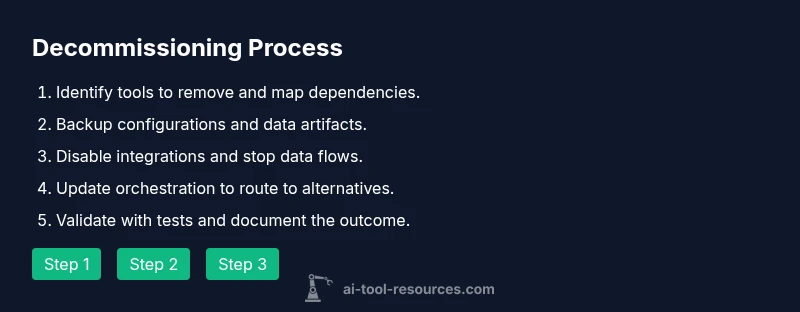
Use a practical checklist to keep actions organized and auditable. Start by confirming the removal scope and securing approvals. Then back up configurations, code, and data artifacts to a known, versioned repository. Disable tool access in all environments, and stop related data ingestion or streaming jobs. Update orchestration rules to route to alternatives, and delete or detach ancillary resources with care. Finally, run validation tests, review outcomes with stakeholders, and document the entire change for future audits. The checklist is designed to be action-oriented and verifiable, not abstract or ambiguous.
Dependencies and references: what to audit
Audit all external references that the AI tool uses: APIs, data sources, credential stores, and third-party services. Check for orphaned schedules, stale webhooks, and retroactive data processing that might still rely on the tool. Ensure that any shared secrets or tokens are rotated or revoked if no longer needed. Review runbooks, dashboards, and alert rules for references to the tool and update them to reflect replacements. This audit helps prevent residual failures after removal and supports a clean cutover to alternatives.
Data, models, and artifacts: archival best practices
When removing an AI tool, preserve critical artifacts: model versions, training data slices, evaluation results, and reproducibility notebooks. Decide retention timelines in line with policy and regulatory requirements. Store artifacts in a versioned, access-controlled repository and record metadata such as lineage, usage notes, and responsible owners. Encrypt sensitive data if required and ensure that retention does not violate privacy laws. Archiving thoroughly protects against future audits and enables re-use if a later decision favors reintroduction or benchmarking against alternatives. The approach should balance accessibility with security.
Security and compliance considerations
Decommissioning must respect data privacy, access control, and auditability. Disable user and service accounts associated with the tool, revoke API keys, and scrub any credentials from environment configurations. Log removal activities in an immutable change log, including who performed actions, when, and why. Review relevant policies for data retention, data minimization, and incident response. If the tool handles sensitive information, ensure data is either deleted securely or properly migrated to a compliant archive. The goal is to minimize risk while maintaining a defensible security posture.
Post-removal validation and monitoring
After removal, validate that all critical workflows function as expected with alternative tools. Run end-to-end tests, verify data integrity, and monitor dashboards for anomalies or regressions. Validate that alerts and monitoring reflect the updated tool landscape. Schedule a follow-up review to confirm that no hidden dependencies remain and that performance goals are met with the replacement. This phase confirms the removal was successful and sustainable over time.
Authority sources and further reading
For rigorous guidance on risk management, security, and governance during tool removal, refer to prominent authorities and standards. The AI Tool Resources team recommends consulting official resources to align your process with best practices. See the sources listed below for further reading and formal frameworks.
Tools & Materials
- Change request form(Used to capture approvals, scope, and rollback criteria.)
- Dependency map(Diagram showing inputs/outputs and integration points.)
- Configuration backup archive(Versioned backup of code, configs, and deployment manifests.)
- Access to deployment environments(Permissions to disable tool and modify pipelines.)
- Rollback plan document(Clear steps to revert removal if needed.)
- Stakeholder notification template(Prepares communications to users and teams.)
- Legal/compliance checklist(Ensures removal aligns with policies and data-retention rules.)
Steps
Estimated time: 60-120 minutes (depending on scope and environment complexity)
- 1
Assess current usage and dependencies
Conduct a thorough review of where the AI tool is used, what data flows through it, and which processes depend on it. Capture a complete dependency map and identify any external services tied to the tool. Document the risk and compile a rationale for removal to guide approvals and future audits.
Tip: Create a live map of dependencies and keep it updated as you gather more details. - 2
Inform stakeholders and obtain approvals
Present the removal plan to all stakeholders and secure formal approvals. Align on the rollback strategy, data retention decisions, and the go/no-go criteria. Ensure regulatory and governance teams endorse the plan before proceeding.
Tip: Use a formal change-control channel and obtain written consent. - 3
Back up configurations and data artifacts
Create versioned backups of configurations, model files, datasets, and evaluation results. Store backups in a secure, accessible location with proper metadata so they can be restored if needed. Verify backup integrity before proceeding.
Tip: Run a checksum or integrity verification after backup. - 4
Disable tool in all environments and stop data ingestion
Turn off the AI tool across development, staging, and production. Cease data ingestion and any streaming jobs that rely on the tool. Coordinate timing to minimize user impact and ensure downstream systems don’t rely on the tool during removal.
Tip: Schedule a maintenance window and notify affected teams. - 5
Update orchestration and dependencies to alternatives
Point pipelines and automation to replacement tools or fallback logic. Update configuration files, environment variables, and service references. Validate that alternatives integrate cleanly with existing monitoring and alerting.
Tip: Retire outdated references in a single change-set to avoid drift. - 6
Run validation tests and monitor for failures
Execute end-to-end tests and data-quality checks to confirm the system behaves correctly without the tool. Monitor logs and dashboards for anomalies and collect feedback from users. If issues arise, pause, re-enable safe rollback, and reassess.
Tip: Have a rollback checklist ready in case tests reveal critical problems. - 7
Document changes and conduct post-removal review
Record all actions, decisions, and outcomes in the change log. Update runbooks, post-mortems, and knowledge bases. Schedule a retrospective to capture lessons learned and ensure future removals are smoother.
Tip: Publish a brief lessons-learned summary for teams to reference.
FAQ
What does removing an AI tool involve?
Removal involves impact assessment, stakeholder approvals, backups, deactivation, migration to alternatives, validation tests, and documentation. It is essential to maintain data integrity and security while ensuring regulatory compliance.
Removal involves assessment, approvals, backups, deactivation, migration, testing, and documentation.
How do you minimize risk during removal?
Minimize risk by thorough planning, robust backups, clear rollback procedures, and staged execution. Validate changes in non-production environments before deploying to production and monitor for anomalies afterward.
Plan, back up, rollback, and validate step by step to minimize risk.
What about data and models after removal?
Data and models should be archived according to retention policies, with metadata for traceability. If necessary, transfer ownership to replacement tools and document data lineage to preserve auditability.
Archive with metadata and ensure traceability.
How long does removal typically take?
Removal duration varies with scope, dependencies, and environment complexity. A small, well-scoped removal can complete in hours; larger programs may take days with careful validation.
It depends on scope; expect hours to days with planning and testing.
Who approves the removal?
Approvals usually come from product owners, security/compliance, and project leads. A formal change-control board or governance committee should sign off.
Approved by product, security, and governance teams.
Can you roll back after removal?
Yes, if a rollback plan was defined and backups exist. Execute the rollback steps exactly as documented to restore the prior state.
Rollback is possible if a plan and backups exist.
Watch Video
Key Takeaways
- Define removal scope before taking action
- Archive artifacts and document decisions
- Verify dependencies and test thoroughly
- Communicate changes to all stakeholders
- Implement and verify rollback plans