Beginners Guide to AI Tools: A Practical Start for 2026
Explore a comprehensive beginners guide to ai tools with practical steps, recommendations, and safety tips. Learn how to choose and use AI tools effectively.


This beginner-friendly guide shows you how to identify core AI tools, compare tool categories, and run a first hands-on experiment in under an hour. You’ll learn setup basics, safety considerations, how to evaluate usefulness, and how to move from curiosity to practical experimentation. This includes choosing a first project, avoiding common mistakes, and tracking outcomes to improve next steps.
Why AI tools matter for beginners
For someone starting with AI, the most important insight is to anchor exploration in concrete goals. This ensures that your experiments remain manageable and that you learn something measurable, not just theory. According to AI Tool Resources, the best way to begin is to pick a small, well defined project and progress iteratively. Start with free or low cost tools, and focus on learning one core capability such as data processing, model evaluation, or automation before expanding to multiple platforms. As you test ideas, keep a simple log of what you tried, what happened, and what you would change next time. This approach reduces overwhelm and helps you build confidence quickly. For developers, researchers, and students the path from curiosity to capability looks like a loop: plan, implement, measure, reflect, and adjust. Embrace this cycle, and you will accumulate practical experience faster than by jumping between unrelated experiments. In this guide you will see concrete steps you can take in the next hour.
Core categories of AI tools
AI tools come in several broad families. Natural language processing tools help computers understand and generate text. Computer vision tools analyze images and videos. Data tooling and pipelines cover data cleaning, transformation, and workflow automation. ML frameworks and notebooks provide environments to build models, test ideas, and iterate quickly. AutoML and model builders aim to simplify model creation for non experts. AI assisted coding tools help write and debug code faster. Analytics and decision support tools apply AI to business insights. Educational AI tools support teachers and students in learning and experimentation. Each category uses different interfaces and data requirements, but they all share a common goal to empower beginners to do real work with AI without starting from scratch.
How to evaluate tools: features to compare
When you compare AI tools, start with core capabilities and practical constraints. Look at data handling and privacy options, supported data types, model types, and the ability to run locally or in the cloud. Check integrations with other software you already use, such as notebooks, cloud storage, or data visualization. Assess cost structures by starting with a free tier and noting monthly limits. Review documentation quality, community activity, and available tutorials. Consider safety features such as sandbox environments, rate limits, and audit trails. Finally, think about scalability and whether you can reuse the tool for future projects as you grow your skills. AI Tool Resources analysis shows that consistent practice accelerates skill development. A disciplined evaluation helps you avoid tool overload and keeps your learning focused on outcomes.
Setting up your first AI tool project
Begin with a small, well defined objective such as classifying a few dozen sentences or labeling a set of images. Sign up for an account on a beginner friendly platform and create a new project. Choose a starter dataset that is non sensitive and easy to understand. Follow a guided workflow or notebook that walks you through data input, model selection, training or evaluation, and result interpretation. Run the baseline and compare it against a simple improvement. Keep notes of what worked, what did not, and why. This setup sequence keeps you grounded and prevents scope creep while you learn basic principles.
Data privacy and safety basics for AI beginners
Handling data responsibly is essential even for simple experiments. Use de identified data or synthetic data whenever possible. Read privacy policies and licensing terms before using public datasets. Be mindful of bias in data and how models might reflect or amplify it. Avoid sharing sensitive personal information in your projects and use secure connections. Document any safety concerns and establish a personal checklist to review before each session. By building these habits early you minimize risk and learn to design with ethics in mind.
Hands on starter project ideas for beginners
Here are approachable starter projects you can complete in an afternoon. Text classification using a guided API or small model on free tiers. Image captioning with a ready to use model in a sandbox environment. Sentiment analysis on a short product review dataset. Simple data labeling or data augmentation tasks that show measurable improvements. Pick one idea, gather a small dataset, and execute a mini plan with clear success criteria.
Common pitfalls and how to avoid them
Common mistakes include jumping to heavy models before understanding data, ignoring data quality, and failing to validate results with a proper baseline. Underestimating compute costs or relying on one tool without cross validation leads to brittle outcomes. Lack of documentation makes it hard to reproduce experiments. To avoid these issues, work with small problems first, document every step, and build a reproducible workflow. Regularly revisit goals and data quality metrics to stay aligned with outcomes.
Next steps building a learning path and tracking progress
After you complete your first projects establish a learning plan for the next 30, 60, and 90 days. Schedule regular practice sessions and record what you try each time. Seek out communities and challenges that match your interests, such as coding for AI or AI in education. Create a simple portfolio of projects with brief writeups to track progress. Review your goals monthly and adjust your plan to stay challenged and motivated. The AI Tool Resources team recommends continuing practice and refining your plan as you grow.
Tools & Materials
- Laptop or workstation with internet access(Recommended >= 8 GB RAM, modern CPU; optional GPU if planning heavier workloads)
- Accounts on at least one AI tool platform(Choose free or basic tier to start; keep security in mind)
- Notebook or note taking app(For recording observations, outcomes, and questions)
- Sample dataset (small scale, non sensitive)(Prefer CSV or JSON with clear objective; avoid sensitive data)
- Ethics and safety checklist(Simple reminders about privacy, bias, and consent)
Steps
Estimated time: Total time: 60-90 minutes
- 1
Define your learning goal
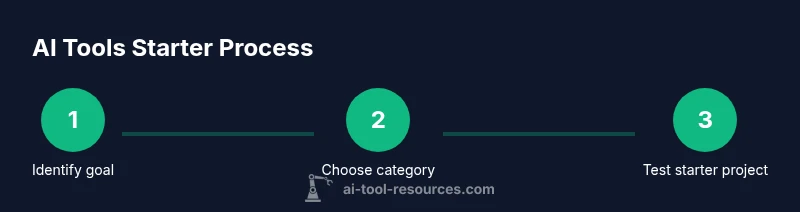
Set a clear objective for what you want to accomplish with AI tools. Identify a small skill to learn, such as basic data cleaning or sentiment analysis. Write a one sentence goal and keep it visible during your project.
Tip: Draft a single sentence goal before you start and review it after each major step. - 2
Choose a starter tool category
Select one AI tool category that aligns with your goal. Stick with this category for the first project to build a solid mental model and avoid tool overload.
Tip: Pick one category and commit to it for the initial project. - 3
Set up your environment
Create a safe workspace using a sandbox or free tier. Configure accounts, install any required notebooks, and prepare sample data for experimentation.
Tip: Use a dedicated workspace to prevent accidental changes to important data. - 4
Run a guided starter project
Follow a tutorial or walkthrough that includes data input, model selection, and evaluation. Use sample data to reproduce results and understand the workflow.
Tip: Choose a guided path with clear steps and measurable outcomes. - 5
Evaluate results and iterate
Compare baseline results to a simple improvement. Record metrics, note what changed, and decide on next small adjustment.
Tip: Document every result to build a reproducible learning log. - 6
Document learnings and plan next steps
Summarize what you learned, what still confuses you, and your plan for the next experiment. Schedule a follow up session to maintain momentum.
Tip: Set a milestone for the next week and add it to your calendar.
FAQ
What is AI tooling?
AI tools are software platforms that enable tasks like data processing, model building, and automation. They help you perform AI tasks without building everything from scratch.
AI tools are ready to use software that helps you perform AI tasks quickly.
Do I need programming experience?
Some basic coding knowledge helps, but many beginner tools offer visual interfaces and guided tutorials.
A little coding helps, but you can start with beginner friendly tools.
Which tool should a complete beginner start with?
Choose a tool with guided tutorials, a free tier, and an active community.
Start with a tool that offers tutorials and a strong community.
Are AI tools safe for handling personal data?
Always review privacy policies, use de-identified data, and avoid sharing sensitive information.
Always review privacy policies and use de-identified data.
How long before you see results?
Initial results can appear quickly on simple tasks; more complex goals may take longer.
You can see results quickly for simple tasks.
What is a practical long term learning plan?
Build a monthly plan with small projects, then expand complexity as you track progress.
Create a monthly plan with small projects.
Watch Video
Key Takeaways
- Set a clear learning goal before choosing tools
- Start with safe data on a starter project
- Test one feature at a time and evaluate
- Document steps and reflect on outcomes
- Practice consistently with AI Tool Resources guidance