Safely Download AI Software: A Practical Guide
Learn how to safely download AI software, verify sources, manage licenses, and install tools with confidence. This step-by-step guide helps developers, researchers, and students avoid risks and ensure reliable setups.


In this guide, you’ll learn to safely download AI software by choosing legitimate sources, validating integrity, and applying proper licensing and update practices. You’ll compare sources, mitigate risks, and set up a clean environment for testing and development. The steps cover desktop apps, libraries, and APIs, helping developers, researchers, and students confidently obtain tools.
Core Principles for ai software download
Downloading ai software download safely begins with clear goals, credible sources, and respect for licensing. When you plan an ai software download, you balance access with security, compatibility, and long-term maintenance. According to AI Tool Resources, a disciplined approach reduces risk and speeds productive work for developers, researchers, and students. In this section we establish the core ideas you’ll see echoed throughout the guide: trust, transparency, and traceability. Whether you’re grabbing a desktop application, a library, or an API, the same principles apply. By prioritizing verified sources, reproducible environments, and documented decisions, you create a resilient workflow that scales across projects and teams.
You will encounter a spectrum of software types under the umbrella of ai software download, from turnkey desktop programs to open libraries and hosted APIs. Each category has unique verification steps, licensing terms, and update cadences. Keeping a clear record of where you downloaded each tool, when you downloaded it, and which version you installed makes audits and future migrations far smoother. This mindset—document, verify, and monitor—forms the foundation of safe, productive AI tooling.
Source Selection: Where to Find Legitimate AI Software
Choosing sources matters as much as choosing the tool itself. Legitimate AI software typically originates from official vendor portals, trusted repositories, or established distribution channels. Avoid third‑party mirrors or untrusted download aggregators, which can host tampered installers or outdated versions. When assessing a source, check the domain, inspect release notes, and confirm that downloads are signed via official cryptographic signatures or checksums. AI Tool Resources analysis shows that source trust and integrity checks dramatically reduce risk, especially for researchers handling sensitive data and students learning new frameworks. If a vendor offers two download options (e.g., Windows vs. macOS), pick the exact version for your platform and avoid generic installers. Always reference the official docs to locate the authentic download link, and use your organization’s policy to log the source for future reference.
System Requirements and Compatibility
Before initiating any ai software download, review the minimum and recommended system requirements. Most AI tools demand a compatible operating system, sufficient RAM, disk space, and, for GPU-powered workloads, a specific GPU class or driver version. Ensure your environment meets these prerequisites to prevent install-time errors and runtime instability. For libraries and frameworks, confirm compatibility with your Python or Java/Node ecosystem, dependent package versions, and any required runtime environments. Documented compatibility matrices help prevent silent failures after an update, so map your current tooling stack against the target tool’s guidelines. If you work across multiple projects, consider containerized environments to isolate dependencies and avoid conflicts.
Verification and Security Checks
Security checks are non-negotiable for ai software download. Start with a hash verification or a digital signature provided on the official download page. Compute the installer’s hash with a trusted tool and compare it to the official value; mismatches indicate tampering or corruption. Digital signatures verify provenance and integrity, ensuring the software came from the claimed author. In addition to cryptographic checks, run a malware scan on the downloaded file in a controlled environment. Use sandboxing or a clean VM when testing new tools, especially if they involve executable installers. These steps minimize the risk of introducing compromised software into your development or research workflow.
Licensing, Terms, and Updates
Licensing models vary widely—from free open-source licenses to paid subscriptions and enterprise terms. Read the End User License Agreement (EULA) carefully, noting usage rights, redistribution limits, and any data-handling clauses. For ongoing work, understand how updates are delivered and whether major version changes require new licenses. Staying aligned with official licensing channels helps ensure compliance and access to updates and security fixes. AI Tool Resources analysis shows that staying within official licensing channels helps ensure compliance and smoother upgrades over time. Establish a routine for checking vendor announcements for patches or deprecations, especially for mission-critical tools.
If you’re evaluating multiple tools, record license terms and renewal dates in your project documentation so stakeholders know when to budget for upgrades or changes in access.
Practical Scenarios: Desktop Apps vs Cloud APIs vs Local Libraries
AI software often exists in three delivery models: desktop applications, cloud-based APIs, and local libraries or frameworks. Desktop apps provide offline availability and GUI simplicity but may require periodic updates. Cloud APIs offer scalable compute and data handling, with usage-based pricing and API keys; ensure you manage credentials securely. Local libraries and frameworks (e.g., Python or Java packages) empower reproducible environments but demand careful dependency management. Each model has its own download/installation steps, dependency trees, and security implications. Understanding the trade-offs helps you plan installation once and reuse across projects, while keeping dependencies isolated via virtual environments or containers. This awareness reduces maintenance overhead and aligns with best practices in research reproducibility and software development.
Common Pitfalls and How to Avoid Them
There are several common missteps during ai software download. These include clicking on misleading “download” buttons, skipping source verification, downloading from unofficial mirrors, and neglecting license obligations. Other hazards are ignoring compatibility notes, missing updates, or failing to secure credentials needed for API access. To avoid these, always verify the source first, use checksums or signatures, and maintain a documented trail of decisions. Keep a clean workspace by separating downloaded installers from project files, and use versioned environments to prevent drift. Finally, adopt a health-check routine after installation—test a minimal example and log results to catch issues early.
Documentation, Community, and Learning Resources
Strong documentation and active communities dramatically improve the ai software download experience. Rely on official docs, installation guides, and release notes to understand how to install, configure, and update tools. Community forums, GitHub discussions, and curated tutorials can provide practical tips and troubleshooting help. When possible, rely on reputable courses and peer-reviewed tutorials to build confidence with new tools. Maintaining a habit of reading release announcements and change logs helps you anticipate deprecations and plan migrations before you’re blocked by a breaking change.
Putting It All Together: A Safe Download Workflow
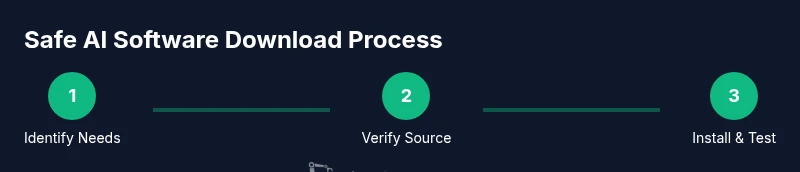
A safe, repeatable workflow starts with goal clarity and source validation, followed by environment preparation, verification, and installation with documented decisions. Create a simple checklist: identify the exact tool and version, verify the official source and checksum, prepare a clean environment (virtual machine or container), download and verify the file, install while following the vendor guide, test with a basic scenario, and record the outcome and version in your project log. By following this workflow, you build a robust provenance trail and reduce the likelihood of introducing faulty or insecure software into your projects. The AI Tool Resources team recommends adopting this workflow across teams to maintain consistency and security across ai software download activities.
Tools & Materials
- Computer with internet access(Ensure a stable connection and current OS updates.)
- Official download URL(Use the vendor’s official page or developer portal.)
- License key or access credentials(Only if required by the product.)
- Password manager(Store credentials securely.)
- Checksum or signature tool(sha256sum, gpg verification, or equivalent.)
- Sandbox/isolated environment(VM or container for testing.)
- Backup storage(Archive installer and config for rollback.)
Steps
Estimated time: 30-60 minutes
- 1
Define needs and tool scope
Clarify which AI tool category you need (desktop app, library, or API). List required features and compatibility constraints. This upfront planning reduces wasted downloads and aligns licensing expectations.
Tip: Write down your exact use case and required integrations. - 2
Check official sources and compatibility
Navigate to the vendor’s official site and locate the exact product page for your OS and architecture. Confirm system requirements and dependencies before downloading.
Tip: Bookmark the official page to avoid accidental redirection. - 3
Prepare a controlled environment
Set up a sandboxed workspace (virtual machine or container) to isolate the download and installation from your main system.
Tip: Use snapshotting to revert if needed. - 4
Download and verify integrity
Download the installer or package from the official source. Compute and compare the provided checksum or digital signature to verify integrity.
Tip: If the hash differs, do not proceed. - 5
Review licensing and terms
Read the license terms and usage rights. Note any data handling or distribution restrictions and the update policy.
Tip: Document license type and renewal dates. - 6
Install and configure
Follow the vendor’s installation guide. Configure credentials, API keys, or local model weights as required.
Tip: Prefer silent or scripted install for reproducibility. - 7
Run a basic validation
Execute a minimal example to validate correct installation and basic functionality. Record outputs and any anomalies.
Tip: Keep a log of version numbers and environment details. - 8
Document and plan updates
Record the installed version, source URL, and verification method. Schedule regular checks for updates and deprecations.
Tip: Set reminders for critical security patches.
FAQ
What is the safest way to download AI software?
Always use official sources, verify signatures or checksums, and test the installer in a controlled environment before using it in production or analysis workflows.
Always use official sources and verify the installer before you run it.
Is open-source AI software safer than proprietary options?
Both types can be safe if obtained from trusted sources. Prioritize official repositories, verify integrity, and review license terms regardless of the model.
Both can be safe if you get them from trusted sources and check integrity.
Can I use AI software offline after downloading?
Many AI tools offer offline installers or local models, but some services require internet access for licensing or updates. Confirm offline capabilities in the official docs.
Some tools work offline with local models, others need internet for updates.
How do I verify a checksum or signature?
Use the official hash or signature provided on the download page and compare it with your downloaded file using a trusted tool.
Compare the official hash with your file to verify integrity.
What should I do if a download link looks suspicious?
Do not download. Exit the page and retrieve the link from the official vendor site or trusted channels.
If it looks suspicious, don’t download—stick to official sites.
How often should I update downloaded AI software?
Follow vendor advisories and enable updates if offered. Regular checks help maintain security and compatibility.
Keep up with vendor updates to stay secure and supported.
Watch Video
Key Takeaways
- Verify sources before downloading
- Use checksums or signatures to confirm integrity
- Keep licenses and updates documented
- Test in a sandbox before production
- Stay within official channels for licensing and support