How AI Tools Assist in Image Creation
Learn how AI tools assist in image creation, from prompt design to licensing. This guide covers core capabilities, workflows, ethical considerations, and real-world use cases for developers, researchers, and students.


How do ai tools assist in image creation? They translate text prompts into visuals, refine outputs, colorize and upscale, using diffusion models, GANs, and transformer editors to offer diverse styles—from photorealistic to abstract—while enabling rapid iteration. For developers, researchers, and students, mastering prompts, licensing, and evaluation is essential for reliable results. This quick definition frames the broader how-to guide that follows.
What do AI image creation tools do, and how do they fit into creative workflows?
AI-powered image creation tools turn ideas into visuals by interpreting prompts and converting them into images. They also assist in refining composition, color, texture, lighting, and even motion cues for animation pipelines. In practice, you’ll often start with a concept sketch or mood board, then generate rough renders, iterate with targeted prompts, and apply non-destructive edits. How do ai tools assist in image creation? They translate prompts into visuals, refine outputs, colorize and upscale, using diffusion models, GANs, and transformer editors to offer diverse styles—from photorealistic to abstract—while enabling rapid iteration. This is not magic; it’s a workflow that blends data, models, and human input. According to AI Tool Resources, practitioners who combine careful prompt design with clear licensing terms consistently achieve more reliable results. They stress the importance of defining constraints early—such as aspect ratio, color palette, and output resolution—so the system doesn’t produce out-of-scope results. Recognize that results improve with iteration: a single prompt is rarely enough for a production-ready image. AI Tool Resources Team adds that keeping a log of prompts, seeds, and settings helps reproduce successful renders and track what to adjust next. This early foundation reduces rework later in the project and makes collaboration smoother across designers, researchers, and developers.
Core capabilities and model families
AI image creation tools support a range of capabilities that empower both rapid prototyping and production-ready visuals. At a high level, you typically see:
- Text-to-image generation that converts descriptive prompts into images with controllable attributes like color, mood, and lighting.
- Inpainting and outpainting to fill missing areas or extend existing scenes with coherent texture and perspective.
- Upscaling and super-resolution to improve detail without creating new artifacts.
- Style transfer and colorization to apply a chosen aesthetic or convert grayscale sketches into vivid color work.
- Image editing and compositing, including background removal, object insertion, and non-destructive layer-based adjustments.
- Vector-based guidance for sketch-to-image translation, leveraging lightweight representations to steer output.
Model families span diffusion-based systems (popular for controllable image synthesis), GAN-based approaches (often efficient for specific domains), and transformer-based editors that refine attributes like composition and texture. In practice, you may mix models and tools to fit your pipeline: a diffusion generator for base renders, an inpainting step to fix details, and a colorization pass to achieve the final look. For teams evaluating options, consider latency, output resolution, licensing terms, and integration complexity. Insights from the AI Tool Resources team emphasize matching model capabilities to your project constraints and licensing terms for reliable, scalable results.
Prompt engineering: designing prompts that produce reliable outputs
Prompt design is the compass of AI image creation. A well-constructed prompt reduces ambiguity and yields outputs closer to your intent. Start with a clear concept, specify essential attributes (style, mood, lighting, perspective), and include constraints like aspect ratio and resolution. Use iterative prompts, add references to known artists or styles if permitted, and employ seed values to reproduce favorable results. Practically, keep a living prompt log and note which prompts produce high-fidelity images. The most successful practitioners couple prompts with example images or mood boards to anchor the model’s interpretation. As you scale, create prompt templates for recurring tasks (e.g., product shots, character design) to accelerate production while preserving consistency. A best practice is to test prompts with small batches before pushing a larger render pass, ensuring you don’t waste compute on unproductive iterations.
Practical workflows: from ideation to final render
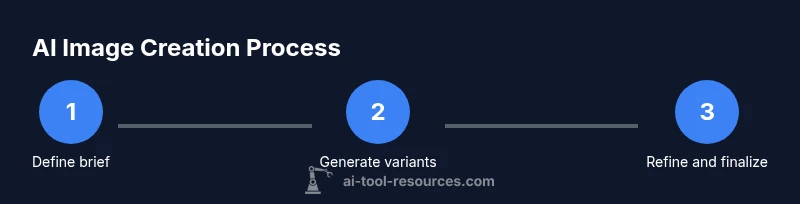
A robust workflow blends human insight with AI automation. Begin with ideation: sketch concepts, collect mood references, and define success criteria (resolution, color space, licensing). Then choose the right toolset for your task, considering licensing constraints and output quality. Generate multiple variants to explore options, compare results, and select the strongest candidates for refinement. Apply non-destructive edits and post-processing (color grading, sharpening, noise reduction) to bring outputs in line with brand guidelines. Maintain a versioned archive of seeds, prompts, and settings to ensure reproducibility. Finally, document licensing for each asset and confirm that usage complies with tool terms. The AI Tool Resources team recommends a clear, auditable trail of prompts and configurations to support collaboration and future updates.
Quality, licensing, and ethics: building trust with AI-generated imagery
Quality assessment spans realism, coherence, and stylistic fidelity. Use both objective metrics (where available) and human review to evaluate outputs. Check for artifacts, color inconsistencies, or perspective errors, and iterate with targeted prompts or post-processing. Licensing is a critical consideration: understand who owns the output, what license applies, and whether commercial use is allowed. Some tools reserve rights or impose attribution requirements, while others grant broad ownership to the user. Consider the provenance of training data and model licenses to avoid unintentional rights conflicts. When deploying AI-generated visuals publicly or commercially, document the source tools, model versions, and prompts used. Ethical considerations include bias in generated content, representation accuracy, and the potential impact on human artists and designers. Adopting transparent workflows and licensing disclosures helps maintain trust with clients, collaborators, and end users.
Real-world use cases across domains: where AI image tools shine
AI image creation is increasingly integrated across fields. In design and marketing, rapid concept visuals shorten iteration cycles for campaigns. In game development and animation, AI-generated textures, environment art, and concept art accelerate world-building. In education and research, AI visuals illustrate complex concepts and data-driven narratives. For researchers, controlled experiments with reproducible prompts enable systematic exploration of style transfer, color theory, and composition. In all cases, define success criteria before starting and maintain clear licenses to avoid legal concerns. Industry adopters note that the most successful implementations combine AI-generated assets with human polish to achieve professional results while maintaining ethical standards and originality.
Emerging trends and best practices: staying ahead of the curve
Expect tighter integration between text-to-image, video, and 3D tooling, enabling end-to-end pipelines from prompt to scene. On-device inference and hybrid cloud-edge architectures will improve latency and privacy. Licensing models will evolve toward clearer, more centralized policies for commercial usage. Build a governance plan that includes prompt auditing, bias checks, and output attribution where required. To stay effective, practice prompt engineering regularly, establish a review cadence for generated assets, and invest in a library of style guides and reference images. The most reliable teams adopt a repeatable process that balances creativity with compliance and reproducibility, ensuring outputs meet both artistic and policy standards.
Tools & Materials
- High-performance computer (GPU-enabled)(16GB+ VRAM recommended; CUDA-enabled NVIDIA or ROCm-compatible GPU)
- Stable internet connection(Cloud-based tools and model retries require consistent bandwidth)
- Access to AI image tools (APIs or desktop apps)(Ensure licensing aligns with your intended use (personal/commercial))
- Prompt templates and style references(Helpful for consistency across batches)
- Image editing software (optional)(Use for post-processing and final touches)
- Color management and calibration tools(Helps ensure color fidelity across devices)
Steps
Estimated time: 60-120 minutes
- 1
Define goals and constraints
Clarify the image purpose, required resolution, color space, and licensing constraints. Document success criteria before starting to guide prompt design and evaluation.
Tip: Write down 2-3 definite outputs you want to achieve and the constraints for each. - 2
Choose the right toolset
Select tools based on the task: text-to-image for concepts, inpainting for missing details, and upscaling for final polish. Review licensing terms before use.
Tip: Favor tools with clear licenses for your target usage (commercial or non-commercial). - 3
Craft effective prompts
Start with a concise prompt, then add descriptors for style, lighting, and composition. Use reference images when allowed to anchor the result.
Tip: Maintain a prompt log to track what works and why. - 4
Iterate with controlled seeds
Run multiple generations with varied prompts or seeds to explore options while keeping key constraints stable.
Tip: Use seeds to reproduce favorable results for refinement. - 5
Apply edits and upscaling
Perform non-destructive edits, adjust color grading, and upscale outputs to final resolution without introducing artifacts.
Tip: Treat edits as separate layers to preserve original renders. - 6
Evaluate and select
Assess outputs against the defined criteria using both objective checks and human judgment. Document the best variants for consolidation.
Tip: Create a short list of top 3 assets with rationale. - 7
Finalize licensing and documentation
Record tool names, model versions, prompt references, and licenses. Ensure traceability for future audits and reuse.
Tip: Keep a license log and asset metadata for compliance.
FAQ
What are AI image creation tools?
AI image creation tools generate visuals from prompts, edit existing images, and apply effects like style transfer or upscaling. They rely on models such as diffusion, GANs, and transformers to produce varied outputs. These tools are used across design, marketing, and research to accelerate ideation and production.
AI image tools generate visuals from prompts and apply edits, speeding up design concepts.
How do you evaluate the quality of AI-generated images?
Quality is judged by realism, coherence, style fidelity, and absence of artifacts. Use both objective checks (resolution, noise) and human review to ensure outputs meet project standards. Reproducibility and alignment with the brief are also critical.
Assess realism, style fidelity, and artifact-free detail through both checks and human review.
What licensing concerns should I consider?
Licensing terms vary by tool and model. Determine ownership of the generated image, whether commercial use is allowed, and any attribution requirements. Keep records of tools used and model versions for compliance.
Licensing terms vary; check ownership and commercial rights, and document tool usage.
Can AI-generated images replace human artists?
AI tools augment human creators by handling repetitive or data-heavy tasks and enabling rapid exploration. They don’t replace artistic vision, critique, and nuanced decision-making that humans provide in storytelling and brand strategy.
AI tools augment creativity, not replace human artistic direction.
What are common pitfalls when using AI image tools?
Artifacts, bias, and misalignment with the brief are common. Iteration, careful prompt design, and licensing checks help mitigate these issues. Always validate outputs with subject-matter experts when possible.
Be mindful of artifacts and bias; iterate prompts and verify against the brief.
What is a practical workflow for AI image creation?
Define goals, select tools, craft prompts, generate variants, edit, upscale, and evaluate. Document prompts, seeds, and licenses at each stage to ensure reproducibility and compliance.
Outline goals, prompts, edits, and licenses to keep your process reproducible.
Watch Video
Key Takeaways
- Define goals and constraints early.
- Iterate prompts to improve quality.
- Check licensing before commercial use.
- Document prompts and tool versions for reproducibility.