Make Images with AI: A Practical How-To Guide for Developers, Researchers, and Students
Master AI image creation: prompts, tools, workflows, and tips for developers, researchers, and students to generate high-quality images with AI safely everywhere


To make images with AI, pick a suitable generator, craft clear prompts, and iterate with variants to refine results. Essential requirements include access to an AI image tool (free or paid), a concise creative brief, and an awareness of licensing for outputs. This guide walks you through tools, prompts, workflows, and best practices for reliable, ethical results.
Understanding AI-assisted image creation
AI-assisted image creation means using machine learning models to generate or modify pictures from prompts, sketches, or existing media. When you say 'make images with ai', you are tapping into text-to-image systems that interpret language and convert it into visual data. You can also perform image-to-image tasks, where an existing image guides the output, or apply style transfer to mimic a particular artist or era. For developers, researchers, and students, these tools unlock rapid prototyping, visual storytelling, and research visualization. According to AI Tool Resources, the field has matured enough to support a wide range of use cases, from concept art to synthetic data for experiments. Keep in mind that results vary by model, prompt clarity, and post-processing choices. Always test outputs for bias, artifacts, and licensing constraints before reuse or publication. In this guide, you’ll learn practical workflows, safety considerations, and best practices to make images with ai responsibly and efficiently.
How image generation works under the hood
Most AI image generation relies on diffusion-based models or generative adversarial networks (GANs). Diffusion models start with random noise and progressively denoise it to form a coherent image, guided by the input prompt. A text encoder (for example, CLIP-like systems) interprets the prompt and aligns it with image representations. The model then tweaks its internal representation to match the described features. You’ll see differences across tools because training data, model size, and inference settings (like guidance scale, resolution, and sampling steps) shape the final output. For many projects, a balance between fidelity, creativity, and computation time matters. Remember that iterations compound results; small prompt adjustments can yield large visual changes.
Ethical and licensing considerations
Ethical use matters when you make images with ai. Be mindful of potential biases, stereotypes, or misrepresentations that can surface in generated outputs. Licensing varies by tool—some platforms grant broad commercial rights, others limit usage or require attribution. If you plan to publish or monetize images, verify each tool’s terms and any model-derived copyright constraints. When possible, favor assets created with opt-in licenses you control and document provenance. Finally, respect privacy and avoid generating images that impersonate real people without consent. These practices help you stay compliant and responsible while exploring AI image creation.
Practical workflow: from idea to image
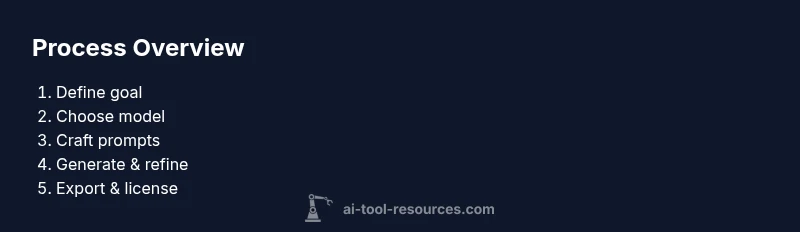
A practical workflow starts with a clear creative brief and ends with a usable image or set of assets. First, outline your goal, target audience, and required attributes (color palette, mood, style). Next, select a tool or model that fits your needs and constraints. Then craft precise prompts, starting with a simple baseline and adding details iteratively. After generating initial outputs, compare results against your brief and note which aspects worked and which didn’t. Refine prompts, reuse seeds if available, and apply post-processing to correct color or composition. Finally, export the best images with appropriate formats and licenses, ready for use in your project.
Tools and platforms: free vs paid and where to start
There are both free and paid paths for making images with ai. Free tools are great for exploration and learning, while paid platforms often offer higher resolution, more controls, and commercial licenses. Local, open-source options provide privacy and customization, whereas cloud-based services emphasize convenience and scale. When choosing a platform, consider prompt fidelity, inference speed, output resolution, watermark policies, and the licensing terms for commercial use. For students and researchers, look for academic-friendly licenses or educational tiers. In all cases, begin with a small, well-scoped project to validate your workflow before committing to a longer-term toolchain.
Troubleshooting common issues and quality improvements
Artifacts, blurry edges, or mismatched colors are common hiccups when you make images with ai. Start by simplifying prompts and ensuring consistent lighting, camera angle, and perspective cues. Increase resolution gradually and test upscaling options that preserve detail. If results are inconsistent, vary seeds and sampling steps, then compare outputs side-by-side. Leverage post-processing tools to fix minor color balance, adjust composition, or remove unwanted noise. Finally, document settings and seed values to reproduce later iterations.
Best practices for consistent results and iteration
Consistency comes from a repeatable workflow. Build a reference prompt library with baseline prompts and successful variants for different subjects. Use version control for prompts and keep a changelog of prompt edits and settings. Always verify licensing and outputs before reuse, and maintain a record of tool versions and model names. By combining careful prompt engineering with disciplined iteration, you can reliably make images with ai while scaling your experimentation and protecting your work.
Tools & Materials
- Computer with stable internet access(Prefer 8+ GB RAM; wired connection improves consistency during generation.)
- Account on an AI image generation platform(Choose based on licensing, image quality, and cost.)
- Creative brief or prompt notebook(Document your goals, style, and constraints before prompting.)
- Optional image editing tools(For post-processing, color correction, or compositing.)
- Sample reference images or mood boards(Helpful for guiding style and composition.)
Steps
Estimated time: 2-4 hours
- 1
Define objective and constraints
Specify what you want to communicate, the target audience, and constraints such as resolution, aspect ratio, and mood. A clear brief reduces wasted generations and keeps outputs aligned with your goals.
Tip: Write down 3–5 concrete attributes (e.g., mood, color palette, lighting) before prompting. - 2
Choose the right tool and model
Select a generator that matches your needs for quality, speed, and licensing. Consider whether you need a local model for privacy or a cloud service for convenience and scale.
Tip: If you’re unsure, start with a free tier to validate your concept before committing. - 3
Draft precise prompts
Create prompts that clearly describe subject, setting, style, and camera details. Start simple, then progressively layer details and constraints to guide the output.
Tip: Include exact nouns for subjects and adjectives for mood; avoid vague terms. - 4
Iterate with variations
Generate multiple variants to compare composition, color, and detail. Use seeds or controlled randomness if available to reproduce promising results.
Tip: Keep a mini prompt log to track what changes produced what results. - 5
Post-process and refine
Apply edits to color, contrast, or composition as needed. Upscale or crop to fit final usage, and verify licensing for commercial reuse.
Tip: Use non-destructive edits and save iterations to backtrack if needed. - 6
Export and manage licenses
Export outputs in suitable formats, label provenance, and confirm licenses for your use case. Maintain records for attribution or licensing audits.
Tip: Document the tool, model, prompt used, and any post-processing steps.
FAQ
What does it mean to make images with ai?
It means using machine learning models to generate imagery from prompts, sketches, or existing media. You can create new visuals or modify existing ones through text-driven guidance.
AI image making means creating pictures with machine learning by describing what you want or guiding an existing image.
Which tools should I start with if I’m a beginner?
Begin with accessible platforms that fit your licensing needs. Free options let you learn basics, while paid tools often offer higher resolution and commercial licenses.
For beginners, try free or low-cost AI image tools to experiment and learn prompt techniques.
What are common prompts mistakes to avoid?
Avoid vagueness, ambiguous subjects, and missing details like lighting or perspective. Include concrete nouns and adjectives to guide generation.
Avoid vague prompts; be explicit about subjects, style, and lighting.
How can I ensure ethical use and licensing?
Review tool terms for commercial rights, attribution requirements, and model training data concerns. Use outputs within licensed terms and document provenance.
Always check licenses and ethics; ensure you’re allowed to use outputs commercially if needed.
Can I use AI-generated images commercially?
Yes, many tools offer commercial licenses, but terms vary. Verify the license for your intended use and keep records of permissions.
Most tools offer commercial options; read the license terms before using outputs commercially.
What are best practices for high-quality results?
Iterate prompts, use seeds, and control parameters like guidance and steps. Combine with thoughtful post-processing to reach professional quality.
Iterate prompts and use seeds; post-process for better results.
Watch Video
Key Takeaways
- Define a clear objective before prompting
- Choose tools and models that fit your license needs
- Craft precise prompts and iterate
- Post-process outputs for quality and consistency
- Keep records of prompts and licenses for compliance