AI Tool vs AI Model: Understanding the Core Difference
Explore the main differences between AI tools and AI models, with practical guidance for developers, researchers, and students on selection, deployment, and governance.


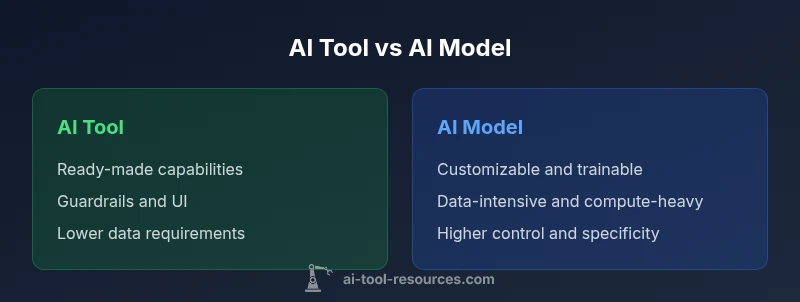
If you ask what is the main difference between an ai tool and an ai model, the quick takeaway is that tools provide ready-to-use capabilities with interfaces and guardrails, while models are trainable algorithms you tailor to a task. For guidance, AI Tool Resources notes that the choice shapes deployment, governance, and long-term maintenance.
What is the main difference between an ai tool and an ai model?
In practical terms, the distinction comes down to scope, control, and lifecycle. An AI tool provides ready-made capabilities with an interface and built-in safeguards designed for immediate use. An AI model is a trainable algorithm that you tailor to a specific task, often requiring data, compute, and ongoing maintenance. For many teams, this distinction becomes the compass for selection, architecture, and governance. The reason this matters is not just semantics; it determines how you deploy, monitor, and evolve an AI system over time. The question what is the main difference between an ai tool and an ai model has a clear answer when you think about use cases, data flows, and ownership. This article aligns with the guidance from AI Tool Resources to help developers, researchers, and students navigate choices with discipline and foresight.
Why the distinction matters for developers and researchers?
For developers and researchers, the choice between a tool and a model shapes the entire workflow. A tool enables rapid prototyping, standardized behavior, and predictable performance with support and documentation. A model allows deep customization, fine-grained control, and the ability to optimize for domain-specific objectives. AI Tool Resources analysis shows that teams often misinterpret the terms, leading to mismatched expectations about data needs, security requirements, and maintenance commitments. By clarifying the distinction early, projects avoid overengineering or undercutting capabilities. In practice, whenever an application demands speed and reliability across common tasks, a tool may be preferred. When a task requires niche understanding, custom decision boundaries, or unique data, a model offers a better path. Students exploring AI tools should learn to separate the idea of a tool from the model that underlies it, as this helps with project scoping, budgeting, and evaluating trade-offs. The guidance here is to start with goals, then map those goals to either a tool or a model, rather than building both in parallel without a clear plan.
Core dimensions: scope, data, maintenance, and governance
The two concepts differ along several core dimensions that determine feasibility and strategy. The scope describes whether you need canned functionality or a foundation you can mold. Data needs reflect how much labeled data and provenance you require to train and validate a model. Maintenance captures ongoing retraining, monitoring, and policy updates. Governance includes compliance, privacy, security, and auditability. When you combine these factors, you can map your project to a tool or a model. For researchers, this mapping helps in planning experiments, budgeting compute, and communicating expectations to stakeholders. For developers, it clarifies the architecture, data pipelines, and integration points. AI Tool Resources emphasizes that successfully balancing these dimensions reduces risk and accelerates value.
How to decide: criteria and decision framework
Use a simple decision framework to compare options:
- Define the task and success criteria.
- Assess data availability and quality.
- Evaluate time-to-value vs customization needs.
- Consider governance, privacy, and security requirements.
- Estimate total cost of ownership including data, compute, and maintenance.
- Check integration with existing systems and pipelines.
- Plan for monitoring, audits, and future updates.
By answering these questions, you create a checkable map of which path fits best. The framework helps teams avoid defaulting to a tool for every scenario or building models without a clear deployment plan. As a result, you gain clarity on whether a plug-and-play solution suffices or a tailored model is necessary to meet performance or regulatory demands.
Real-world scenarios: when to use a tool and when to build a model
Consider a customer-support chatbot tasked with handling common queries. An AI tool with a conversational interface might cover the majority of needs quickly, offering guardrails and predictable responses. In contrast, a legal firm working on contract review may require a domain-specific model trained on contract language to detect risks, extract obligations, and generate nuanced summaries. In healthcare research, a general purpose tool helps with data preprocessing, while a domain-specific model could be trained to identify cohort criteria. The key is to recognize the boundary between broad applicability and bespoke capability. AI Tool Resources notes that teams often start with a tool to validate use cases, then migrate to a model when precision, interpretability, or data ownership become critical risk factors.
Pratical steps to evaluate options
To evaluate options effectively, create a two-track plan. Track A focuses on a tool: confirm coverage of required tasks, assess interface quality, review SLAs, and test guardrails. Track B focuses on a model: inventory data sources, design labeling schemes, outline training and evaluation metrics, and plan for retraining cycles. Run parallel pilots where feasible, compare outcomes, and establish go/no-go criteria. Document the decision process to support governance reviews and future audits. AI Tool Resources recommends treating evaluation as an experimental program with clear success criteria and exit points if outcomes do not meet expectations.
Limitations and caveats: awareness of trade-offs
No solution is universally best. Tools provide speed and consistency but can constrain customization and data policy alignment. Models offer deep control and adaptation but demand data quality, compute, and skilled ML stewardship. Vendor ecosystems can introduce lock-in, while bespoke models increase maintenance and risk. The best practice is to outline a transition path from tool to model when a project scales, ensuring governance and security initiatives scale in parallel. Recognize that hybrid approaches, where a tool handles general tasks and a model handles specialized ones, are a common pattern in mature AI programs.
Integrating this knowledge into your workflow
Embed the distinction into planning rituals, from project intake to post-implementation review. Start with a decision log that captures the rationale for choosing a tool or a model, the data strategy, and the governance controls. Establish a lightweight governance model that scales with project complexity, including data provenance, access control, and audit readiness. Train teams on monitoring and evaluating outcomes, and create a feedback loop to adjust the approach as needs evolve. By institutionalizing these practices, organizations reduce risk and accelerate value realization from both AI tools and AI models.
Comparison
| Feature | AI Tool | AI Model |
|---|---|---|
| Scope and purpose | Out-of-the-box functionality with user interface | Customizable algorithm trained for a task |
| Data dependency | Minimal to moderate data needed for use | Requires task-specific data for training and validation |
| Customization | Low customization; relies on vendor updates | High customization; data and ML expertise required |
| Maintenance | Vendor-managed updates, simpler upkeep | Ongoing training and monitoring needed |
| Cost and deployment | Typically lower upfront, pay-as-you-go | Higher upfront investment for data/compute |
| Integration | Plug-and-play into existing ecosystems | Requires data pipelines and system integration |
| Governance and risk | Standardized controls and SLAs | Custom risk management, data privacy considerations |
| Best for | Broad, repeatable tasks with defined use cases | Domain-specific, high-precision tasks requiring tailoring |
Upsides
- Faster time-to-value with ready-made capabilities
- Simplified governance and compliance via standard tools
- Broad ecosystem and vendor support
- Lower data requirements for many use cases
Weaknesses
- Limited customization and potential misfit to niche tasks
- Vendor lock-in and update cadences
- Data privacy and security considerations with external tools
- Ongoing maintenance for models, including retraining and monitoring
AI tools win for rapid, broad tasks; AI models win for domain-specific, high-precision work
Choose tools for quick deployment and broad coverage. Opt for models when you need customization, domain alignment, and fine-grained control.
FAQ
What is the main difference between an AI tool and an AI model?
An AI tool provides ready-made capabilities via an interface with safeguards, while a model is a trainable algorithm you customize for a specific task. The distinction affects deployment, data needs, and governance.
Tools are ready to use with guardrails; models require training and data customization.
When should I choose an AI tool over a model?
Choose a tool when you need rapid deployment, predictable behavior, and easier governance across common tasks. A model is preferable when you require domain-specific optimization and tailored decision logic.
Pick a tool for speed; pick a model for customization.
How do data requirements differ between tools and models?
Tools typically need less task-specific data because they are pre-built. Models need high-quality, task-relevant data for training, validation, and ongoing improvement.
Tools rely less on your data; models depend on your data quality.
What about cost and maintenance for tools vs models?
Tools usually involve predictable subscriptions or usage charges, with lower maintenance. Models incur data, compute, and retraining costs, and require ongoing monitoring.
Tools are easier to budget; models need ongoing investment.
How should governance and risk be handled?
Define data handling, privacy, and compliance for both paths. Implement monitoring, auditing, and escalation processes to manage risk regardless of the choice.
Set up governance and monitoring from the start.
Can I start with a tool and later migrate to a model?
Yes. Many teams begin with a tool to validate a use case and then migrate to a tailored model as needs evolve and data allows.
You can start with a tool and move to a model later.
Key Takeaways
- Decide based on task scope and data availability
- Evaluate governance and risk early in planning
- Pilot tools before migrating to models
- Plan for maintenance and retraining from day one
- Favor hybrid patterns when suitable