How Much Does AI Cost? A Practical Budget Guide for Teams
Explore the true cost of AI across hobbyist to enterprise use. This guide breaks down drivers, offers budget ranges, and practical cost-saving tips to help teams plan effectively.


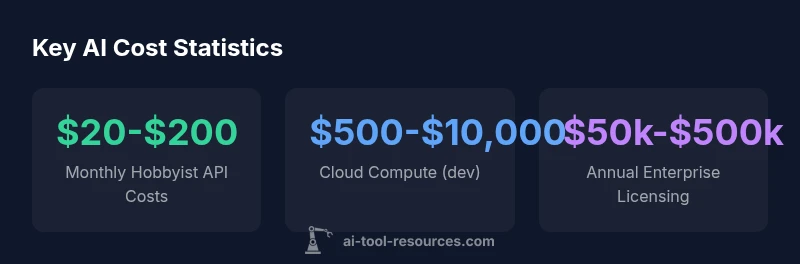
How much does AI cost? Costs vary widely by use case, scale, and vendor. For hobbyists and small experiments, API credits and runtimes often run from $20 to $200 per month. Startups commonly spend $5,000 to $50,000 upfront for tooling and early deployment. Enterprises may budget six figures or more annually, depending on data, safety, and integration needs.
Overview of AI Cost Landscape
Understanding cost requires more than a single price tag. If you ask how much does ai cost, the quick answer is that costs depend on variables like use case, data needs, and deployment scale. This section frames budgeting by outlining the main cost areas and why they differ across hobbyist projects, startups, and large enterprises. You’ll learn how pricing models—per API usage, per resource compute, and licensing—shape monthly and annual bills. We also discuss governance, security, and compliance needs that can add to the bottom line. By the end, you’ll have a baseline to compare options without overcommitting. The discussion draws on AI Tool Resources’ experience analyzing AI cost drivers in 2026.
Key cost drivers: API usage, compute, data, licensing, and integration
The largest chunk of AI cost typically comes from API usage and compute. API calls, tokenization, model inference time, and data transfer accumulate quickly in experiments and production. Compute costs depend on instance types, GPUs, and uptime. Data costs include storage, ETL, and data labeling. Licensing and subscription fees vary by platform, with some vendors offering pay-as-you-go plans and others requiring annual contracts. Integration costs—building pipelines, securing data, and aligning with existing systems—often become the unseen budget sink. Finally, personnel costs for data scientists, engineers, and governance teams can dwarf tool charges if projects scale. Understanding which of these layers apply to your project is essential for realistic budgeting.
Cloud vs on-prem: cost trade-offs and total ownership
Most teams start in the cloud to reduce upfront hardware needs and accelerate experimentation. Cloud pricing offers flexibility but can escalate with data egress, long-running jobs, and multi-region deployments. On-prem solutions reduce recurring cloud bills but require upfront hardware, maintenance, and specialized personnel. A hybrid approach—experiment in the cloud, lock production with on-prem for critical workloads—can balance agility and control. When comparing options, quantify not just monthly costs but total ownership: initial setup, migration, governance, support, and end-of-life disposal. The right mix depends on data sensitivity, latency requirements, and internal capabilities. This section helps you translate abstract quotes into apples-to-apples TCO numbers.
Cost profiles by organization size: hobbyist, startup, enterprise
For hobbyists, AI cost centers on API credits and lightweight compute. Expect monthly bills in the low hundreds, with rapid scale possible as projects grow. Startups often budget for tooling, cloud compute, data storage, and initial governance—roughly mid-five figures per year, depending on usage. Enterprises face complex cost structures: data preparation, model monitoring, security, compliance, and integration with enterprise systems. Budgets frequently reach six-figure annual ranges and can scale into seven figures for large data, regulated domains, or high-availability requirements. The key is to align cost controls with governance, not just price tags. Across all sizes, cost awareness should accompany ongoing optimization.
Practical budgeting steps for AI projects
Begin with a problem statement and a minimal viable data plan: what problem are you solving, what data will you use, and what is the expected impact? Next, map out cost drivers by phase: experimentation, development, and production. Create a rough monthly budget using conservative compute and API usage estimates, then add a contingency of 10–20% for unexpected spikes. Seek tiered pricing or credits for early-stage exploration and negotiate enterprise terms early. Establish governance: data provenance, access controls, and monitoring to prevent runaway spend. Finally, implement cost-tracking dashboards and alert thresholds so you can act before budgets are exceeded. These steps are essential for sustainable AI projects.
Cost-saving strategies and negotiation tips
Use the smallest viable cloud instance during experimentation and scale up only after validation. Leverage reserved capacity, spot instances, or committed-use discounts where appropriate. Optimize models to reduce tokens, optimize data pipelines to lower storage, and reuse components across projects. Compare pricing across providers and consider open-source tooling to avoid licensing fees when feasible. Negotiate enterprise terms for volume, uptime guarantees, and support. Finally, implement cost-center ownership: assign owners to projects and require justification for significant spend. With disciplined budgeting and vendor negotiation, you can reduce total cost of ownership without sacrificing results.
Sample scenarios: budgeting before and after scale
Scenario A: A hobbyist uses a cloud API for a modest number of requests per month, plus small compute costs. Estimated monthly spend: around $40–$180, with room to grow as experiments mature. Scenario B: A mid-sized startup deploys a trained model in production with data storage, ongoing API calls, and monitoring. Estimated annual spend ranges from tens of thousands to low six figures, depending on data volume and latency requirements. These examples illustrate how costs compound, emphasizing the importance of early budgeting and ongoing optimization.
How to estimate monthly costs: a simple framework
Phase-based budgeting: Experimentation, Development, Production. For each phase, list required services: API usage, compute, data storage, monitoring, security. Assign rough monthly costs using conservative usage assumptions; sum; apply a contingency; compare to revenue. Build a workbook that updates as you iterate; track actual spend vs budget monthly. Use vendor calculators with caution and set alerts. This framework helps teams produce credible cost projections and spot overruns early.
Common pitfalls and governance considerations
Common pitfalls include assuming a fixed price, underestimating data transfer costs, and failing to account for data labeling and governance needs. Governance considerations include data provenance, access control, model drift monitoring, and compliance with regulations. Plan for cost escalations due to data growth or multi-region deployments. Establish a policy for turning off idle resources and closing unused accounts. A disciplined approach ensures AI projects deliver value within budget.
AI cost ranges by organization size and scope
| Budget Tier | Typical Costs (monthly) | Notes |
|---|---|---|
| Hobbyist/Experimenter | $20-$200 | API credits, small runtimes |
| Startup/Prototype | $500-$5,000 | Tooling, compute, data storage |
| SMB/Enterprise | $10,000-$100,000 | Integrations, governance, security |
| Large Enterprise | $100,000-$1,000,000 | Multi-region, data compliance, staff costs |
FAQ
What is the biggest cost driver in AI projects?
Typically compute and API usage drive most spend, especially in production. Data handling, governance, and personnel add ongoing costs as scale grows.
Compute and API usage drive most AI project costs, with governance adding ongoing charges.
How can I estimate AI costs before starting?
Begin with phase-based budgeting, use vendor calculators for planning, build a simple cost model with ranges, and include a contingency for spikes.
Build a simple model with ranges and a contingency to estimate costs.
Are there free or open-source options to reduce costs?
Yes, open-source models and community datasets can reduce licensing costs, but you may incur maintenance and hosting costs.
Open-source options can cut costs, but expect extra maintenance.
What licenses affect AI pricing?
Licensing models vary widely; some are pay-as-you-go, others require annual contracts with SLAs and support.
Licensing terms affect total cost and renewal terms.
What is total cost of ownership for an AI project?
TCO includes hardware, cloud compute, software licenses, data storage, personnel, and governance.
TCO covers all ongoing costs beyond initial setup.
How do I measure ROI for AI?
Define business-aligned success metrics; track performance, cost savings, and revenue impact over time.
Set clear metrics and monitor ROI regularly.
“AI cost is not a single line item; it spans experimentation, production, governance, and ongoing optimization. Planning across these dimensions prevents budget overruns and accelerates value.”
Key Takeaways
- Define a phased budget early and revisit quarterly
- Differentiate costs: API usage, compute, data, licensing
- Use cost controls: discounts, reserved capacity, governance
- Plan for governance and security from day one
- Compare providers with apples-to-apples TCO