Urgent Troubleshooting for Problems with AI Tools
A fast, developer-focused troubleshoot guide for problems with ai tools. Learn a step-by-step diagnostic flow, practical fixes, and safety notes to reduce risk and downtime.


Most problems with ai tools start from data quality, misconfiguration, or weak tooling governance. According to AI Tool Resources, begin with a rapid triage: verify inputs, confirm environment consistency, and run a minimal, verifiable test. If issues persist, escalate with a structured diagnostic flow to isolate root causes quickly. This quick-start approach reduces downtime and guides you to the right fixes.
The Most Common Problems with AI Tools
AI tools can underperform due to data drift, input misformatting, or configuration gaps. Symptoms include inconsistent outputs, stalled pipelines, or failed tasks. In practice, issues often originate at the interface among data, model behavior, and deployment. According to AI Tool Resources, the top failure modes fall into data quality, integration, governance, and model-specific quirks. This section surveys the top risks you should anticipate, with concrete signs and pragmatic mitigations you can apply now. You'll learn to differentiate between simple user mistakes and systemic design flaws, and you'll see how rapid triage can save days of debugging. Common issues include stale data snapshots, missing features, incorrect prompts, and misrouted API calls. When you see unexpected costs, noisy logs, or unpredictable performance, start with the simplest checks before diving deeper.
Data Quality and Privacy: The Silent Killers
Data quality is the heartbeat of AI tool reliability. Poorly labeled data, inconsistent formatting, or stale training data can produce erroneous outputs that ripple through pipelines. Privacy concerns arise when handling sensitive information in prompts, results, or logs. The fastest way to detect problems is to reproduce with a minimal dataset, compare against a baseline, and review data lineage. Implement robust input validation, data sanitization, and access controls to prevent leakage. From an engineering standpoint, encrypt data in transit, minimize logging of sensitive fields, and employ data masking where feasible. AI Tool Resources emphasizes documenting data provenance to track how data affects outputs over time. By maintaining a strict data regime, you reduce drift and improve auditability.
Bias, Hallucinations, and Safety Risks
Bias and hallucinations remain pervasive challenges in AI tools. Outputs may reflect training data biases or environmental cues, leading to unfair treatment or incorrect conclusions. Mitigation strategies include grounding outputs with verified sources, constraining prompt scopes, and implementing post-processing checks. Safety is not a one-off task but an ongoing discipline: monitor for toxicity, ensure compliant content, and enforce guardrails across all deployment stages. Audit prompts and responses in logs, establish escalation paths for questionable results, and prioritize user education on limitations. AI Tool Resources notes that safe practice requires human oversight for high-stakes decisions and continuous model monitoring.
Integration, API Errors, and Latency
Many problems occur at the integration layer: flaky network connections, misconfigured endpoints, or incorrect API parameters. Latency spikes degrade user experience and can cause retries that compound costs. The fix starts with a reproducible test harness: run the same request against a staging environment, compare timing metrics, and capture error messages. Validate API keys, endpoints, versioning, and authentication flows. Implement circuit breakers and exponential backoff to handle transient failures. When problems persist, collect telemetry, reproduce with a minimal call sequence, and coordinate with the API provider to confirm if the issue is on the service side.
Governance, Compliance, and Documentation
Deployment of AI tools without governance leads to uncontrolled risk. Establish guardrails for data handling, retention, and access. Document tool purposes, inputs, outputs, and failure modes in a central knowledge base. Create a playbook for incident response that includes quick containment steps, communication templates, and post-mortem procedures. Ensure compliance with data protection regulations, contractual obligations, and internal policies. Regular audits and stakeholder reviews help keep tooling aligned with organizational risk appetite.
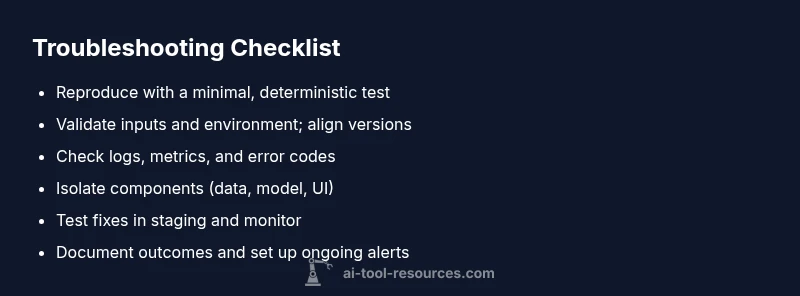
Diagnostic Checklist You Can Use Now
- Reproduce the issue with a minimal, deterministic test case. This isolates variables and clarifies the symptom. Keep datasets versioned.
- Validate inputs and environment: confirm schemas, encoding, locale, and API versions. Ensure your deployment mirrors the tested setup.
- Review logs and metrics: look for error codes, latency spikes, or anomalous feature values. Correlate events with changes.
- Isolate components: separate data, model, and display layers to identify where the failure originates.
- Test fixes in a controlled setting: use a staging environment with synthetic data when possible.
- Document results and monitor: capture the change, test outcomes, and define ongoing monitoring to prevent regression.
How to Evaluate Tools Before Adoption
Assess reliability, explainability, and governance features before choosing an AI tool. Demand transparency about data handling, model updates, and drift monitoring. Run a pilot with representative data and clear success metrics. Compare vendor safeguards, incident response times, and support quality. Create a risk register that maps potential failure modes to mitigations, and require a rollback plan if performance degrades.
Steps
Estimated time: 30-60 minutes
- 1
Reproduce with a minimal test case
Create a small, deterministic input and run the same request multiple times to observe behavior. This isolates variables and confirms the symptom.
Tip: Use a versioned dataset and fixed config for reproducibility. - 2
Validate inputs and environment
Check data schemas, encoding, locale, and API versions. Make sure the production and test environments align.
Tip: Document each change to inputs and environment so you can revert if needed. - 3
Check logs and metrics
Search for error codes, latency patterns, and anomalous feature values. Correlate times with deployments or data updates.
Tip: Enable structured logging and include request IDs for traceability. - 4
Isolate the failing component
Systematically separate data, model, and presentation layers to locate where the failure originates.
Tip: Swap in a known-good prototype to confirm the root cause. - 5
Apply fixes in a controlled setting
Implement the simplest fix that addresses the symptom and re-test in staging with representative data.
Tip: Run back-to-back tests to verify stability. - 6
Document results and implement monitoring
Record the outcome, metrics, and any policy changes. Set up ongoing monitoring to catch regressions.
Tip: Create alert thresholds aligned with business impact.
Diagnosis: End-user reports inconsistent outputs or system failures in AI tools integration
Possible Causes
- highData/input quality issues
- highConfiguration drift or misconfiguration
- mediumAPI rate limits or network issues
- lowModel drift or data poisoning
Fixes
- easyCheck input schemas and sanitize inputs
- easyVerify environment variables and configuration profiles
- easyTest with a known-good dataset in a controlled environment
- mediumReview API usage and rate limits; implement retry/backoff
- hardCoordinate with vendor for drift investigation and patch release
FAQ
What counts as a problem with ai tools?
Problems include incorrect outputs, inconsistent results, failed tasks, delays, and unexpected costs. These issues often stem from data quality, misconfigurations, or architectural gaps. Recognize symptoms early with a structured approach and compare against a baseline.
Common problems include incorrect outputs, inconsistent results, and misconfigurations. Start with a structured check to isolate the issue.
How can I detect data leakage with AI tools?
Data leakage occurs when sensitive information appears in prompts, outputs, or logs. Monitor prompts and responses, apply data masking, and enforce strict logging controls. Use access controls and redaction in test environments.
Watch for sensitive data appearing in prompts or logs, and use masking and strict access controls.
How often should I test AI tool outputs?
Regular testing is essential, especially after updates. Establish a testing cadence tied to deployment cycles, and run baseline comparisons to detect drift early.
Test outputs on a cadence aligned with updates and deployments; compare to baselines.
When should I escalate to the vendor?
Escalate when repeats occur after fixes, or when the issue involves service stability, drift, or security. Provide logs, reproduction steps, and a minimal dataset to help the vendor reproduce.
If problems persist after fixes or involve drift or security, contact the vendor with evidence.
How can I minimize bias in AI tool outputs?
Mitigate bias by grounding outputs with verified sources, constraining prompts, and applying post-processing checks. Regular audits and diverse test cases help detect biased results.
Ground outputs in verified sources and test with diverse inputs to reduce bias.
Is there a safe deployment checklist?
Yes. Implement a governance checklist covering data handling, privacy, model updates, monitoring, and rollback plans. Use incident response playbooks and ensure stakeholder sign-off.
Adopt a governance checklist with data rules, monitoring, and rollback plans.
Watch Video
Key Takeaways
- Audit data quality before fixes
- Follow a structured triage flow
- Limit data exposure during debugging
- Document changes and tests
- Monitor drift and renewal checks