How to Use AI Tools: A Practical Step-by-Step Guide
A comprehensive, educator-friendly guide to selecting, configuring, and using AI tools effectively. Learn goal definition, data prep, prompts, evaluation, governance, and real-world workflows with practical examples.


Learn how to select, configure, and apply AI tools effectively to solve real tasks. This guide covers goal definition, input preparation, prompt design, evaluation, and governance. You will need internet access, a compatible device, and basic data handling skills.
What is an AI tool and why use it in your work
An AI tool is any software that uses machine learning, natural language processing, or related AI techniques to generate, transform, or analyze data. For developers, researchers, and students, AI tools can automate repetitive tasks, accelerate data interpretation, and boost creativity. However, to use them responsibly, you must set clear goals, define success criteria, and choose tools that align with your needs.
According to AI Tool Resources, practical guidance on selecting and using AI tools helps teams move from experimentation to reliable production. Start by articulating the problem you want to solve and the measurable outcome you expect. This isn’t just about getting better results; it’s about enabling faster iteration, safer experimentation, and better collaboration across disciplines. In this article, you’ll find a structured approach you can apply to a wide range of tasks, from content generation to data analysis.
Defining the task and selecting the right AI tool
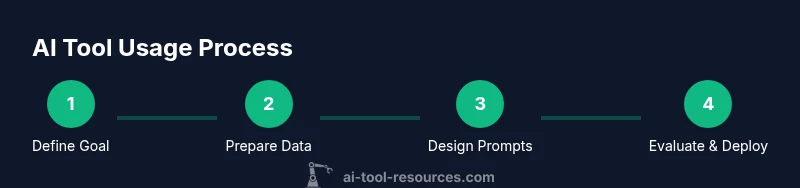
To begin, write a one-sentence task definition and list the outcomes that would signal success. Use these outcomes to compare tools: capability fit, ease of use, integration options, cost, and governance features. A good match balances technical power with user-friendly workflows. As you evaluate, keep a notebook of prompts, configurations, and observed results to inform future choices and reduce decision fatigue.
By documenting your criteria, you ensure you select a tool that scales and remains controllable as your project grows.
Data readiness: preparing inputs for AI tools
Quality inputs drive quality outputs. Before running an AI tool, audit your data for privacy constraints, correctness, and representativeness. Anonymize sensitive information, standardize formats, and create representative samples for testing. Build a small, labeled test set to sanity-check outputs. This preparation helps you catch bias, errors, and edge cases early, saving time down the line.
AI Tool Resources emphasizes starting with synthetic or de-identified data when possible to minimize risk while still validating tool behavior.
Prompt design and configuration: shaping outcomes
Prompts are the primary bridge between your problem and the tool’s capability. Start with clear, directive prompts and define constraints such as tone, length, and structure. Establish default settings (temperature, max tokens, repetition penalties) that produce reproducible results. Keep a prompt library and version history so you can reproduce successful configurations or learn from failures. Good prompts reduce unexpected outputs and improve consistency.
Running trials: monitoring outputs and adjustments
Run an initial trial with a small input set to observe behavior. Compare results against your success criteria and note any deviations. If outputs are unsatisfactory, adjust prompts, data inputs, or tool parameters, then re-run. This iterative loop is central to achieving reliable performance without overspending on compute or data costs. Document changes for traceability.
Validation, quality, and governance: deciding what to deploy
Adopt objective metrics aligned with your goals (accuracy, relevance, bias checks, or user satisfaction). Use holdout data to assess generalization and run fairness checks if relevant. Establish governance: who can access the tool, what data can be processed, and how outputs are used. Decide whether to deploy, pilot, or pivot based on measured performance and risk tolerance.
Real-world use cases: learning from examples
AI tools are used in coding assistants, content generation, data analysis, and research. For example, you might generate draft documentation, summarize scientific papers, or prototype code snippets. Each case benefits from careful input preparation, clear goals, and an explicit evaluation plan. The key is to translate an abstract capability into repeatable, auditable steps.
Safety, ethics, and responsible use
Respect data privacy, avoid leaking sensitive information, and consider potential bias in outputs. Maintain logs of prompts and results to support audits. When in doubt, err on the side of transparency and consent, especially when outputs influence decisions that affect people or critical systems. These practices help sustain trust and compliance across teams.
Getting started quickly: a practical blueprint
Begin with a small, well-scoped task, define success criteria, collect representative input data, draft a few strong prompts, run rounds of tests, and document outcomes. If results are promising, expand gradually while preserving governance controls and a clear record of what changed at each step. This blueprint minimizes risk and accelerates learning.
Authority sources and practical references
Below are trusted sources you can consult for deeper guidance on AI risk, governance, and best practices. They complement hands-on experimentation with formal standards and research insights. Ensure you review these references when planning a tool rollout.
Authority sources
Tools & Materials
- Computer or device with internet access(Any modern laptop or desktop; ensure sufficient compute for your chosen AI tool.)
- Access to an AI tool or platform(Account credentials; ensure you understand pricing and usage limits.)
- Sample datasets or prompts(Prepare representative inputs for testing and evaluation.)
- Notebook or text editor(Track goals, prompts, configurations, and results.)
- Data privacy guidelines(Have a policy for data handling and sensitive information.)
Steps
Estimated time: 60-90 minutes
- 1
Define goal and success metrics
Identify the task you want the AI tool to perform and articulate how you will judge success. Establish concrete metrics and a clear deadline to keep the effort focused.
Tip: Write a single-sentence goal and at least two measurable outcomes. - 2
Select the right AI tool and set up access
Choose a tool that matches your capability, data needs, and governance requirements. Set up your account and confirm access to required features.
Tip: Create a quick 'tool fit' checklist before committing to a platform. - 3
Prepare inputs and data quality checks
Audit inputs for privacy, accuracy, and representativeness. Normalize formats and anonymize data where possible to prevent leakage.
Tip: Run a small pilot dataset to validate input readiness before full-scale use. - 4
Design prompts and configure settings
Craft prompts with constraints (tone, length, structure) and set defaults (temperature, max tokens) to balance creativity and consistency.
Tip: Keep a prompt library with versioned changes for reproducibility. - 5
Run initial trials and monitor outputs
Execute a test run on a representative sample and compare results to your success criteria. Note unexpected behavior for refinement.
Tip: Track changes to prompts and settings to attribute outcomes. - 6
Validate quality and assess risk
Evaluate outputs with objective metrics and bias checks. Decide if further iteration is needed or if governance constraints require stopping.
Tip: Use holdout data to measure generalization and avoid overfitting prompts. - 7
Iterate prompts and inputs
Refine prompts, adjust inputs, and re-run trials. Aim for incremental improvements and documented rationale for each change.
Tip: Limit the number of variables changed per iteration for clarity. - 8
Document deployment and governance
Create a deployment plan with access controls, logging, and rollback procedures. Ensure ongoing monitoring and periodic audits.
Tip: Automate logging where possible to support traceability.
FAQ
What is an AI tool, and how is it different from traditional software?
An AI tool uses machine learning or NLP to generate or analyze data, often improving with examples. Unlike traditional software, it can learn from data and adapt outputs over time.
An AI tool uses data-driven methods to generate or analyze things, and it can improve with experience. It behaves differently from static software because it learns from samples.
How do I choose the right AI tool for a task?
Define the task, list success criteria, and compare tools based on capability, ease of use, cost, and governance features. Start with a small pilot before full adoption.
Start by defining the task, set success criteria, and compare tools on capability and governance. Try a small pilot first.
What data should I prepare before using an AI tool?
Prepare representative, clean inputs. Anonymize sensitive data, standardize formats, and keep a sample for testing. Good data quality reduces errors and bias.
Prepare clean, representative inputs and anonymize sensitive data. It's essential for reliable results.
How can I evaluate the quality of AI-generated results?
Use objective metrics aligned with goals, test on holdout data, and check for bias or unintended outputs. Document evaluation methods for transparency.
Use clear metrics and holdout data to judge quality, and watch for bias in results.
Are there safety or privacy concerns I should consider?
Yes. Protect sensitive data, monitor outputs for harmful content, and implement governance workflows. Regular audits help maintain compliance.
Yes. Protect data, monitor outputs, and set governance rules to stay compliant.
What are common pitfalls when starting with AI tools?
Overlooking data quality, ignoring governance, and treating outputs as final without validation are common issues. Start with small pilots and document everything.
Pitfalls include poor data quality and skipping governance. Begin with small pilots and keep records.
Watch Video
Key Takeaways
- Define clear goals and success metrics first
- Choose tools that fit your data and governance needs
- Prepare quality inputs and document prompts
- Iterate with measurable feedback loops
- Prioritize safety, ethics, and accountability